
The API can be used for:
Only DHL packages originating within Turkey and international packages.
All DHL eCommerce Solutions TR shipping products
This documentation provides detailed information about the API its use. You can also go directly to the following topics:
- Shipment API
- Label API
- Document API
BY accessing and using the DHL eCommerce Solutions TR API, you indicate that you accept the legal terms of use. If you do not accept these legal terms, you or the entity you are authorized to represent should not use the site.
The DHL eCOMMERCE Solutions TR API is your one solution to get shipping products, generating shipping labels, tracking packages.
This documentation provides detailed information about the API structure and its use. Check the API Catalog to see the first APIs already released on this portal.
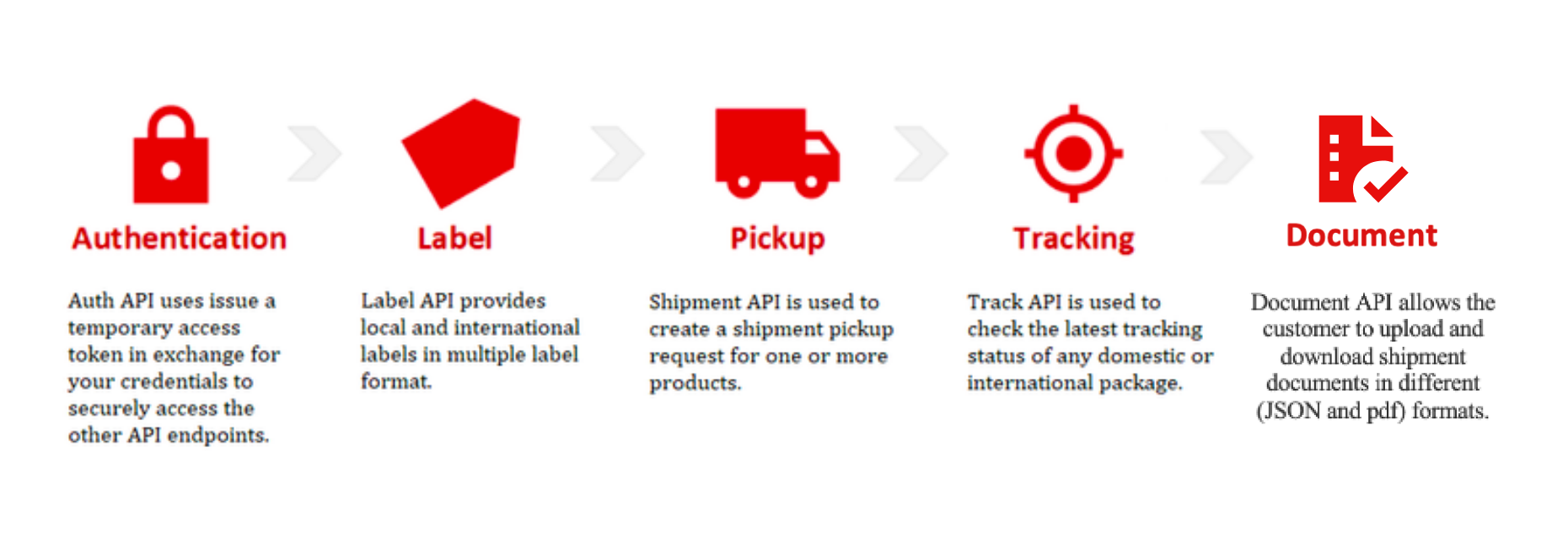
Using the API
The API has been designed for use by developers. You will need basic knowledge of REST APIs, JSON and HTTPS. In addition, your organization must have a customer account with DHL eCommerce Solutions Turkey.
Example Use Cases
Simply integrate into your existing website or solution.
Easy integration into any eCommerce platform such as your Order Management System, Transportation Management System or an eCommerce website.
Sellers can use the API to get access to DHL eCommerce TR portfolio solution.
Third-party vendors and shipping aggregators can use the API to provide their customers with access to DHL eCommerce shipping solutions.
Get Access
You must request credentials for any applications you develop
To register your app and get your API subscription keys:
- Click My Apps on the portal website.
- Click the + Add App button to create a new app
The “Add App” form appears. - If you wish to add the API to an existing App, click on App's "Edit" button
- Fill in the form
Select "DHL eCommerce Solutions TR API (DHL Global Forwarding, StarBroker eCS)" from the API drop down list - When you have completed the form, click the Add App button or Save button
- Please email XXXXXXXXXXX for API request approval
Authentication
DHL eCommerce Solutions TR API uses API Key protocol to authenticate and authorize access to API consumers. For implementation details, please see Swagger specification on the "Reference Docs" tab.
To view your API credentials :
- From the My Apps screen, click on the name of your app.
The Details screen appears. - If you have access to more than one API, click the name of the relevant API.
Note: The APIs are listed under the “Credentials” section. - Click the Show link below the asterisks that is hiding the Consumer Key.
The Consumer Key appears.
Environments
The addressable API base URL/URI environments are:
|
Environment |
Description |
|
https://api-uat.dhl.com/dgff/ecom/tr |
Test environment |
|
https://api.dhl.com/dgff/ecom/tr |
Production environment |
Rate limits
Rate limits protect the DHL infrastructure from suspicious requests that exceed defined thresholds.
The table below details the main request limits:
|
Service Level |
Maximum calls per minute |
Maximum calls per day |
|
Standard |
XXX per minute |
No limit |
Please contact XXXXXXXXXXX if you need a different service level.
When the limit is reached, you will receive an HTTP Status code:
429: Too many requests.
Specifics for the use of DHL eCommerce Solutions TR API Data
- To register for the use of and access to the DHL eCommerce Solutions TR API (DHL Global Forwarding, StarBroker eCS) – hereinafter “DHL eCommerce Solutions TR API” – You and/or the legal entity you are authorized to represent (hereinafter “You”/”Your”) need to have an active customer account with a DHL Global Forwarding entity (hereinafter referred to as “DHL”). An API Productive Key and access details will be provided to You subject to a successful validation of Your credentials by DHL. For the avoidance of doubt, a reference to the DHL eCommerce Solutions TR API in these Legal Terms is deemed a reference to the DHL eCommerce Solutions TR API including the API Services (such API Services include the upload and download of documents as set forth herein and in the scope description), unless the context suggests otherwise.
- The DHL eCommerce Solutions TR API provides the possibility to generate DHL Consignment and Labels using posted data. Please be aware that the generation of the Consignment and Label by use of the DHL eCommerce Solutions TR API does not constitute the contract of carriage. The contract of carriage will only be concluded when the consignment is handed over or picked up and accepted by DHL.
- If You engage an external developer, or other IT services provider to develop Your Application or any other third party (“Third Parties”) to access and/or use the the DHL eCommerce Solutions TR API on Your behalf, You remain fully liable for any acts or omissions of such Third Parties in connection with the access to and/or usage of the DHL eCommerce Solutions TR API.
- These Legal Terms and the General Developer Portal Terms of Use govern Your use of and/or access to the DHL eCommerce Solutions TR API and, unless otherwise stated herein, do not replace and/or modify the applicable terms and conditions of carriage; any transportation services agreement; or any other agreements with DHL or any of its affiliates, which govern services or products provided to You (separately, each an “Agreement”). Not withstanding the foregoing, You expressly acknowledge and agree that solely with respect to Your use of and access to the DHL eCommerce Solutions TR API the Legal Terms shall take precedence over the terms and conditions in an Agreement, unless an Agreement specifically addresses the use of or access to the DHL eCommerce Solutions TR API by You, in which case the Agreement shall prevail.
1.0.0
- Initial release