
Best for:
- Providing access to the Transport Order information at any time
- Customer-centric contract logistics solutions
- Business customers of DHL Supply Chain
The Track & Trace API comes in two versions that enables you to use services to access Order information provided by DHL Supply Chain in the MySupplyChain Track & Trace visibility solution (previously called Connected View).
Track and Trace - Transport Orders Only
- This is a request to receive ONLY Transport Orders matching a key and country.
Track and Trace - All Orders Types
- This API has two calls, the first returns a list of orders matching the key and country. A second API is then called with a unique reference to return the order details.
The order types available are Purchase Order, Customer Order, Warehouse Order and Transport Order.
Scope
These versions of the APIs can return all Order types or just Transport Order data (shipments).
The type of information available through the public API is the same as the one users can find on the MySupplyChain Track & Trace public web search without logging in.
Using the API
The Transport Orders Only API takes only 3 key parameters and is easy to setup.
All that is needed is a Transport order reference and a country code for where the order originates. The final parameter is a period of days in the past to search, this is a maximum of 120 days.
The All Order Types API takes only 2 key parameters in the first call. An order reference and a country code are required.
Within the payload returned by this API will be a unique key, "order_id", this must be used as the required parameter for the second API call.
Calling the second API with the "order_id" will return the Order Detail information regardless of the Order type.
The MySupplyChain Track & Trace public API is a Restful API which uses GET HTTP requests.
Example Use Cases
Find the location of a shipment
You can use the API to help you build a website or application that enables DPDHL customers to see the location of their shipment.
Discover when a shipment will arrive
You can use the API to help you build a website or application that enables DPDHL customers to see when they can expect a delivery.
Get information on shipment Status
Some customers want to be informed of the current status of their request. Is it "Awaiting Dispatch", "In Transit" or "Delivered". These APIs can provide them with the information regarding shipment Status. With the "All Order Types" API it is possible to return the status events for Purchase, Customer and Warehouse Orders along with the Transport Order information. For example: have the goods been picked in the warehouse?
Customize my web application language
Customize your web application based on your users’ needs. You can use the API to create language-specific web applications, so that customers can track their shipment in their native language.
Get Access
To obtain the credentials please contact DHL Supply Chain Representative. You will receive separate credentials for the Sandbox and Production environment.
If you are not a DHL Supply Chain Customer, contact one of our experts here.
Authentication
The API Key and the key secret should be sent as HTTP basic authentication credentials. Also, the API Key has to be sent in an HTTP header named WSAPIKey.
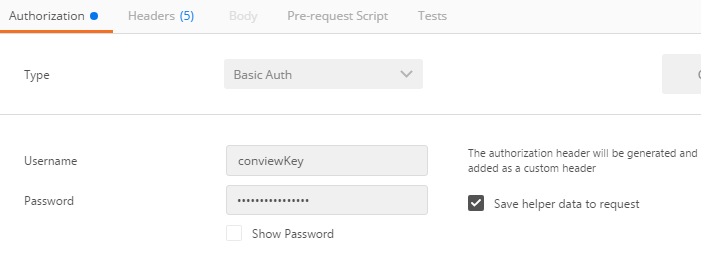
This is the successful response which you will see when successfully authenticated.
HTTP Response Status Code 200
This is the failed response which you will see in the browser in case of invalid credentials.
HTTP Response Status Code 401 Unauthorized
{
  "error" : "invalid_client",
  "error_description" : "Client authentication failed (e.g. unknown client, no client authentication included, or unsupported authentication method).
  The authorization server MAY return an HTTP 401 (Unauthorized) status code to indicate which HTTP authentication schemes are supported. "
}
Environments
The addressable API base URL/URI environments are:
| Environment | Description |
| Q&A Environment | |
| https://apidsc.dhl.com | Production environment |
Rate limits
Rate limits protect the DHL infrastructure from suspicious requests that exceed defined thresholds.
When the limit is reached, you will receive an HTTP Status code:
429: Too many requests.
Please contact api.dsc@dhl.com to get more information about it.
Additional Information
There is a rate card in place for the use of the MySupplyChain Track & Trace API. Please discuss potential commercials with your local MySupplyChain Track & Trace contact prior to API usage.
Example requests
Simple HTTP request example
curl -X GET 'https://apidsc-qa.dhl.com/order/v1/conview?num=2019015&c=GB&p=120' -H 'WSAPIKey:PasteHere_ConsumerKey'
The JSON payload explanations, parameters can be checked in the Reference Docs section.
The following parameters need to be included in the URL for the Transport Only API:
| Parameter | Description | Examples |
|---|---|---|
| num | An order reference to search with | 20190115 |
| c | 2-letter country code | GB, DE, ES, US, etc. |
| p | Hard-coded to 120 | 120 |
The following parameters need to be included in the URL for the All Order Types API:
API Call 1 (allorders):
| Parameter | Description | Examples |
|---|---|---|
| num | An order reference to search with | 20190115 |
| c | 2-letter country code |
GB, DE, ES, US, etc. |
API Call 2 (orderdetails):
| Parameter | Description | Examples |
|---|---|---|
| order_id | A unique order reference to search with | String |
specifics for the use of MySupplyChain Track & Trace (formally CONNECTEDVIEW) (DHL SUPPLY CHAIN) API
In addition to the preceding section, the following terms and conditions apply only to Your usage of data or information received through the MySupplyChain Track & Trace (DHL SUPPLY CHAIN) API:
- Data requested and received via the MySupplyChain Track & Trace (DHL SUPPLY CHAIN) API, such as estimated delivery date, actual delivery date, transport status, transport history is hereinafter referred to as “Tracking Data”.
- Other than set forth herein You must not reveal and/or provide third parties with the Tracking Data and/or analyze, modify such data in any form and/or derive data/information especially for competitive purposes from it without DHL Supply Chain’s prior written consent.
- Unless otherwise agreed, You shall delete the Tracking Data (including the transport history) 120 days after the last delivery is completed. DHL Supply Chain shall not be required to provide Tracking Data to You that is 120 days after the last delivery.
- You may only submit Tracking Data to the recipient of the goods (Your Customers) and no other person. Such submission shall always be in compliance with applicable laws and regulations, including without limitation data protection laws and competition/antitrust law. Without limiting any of the foregoing, You shall ensure that the data shall not be combined with an advertisement or presented in a way that it could be regarded as advertisement.
- Should You share Tracking Data with Your Customers “Delivered by Deutsche Post DHL Group” shall be displayed to Your Customers in text (minimum font size 12) at the time it is presented/submitted to them.
1.0.0
- Published API documentation with additional methods to Track All Order Types