
Best for:
- Onboarding Colleagues
Get Access
NOTE: Describe the process how the user gets access to this API (please delete this message).
- To request access for our Production and Sandbox environments you have to sign up. To sign up, please get in touch with your local sales representative. You can contact them via the contact form.
- You will receive your credentials.
- Check this User Guide documentation to understand how to get a valid Access Token and submit shipments or get tracking information.
Note: The Sandbox environment is accessible directly from this documentation page, where you can leverage the predefined test requests in Reference section.
Authentication
Access Token
NOTE: Describe the access token(Please delete this message).
The API provides an OAuth 2.0 access token with various authorization scopes.
The access token can be used to authorize access for the Deutsche Post Shipping API.
Get Access Token
NOTE: Describe how to get access to the token (Please delete this message).
The Get Access Token API call provides OAuth 2.0 Bearer token with authorization scope, assigned to your client id, which will grants you an access to the Deutsche Post International Shipping APIs.
The API operation is secured by HTTP Basic authentication, therefore you have to provide client_id and client_secret as an username and password, when calling the API.
Example:
NOTE: Give the user an example (Please delete this message).
You will receive client_id and client_secret from Deutsche Post International representative in following format.
Credentials bellow could be used in this Sandbox environment to get the Access Token.
Client_id: c96b49bb-c378-4a15-b2e3-842a9850b23d
Client_secret: be44af0a-74f9-438e-a3ac-e3e21d84259f
When passing the client_id and client_secret via HTTPS request, using HTTP Basic authentication, you have to populate HTTP Header Authorization in following format.
Note: Client_id and client_secret has to be encoded in base64-encoding. There is a space characeter between Basic and the base64-encoded string. There is a : character between the client_id and client_secret, when encoded in base64-encoding.
Authorization: Basic base64-encoded(client_id:client_secret)
Authorization: Basic Yzk2YjQ5YmItYzM3OC00YTE1LWIyZTMtODQyYTk4NTBiMjNkOmJlNDRhZjBhLTc0ZjktNDM4ZS1hM2FjLWUzZTIxZDg0MjU5Zg==
Note: You can test the Get Access Token API directly from the documentation page. The Authorization HTTP Header was populated for you in the Console View on the right side of the screen.
You will receive following response in the JSON format.
{
"access_token": "vzoJsASlFm0rfz3HsZEWC69lgQcytQQqWJvk9eBL3cMF8j7W4ny4Dh",
"token_type": "Bearer",
"expires_in": 18000,
"scope": "dpilabel dpitracking"
}
Understanding of the response fields: access_token: Contains Access Token string for the Shipping / Tracking API authentication and authorization.
- token_type: Type of the OAuth 2.0 access token. Default value is "Bearer".
- expires_in: Time to live of the access token. Default value is 18000 seconds / 5 hours. After this time the token expires.
- scope: Authorization scope of access token. Default value for Shipping API is "dpilabel". It could contain multiple scope values, which will be separated by space character.
Access Token Info
NOTE: Give Information about the Access Token (Please delete this message).
The Get Access Token Info API call provides an information about the issued token.
Revoke Access Token
NOTE: Give Information about how to revoke the Access Token (Please delete this message).
The Revoke Access Token API call provides you an option to revoke your Access Token, which not yet expired.
Environments
NOTE: Give the user a feeling about the available environments (Please delete this message).
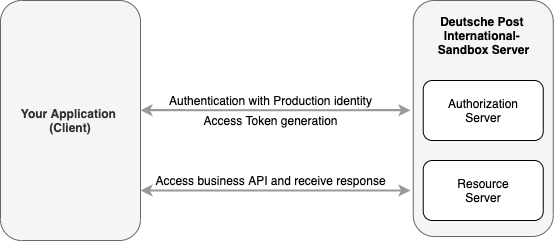
Deutsche Post International provides Production environment as well as Sandbox for development and testing.
Access to both environments is managed and you have to use OAuth 2.0 Access Token, when accessing the API resources.
Access Token could be requested via Get Access Token API, where you have to provide your API credentials: Client_ID and Client_Secret.
Note: You will have different identities for Production and Sandbox environment.
Sandbox:
NOTE: Give the user information about the Sandbox environment if available (Please delete this message).
You can use the Sandbox environment for development and testing purpose.
Sandbox Base URL: https://api-qa.deutschepost.com
Sandbox provides the same APIs as Production environment. >Note: The APIs exposed on Sandbox could be called directly from this documentation.
Production
NOTE: Give the user information about the Production environment if available (Please delete this message).
For production purposes please use the production environment. The production environment hosts the same APIs as the sandbox, but with different base URL.
Production base URL: https://api.deutschepost.com
.png)
Note: Please keep in mind that sandbox credentials are not valid for the production environment. To access the latter, please use the production set of credentials provided to you during on boarding.
Rate limits
NOTE: Describe the API's rate limits and options if available (Please delete this message).
Rate limits protect the DHL infrastructure from suspicious requests that exceed defined thresholds.
The table below details the main request limits:
| Service Level | Maximum calls per second | Maximum calls per day |
|---|---|---|
| Starter | 1 | 250 |
| Standard | 2 | 1000 |
When the limit is reached, you will receive an HTTP Status code:
429: Too many requests.
If you need higher throughput, go to your APP and click on "Upgrade Rate Limit" or please contact support@dpdhl.freshdesk.com.
Sed ut perspiciatis unde omnis iste natus error sit voluptatem accusantium doloremque laudantium, totam rem aperiam, eaque ipsa quae ab illo inventore veritatis et quasi architecto beatae vitae dicta sunt explicabo. Nemo enim ipsam voluptatem quia voluptas sit aspernatur aut odit aut fugit, sed quia consequuntur magni dolores eos qui ratione voluptatem sequi nesciunt. Neque porro quisquam est, qui dolorem ipsum quia dolor sit amet, consectetur, adipisci velit, sed quia non numquam eius modi tempora incidunt ut labore et dolore magnam aliquam quaerat voluptatem.
Legal Terms Content. This section is required for customer facing APIs.
Here, you need to specify the legal terms under which your API can be used by the Developer Portal users.
Please contact Simon Wirges (simon.wirges@dhl.com) for further information.
Please delete this message afterwards.
AAA
BBB
CCCC
choose a different option when adding FAQs.
Answer!
Two!
New Answer!
Another Answer!
1.0.1
NOTE: Make sure to add a changelog with every API release.
- Added feature: Request package location
- fixed bug: UTF-8 encoded address data is displayed correctly
1.0.0
- Initial launch