
Best for:
- Creating labels for domestic and international packages
- Users with a DHL eCommerce Solutions Americas customer account
- Only services within the United States and Canada
This site is a complete reference for DHL eCommerce Solutions Americas API (version 4), and also includes a free, ready-to-use Postman collection to get started quickly.
BY ACCESSING AND USING THE DHL ECOMMERCE AMERICAS API (THE "SITE"), YOU INDICATE YOUR ACKNOWLEDGEMENT AND ACCEPTANCE OF THESE LEGAL TERMS OF USE. IF YOU DO NOT AGREE WITH THESE LEGAL TERMS, YOU OR THE ENTITY YOU ARE AUTHORIZED TO REPRESENT (HEREINAFTER "YOU"/"YOUR") SHOULD NOT USE THE SITE. DHL ECOMMERCE AMERICAS MAY CHANGE, SUSPEND OR DISCONTINUE ANY ASPECT OF THE SITE AT ANY TIME, INCLUDING THE AVAILABILITY OF ANY FEATURE, DATABASE OR CONTENT. DHL ECOMMERCE MAY ALSO IMPOSE LIMITS ON CERTAIN FEATURES AND SERVICES AND/OR RESTRICT YOUR ACCESS TO PARTS OR ALL OF THE SITE WITHOUT NOTICE OR LIABILITY OF ANY KIND.
The DHL ECOMMERCE SOLUTIONS AMERICAS API is your one stop solution to get shipping products, calculating duty and tax, generating shipping labels, manifesting packages, requesting shipment pickup, tracking packages and generating return labels.
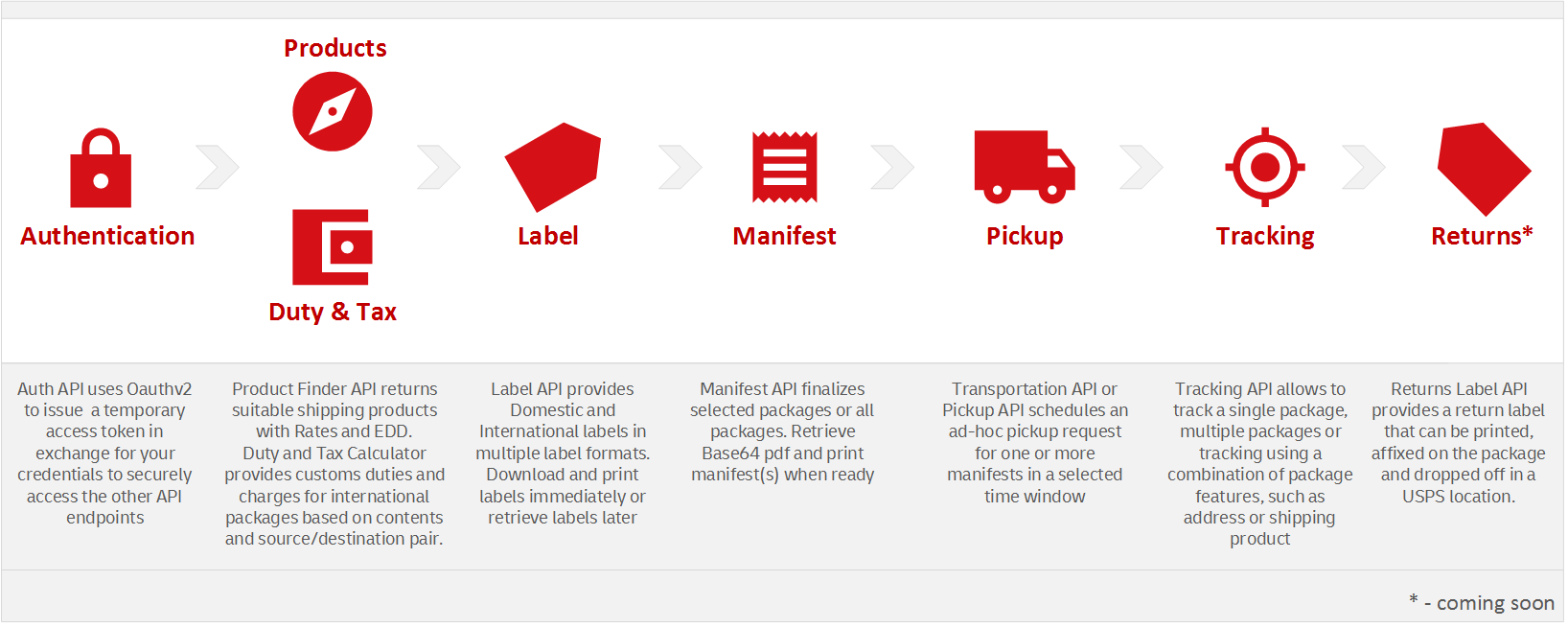
The API can be used for:
- Only DHLeC packages originating within United States and Canada
- Domestic and international packages
- All DHL eCommerce Solutions Americas shipping products
This documentation provides detailed information about the API structure and its use. You can also go directly to the following topics:
- Product Finder API
- Duty and Tax Calculator (DTC) API
- Label API
- Manifest API
- Tracking API
- Transportation API
- API References
- API Error Reference
Also, information about each error code can be directly referenced by appending the error code to the following URL. For example:
https://api.dhlecs.com/docs/errors/400.0204003
The same error URLs are also returned in the APIs when there is an error response. This allows clients to quickly get detailed information on each type of error.
Using the API
The API has been designed for use by developers. You will need basic knowledge of REST APIs, JSON and HTTPS. Also, your organization must have a customer account with DHL eCommerce Solutions Americas.
Example Use Cases
Simply Integrate in your existing website / solution
Easy integration into any eCommerce platform such as your Order Management System, Transportation Management System or an eCommerce website.
Merchants can use the API to get access to DHL Ecommerce Americas portfolio solution
Third Party Vendors (3PVs) and shipping aggregators can use the API to provide their customers with access to DHL ECommerce shipping solutions.
Using this guide, you can learn how to:
- Use the Authorization endpoint to get an access token
- Find Products for a shipping label request using Product Finder along with contractual rates and estimated delivery dates (EDD)
- Use the Duty and Tax Calculator API (DTC) to calculate estimated duties, taxes and fees for international shipments
- Create and download shipping labels in multiple supported formats
- Request a Manifest for some or all packages
- Download and print manifests
- Request a shipment pickup
- Track single or multiple packages
- Track packages using a combination of Parameters
Postman Collection
Postman is a collaboration platform for API development and testing. DHL eCommerce Solutions Americas' official Postman collection helps you download the complete API collection into your Postman work space and get started quickly on your integration.
You can download Postman here.
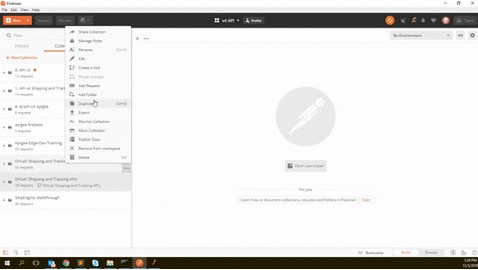
Click on "Run in Postman" button at the top of the page and select Postman for Windows if you're running a Windows PC. This will open Postman and download the complete collection under the name "DHL eCommerce Solutions Americas API".
This collection includes collection variables named clientId and clientSecret. Set these variable to values received from the on-boarding or implementations team so you can send API requests and get results in Postman. They may also provide you a different pickup number for testing, in which case you need to replace the 'pickup' collection variable.
See below for an illustration
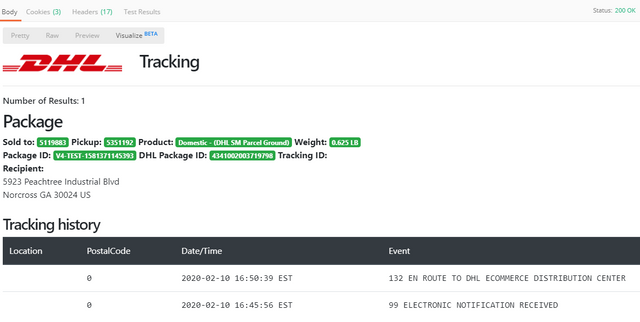
The collection also contains beautiful illustrations of most API responses which allows to visualize the responses in a better way. This is built using the API Visualization feature in Postman.
Environments
Sandbox
The Sandbox environment is your test bed while you are exploring the APIs and for building and testing your integration. From an application standpoint, the Sandbox environment and the Production environment are like-for-like, which means you can expect them to work exactly the same way. However, there are a few key differences.
- A label / manifest you created in the Sandbox environment won't be available in Production
- List of pickups that your account has access to may vary between Sandbox and Production
- List of API products that you have access to may vary between Sandbox and Production
- Capacity of servers for processing Sandbox requests will be significantly lesser when compared to Production
- Master data setup (Sold-To and Pick-up Account numbers, list of accessible distribution centers, content Category codes allowed) may be different between Sandbox and Production
While you can feel free to explore and test the APIs in the Sandbox environment, kindly work with your Client Success Manager / Implementation manager to ensure the master data setup has been completed before you decide to go live in Production.
To avoid any confusion, the Sandbox environment has it's own URL which is listed below.
There is no cost of using the Sandbox environment although requests can be throttled and/or blocked permanently if the system detects excessive or abusive usage patterns.
Following are the endpoints for the different environments.
| Environment | URL | Remarks |
|---|---|---|
| Sandbox | https://api-sandbox.dhlecs.com | For customer exploration, integration and testing |
| Production | https://api.dhlecs.com | For production use only |
Use the Sandbox as your test bed for experimenting with the API collection, for building your integration and testing your workflows. When you're ready, switch to production and you're ready to roll.
Rate Limits
To use the DHL eCommerce Solutions Americas API, you need to have an understanding of how we limit the number of requests that you can submit to one or more resources at a given point of time and over a period of time.This protects the web services from being overwhelmed with requests beyond their peak capacity and also protects against unwarranted distributed denial-of-service (DDoS) attacks on the system.
All of our APIs are rate-limited on two levels -
- Number of requests you can submit in parallel for a single resource (Spike Arrest)
- Number of requests you can submit over a period of time (1 day, 1 week etc.) for one or more resources (Quota Violation)
The first limit is to protect our resources against sudden traffic surges. This throttles the number of requests sent to the back end, protecting against performance lags and downtime.
The second limit is an outcome of a configuration on the number of request messages that a resource/group of resources allows over a period of time, which in our case is set to a per week basis. This can be different for each client, and is dependent on many factors. Kindly consult your Client Success / implementation manager if you have questions on what these limits are set to specific to your account.
What happens when your request is throttled?
You will receive a 429 error with an error response body that provides more information on if your request was denied due to a spike arrest or a quota violation. The detailed error codes between these two issues are also different.
If you're receiving this error and believe this is incorrect, please contact your implementations/account manager who will be able to verify your quota and increase it if necessary.
How to avoid throttling?
There are a few things you can do to avoid running into the issue of spike arrest or quota violations.
- Know the limits for your account on both these dimensions
- Spread out your requests so they are not submitted all at strike, rather spread out throughout the hour and day
- Design your integration in a way where if your request is throttled, have a mechanism to queue them up and re-submit them later.
- Take advantage of hours where there's usually less traffic, such as between 10 PM and 6 AM Eastern time.
Authentication
Access Token
To access any of DHL eCommerce's API resources, client credentials (clientId and clientSecret) are required which must be exchanged for an access token. The following section will guide you through the process of using this service to obtain an access token.
Scope
The following operations are allowed in the Authentication API:
| Operation | Path | Type | Description | Availability |
|---|---|---|---|---|
| Acccess Token | /auth/v4/accesstoken | POST | Provide client credentials and obtain an access token | All customers |
Important
An access token is valid for a certain amount of time before it expires. This limit is currently set to 60 minutes. When it expires, the requested resource will throw the following error: 'Access token expired'. At this time a new access token should be requested. A new access token is not needed for each request.
We recommend that you refresh the access token periodically (~15 mins to 30 mins) so that none of the resource requests receive an error due to an expired access token. We will inform clients if the access token expiry is changed to less than 30 minutes.
Workflow
- The following fields needs to be sent as form parameters -
client_id,client_secretandgrant_type - Sending the request will return an
access_tokenin the response
The access token is a Bearer token hence it must be sent with every resource request using the Authorization header with the word Bearer preprended to the token itself and separated by a space.
-
- For example, if the access token value is
edEB6SlC8wafnWgAlgqxagATPF0F, then the token must be passed in all resource requests as a header as follows -
- For example, if the access token value is
Header name: Authorization
Header value: Bearer edEB6SlC8wafnWgAlgqxagATPF0F
Request
Here is a sample request
POST /auth/v4/accesstoken HTTP/1.1
Host: api-sandbox.dhlecs.com
Content-Type: application/x-www-form-urlencoded
grant_type=client_credentials
client_id=<your client id here>
client_secret=<your client secret here>
Note that the request contains a field called
grant_typewith a value ofclient_credentials. The grant_type is sent in the body with the Content-Type of application/x-www-form-urlencoded. This is mandatory for successful authentication and getting anaccess_token. Please refer here for more information on grant types.
Response
| Node | Data Type | Description |
|---|---|---|
| access_token | string | access token. Store this value for all resource requests. |
| client_id | string | client id (username) of the client app |
| token_type | string | type of token. We use BearerToken |
| expires_in | number | expiry time in seconds |
Here is a sample good response
{
    "access_token": "OGH0T5hPVJ2oL0DYhRfYJgJMJYhC",
    "client_id": "G8PaGaNdIg5CS5q5mAibmJ9jywTFiO97",
    "token_type": "Bearer",
    "expires_in": 3600
}
Here is a sample bad response
{
    "type": "https://api-sandbox.dhlecs.com/docs/errors/400.0000005",
    "title": "Invalid credentials"
}
SPECIFICS FOR THE USE OF DHL ECOMMERCE AMERICAS API
To register for the use of and/or access to DHL eCommerce Solutions’ Americas API and the underlying API Services (label, manifest, tracking) – hereinafter referred to as DHL eCommerce Solutions Americas API – you and/or the entity you are authorized to represent (hereinafter "You"/"Your") need to have an account with and/or have entered into a Customer Services Agreement with Global Mail, Inc. dba DHL eCommerce Solutions. If You engage an external developer or other IT services provider to represent You and to develop Your Application according to the General Developer Portal Terms of Use and these special API terms & conditions (also referred to as "Legal Terms"), You are liable for the acts or omissions of such third party in connection with the access to and/or usage of the DHL eCommerce Solutions Americas API.
These Legal Terms and the General Developer Portal Terms of Use govern your usage of and/or access to the DHL eCommerce Solutions Americas API including the API Services and, unless otherwise stated herein, do not replace and/or modify any other DHL eCommerce Solutions terms and conditions of Carriage, Customer Services Agreements and/or any other agreements, contracts or SOWs with DHL eCommerce Solutions or any of its affiliates, which govern services or products provided to you (separately, each an "Agreement"). Notwithstanding the foregoing, you expressly acknowledge and agree that solely with respect to Your use of and access to the DHL eCommerce Solutions Americas API these Legal Terms and the General Developer Portal Terms of Use shall have preference over the terms and conditions in an Agreement, unless any terms and conditions in an Agreement specifically address the use of/access to the DHL eCommerce Solutions Americas API by You, in which case the specific terms and conditions of the Agreement shall prevail with respect to Your use of/access to the DHL eCommerce Solutions Americas API.
You shall use the services and/or data that You receive via the DHL eCommerce Solutions Americas API only for the legitimate contractual purposes and only in connection with DHL eCommerce Solutions’ carriage services. DHL eCommerce may revise and update these Legal Terms at any time. Your continued usage of the Site after any changes to these Legal Terms will mean You accept those changes.
The following prerequisites and/or restrictions apply for the usage of data or information received via the DHL eCommerce Solutions Americas API:
Product Finder
DHL eCommerce Americas Product Finder API enables clients to determine which DHL shipping products are suitable for a given shipping request including estimated rates and estimated delivery dates (EDD). The rates returned are account-specific along with a list of applicable surcharges (if any). The DHL Product Finder API covers most DHL eCommerce Americas shipping products, both Domestic and International.
At this time, dimensions and dimensional weight are not considered when estimating rates.
PLEASE NOTE: The rates and delivery dates provided by the Product Finder are estimates only and may not reflect the actual billed rates or delivery times. The accuracy of the rate information depends on a number of factors, including the accuracy of Your input.
Label
The API Service "label" provides You with the possibility to create and download labels for singular shipments. Please note that the creating and/or downloading of a label does not constitute the contract of carriage. Such contract will be concluded once the labeled package is handed over or picked up and accordingly accepted by DHL eCommerce Solutions.
Manifest
The API Service "manifest" provides You with the possibility to select single items/packages for manifest (via package ID), to generate a Driver's Summary Manifest (DSM) as a pdf-file and download/print the DSM when required in order to facilitate handover of the DSM to the driver at the time of pickup.
It is in Your sole responsibility to select the correct (number of) packages for manifest and to check whether all relevant packages have been included to the manifest.
Tracking
Data requested and received via the DHL eCommerce Solutions Americas API, such as transport status, estimated delivery date, is hereinafter referred to as "Tracking Data".
Tracking Data is Confidential Information in the meaning of section "Communication" of the General Developer Portal Terms of Use. Other than set forth below You must not reveal and/or provide third parties with the Tracking Data and/or analyze, modify such data in any form and/or derive data/information especially for competitive purposes from it without DHL eCommerce Solutions’ prior written consent.
You may only submit Tracking Data provided to You via the DHL eCommerce Solutions Americas API to the recipient of the packages and no other person. Such submission shall always be in compliance with applicable laws and regulations, including without limitation data protection laws and competition/antitrust law. Without limiting any of the foregoing, You shall ensure that the data shall not be combined with an advertisement or presented in a way that it could be regarded as advertisement.
If You are neither the Shipper nor the recipient of packages the Tracking Data refers to, the following applies additionally. You represent and warrant that:
- You are duly authorized to act on behalf of the Shipper;
- You shall make the Shipper aware of the restrictions set out in these Legal Terms and the General Developer Portal Terms of Use;
- You shall make the Shipper aware of the necessity to inform the recipient about the processing of his/her personal data according to applicable data protection laws.
Unless otherwise agreed, You shall delete the Tracking Data (including the transport history) 90 days after the delivery is completed. DHL eCommerce Solutions shall not be required to provide Tracking Data to You that is older than 90 days from the delivery date.
Changes
The DHL eCommerce API v4 introduces a number of enhancements, fixes and new features aimed at improving the integration experience:
- Improved availability, enabled by a behind-the-scenes technology refresh
- Improved performance, with aggressive latency and throughput targets
- New product finding and rating capabilities, for accurate up-front rate information
- New estimated delivery date (EDD) functionality, for easier planning and decision-making
- An updated end-of-day closeout and manifesting process, avoiding network timeouts and performance issues
- Additional fields required by some countries in 2021 for cross-border shipments
- Integration of the duty and tax calculator (DTC) as part of a unified API portfolio
Deprecation Schedule
Users of the DHL eCommerce v1, v2 and v3 APIs are encouraged to migrate as soon as possible. In particular, all international customers should migrate to v4 by January 2021 in order to remain compliant with upcoming cross-border regulatory requirements. Domestic customers on the older v1 API should also migrate by January 2021. Domestic-only customers on the v2 API should migrate by July 2021. All customers on the v3 API should migrate by May 28, 2021.
