
Best for:
- Shipping, tracking & returning of DHL Parcel Connect
- Implementing modularized customer solutions within Europe & into Europe
- Sending cross-border shipments within Europe with DHL Parcel Connect
- Sending cross-border returns within Europe with DHL Parcel Return Connect
- Sending cross-border shipments into rest of world from Europe (excl. DE) with DHL Parcel International
The eConnect API Gateway is issued by DHL eCommerce. It is the one stop solution for large customers of DHL eCommerce to send outbound shipments, retrieve labels, access track and trace data and create return shipments. It covers the DHL products Parcel Connect, Parcel Return Connect and Parcel International.
Users of the eConnect API can:
|
Send shipment data |
Generate label |
Track & Trace |
Create Returns |
|
|
|
|
 |
|
Create shipments incl all product features e.g. integration into online shops, logistics software etc. |
Receive ready-to-print labels i.e. the API provides compliant labels in different sizes/ formats |
Retrieve track & trace information Access track and trace information on account or piece level |
Generate return shipments incl. labels returns can be dropped-off by recipients in 27 European countries |
Next to the API, the eConnect shipping tools offer other options for customer integration. The different options can be chosen or combined depending on the customer's preferences. The available channels are:
- eConnect API
- eConnect Partner
- eConnect Portal
- eConnect Client
- eConnect Plugins
Contact your DHL representative for your tailored shipping solution.
Scope
The eConnect API covers the essential DHL cross-border parcel products for shipments within Europe and beyond: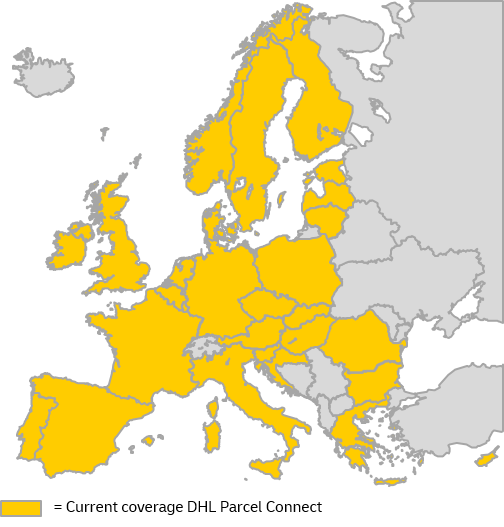
- DHL Parcel Connect: the best choice for cross-border eCommerce senders focusing on B2C. DHL Parcel Connect ships via the Connect network into 28 parcel destinations in Europe using a network-wide parcel product standard with harmonized features (e. g. label, dimensions, weights, etc.).
- Weight: Up to 31.5kg
- Dimension: Maximum 120 x 60 x 60cm
- Fast transit times: typically ranging between 1-3 days(depending on origin/destination country)
- For customers in all DHL Parcel Europe countries
- Delivery in all DHL Parcel Europe and partner countries
- End-to-End transparency through track & trace including pre-delivery notification
- Saturday and delivery on preferred day possible
- Direct delivery to Service Points
- Additional services available (e.g. cash on delivery, bulky goods)
- DHL Parcel Return Connect: the product offers a comprehensive return solution from 27 DHL Parcel Connect destinations. Return senders can access approx. 70 thousand ServicePoints across Europe for return drop-off. (see http://psf.dhl.com)
- DHL Parcel International: Complementary offering to cover worldwide destinations outside the DHL Parcel Connect network via postal standard (incl. customs destinations).
Please see below an overview of our recommended products per country:
|
Country |
Outbound Product |
Return Product |
|
Austria |
Parcel Connect |
Return Connect |
|
Belgium |
Parcel Connect |
Return Connect |
|
Bulgaria |
Parcel Connect |
Return Connect |
|
Croatia |
Parcel Connect |
Return Connect |
|
Cyprus |
Parcel Connect |
Return Connect |
|
Czech Republic |
Parcel Connect |
Return Connect |
|
Denmark |
Parcel Connect |
Return Connect |
|
Estonia |
Parcel Connect |
Return Connect |
|
Finland |
Parcel Connect |
Return Connect |
|
France |
Parcel Connect |
Return Connect |
|
Germany |
Parcel Connect |
Return Connect |
|
Greece |
Parcel Connect |
Return Connect |
|
Hungary |
Parcel Connect |
Return Connect |
|
Ireland |
Parcel Connect |
Return Connect |
|
Italy |
Parcel Connect |
Return Connect |
|
Latvia |
Parcel Connect |
Return Connect |
|
Lithuania |
Parcel Connect |
Return Connect |
|
Luxembourg |
Parcel Connect |
Return Connect |
|
Netherlands |
Parcel Connect |
Return Connect |
|
Norway |
Parcel International |
Not available |
|
Poland |
Parcel Connect |
Return Connect |
|
Portugal |
Parcel Connect |
Return Connect |
|
Romania |
Parcel Connect |
Return Connect |
|
Slovakia |
Parcel Connect |
Return Connect |
|
Slovenia |
Parcel Connect |
Return Connect |
|
Spain |
Parcel Connect |
Return Connect |
|
Sweden |
Parcel Connect |
Return Connect |
|
United Kingdom |
Parcel International |
Not available |
|
Rest of World |
Parcel International |
Not available |
Feel free to check out our website for more detailed product information. For further information on the functionalities, please visit Use Cases.
In case you are a customer based in Germany, please check out our German portfolio at the DHL Entwicklerportal.
Example Use Cases
Example 1: user sends shipment data to DHL and receives a label in return
The eConnect API allows the user to send shipment data for Parcel Connect, Parcel Connect Return and Parcel International shipments to DHL. The data needs to be send in JSON format, following the request specification according to this API portal documentation. If requested the API will return the respective label in the desired format (see label section).
Example 2: user searches for shipment status via track & trace
The eConnect API offers a full track and trace functionality for the shipments send by each integrated customer or partner. It is possible to request the status information on singular shipment or on account level.
Please visit our Use Case section for a full list of possible use cases.
Get Access
For onboarding, you need to follow this process guided by the DHL API team:
- Contact DHL to align use case and requirements
- Apply for access to sand box environment
- Implement your API solution (see use cases)
- Seek approval from DHL (for data and label)
- Retrieve access to production environment
To contact the DHL API team, please use this contact form.
Using the API
To get access to the API, you will receive a Client ID and a password; please use the contact form to apply for these (including your company name, industry and contact details (incl. phone number and email address)).
The API provides OAuth 2.0 Access Token with various authorization scopes.
The “Get Access Token” API call provides an OAuth 2.0 Bearer token with authorization scope, assigned to your client id. It grants you an access to the CCC APIs.
The API operation is secured by HTTP Basic authentication, therefore you have to provide 'client_id' and 'client_secret' as an username and password, when calling the API. Credentials will be provided to you via secured channel.
Environments
The addressable API base URL/URI environments are:
| Environment | Description |
| https://api.sandbox.dhl.com | Sandbox environment |
| https://api.dhl.com | Production environment |
The Sandbox environment can be used for testing freely. Only the production environment will trigger underlying processes, e.g. billing, operational procedures.
Information for integrators
The DHL Europe eCS API differentiates between customers and integrators. If you are an integrator, you may retrieve permission to operate the API on behalf of an assigned customer. For administrative reasons, shipments are always assigned to a dedicated customer. API users with status “integrator” cannot generate shipments themselves, unless they additionally have a customer account.
The customer/integrator configuration is performed by DHL, please contact via the contact form.
Rate Limits
Rate limits protect the DHL infrastructure from suspicious requests that exceed defined thresholds.
Should you exceed your rate limit you will receive a HTTP status code within the API response that will indicate this.
In addition to the rate limit a so called “spike arrest” protects our API Platform from potential outages caused by a very large volume of requests sent in a short time span (minutes or seconds). This will be indicated by a different HTTP status code.
This API offers various functionalities that all support you in managing your DHL eCommerce Solutions cross-border parcel shipments. This page gives an overview and introduction to the available functionalitites. A detailed developer's documentation is available in the "Reference Docs" section (see here).
Shipment Data
- It is mandatory for the sender to send shipment data for each individual piece/parcel. Please see below explanations for details on the requested shipment parameter, in addition please check our "request specification", "use cases" and the "refernce docs" section on this website.
- Along with the recipient and sender address data, several additional shipment details need to be defined for each shipment:
- Product type: DHL Parcel Connect, DHL Parcel Return Connect or DHL Parcel International
- Sender address data: Use these fields to define the shipper address on the label. The field “customerIdentfication” must contain the senders DHL customer account number. Please note: For Connect return shipments the “customerIdentification” needs to be included as an attribute for the sender as well, not for the receiver.
- Recipient address data: Use these fields to insert the consignee address
- Product features: Depending on the selected product type, various product features are to be selected in the shipment data:
- Mandatory features
- Delivery type: The delivery type needs to be chosen i.e. default for doorstep, parcelshop, parcelstation or postOffice.
- Gross weight: It is mandatory to provide the gross weight in kg.
- Direct Injection (DI): DI allows the customer to inject high parcel volumes directly into a defined DHL gateway. For technical reasons, the DI info needs to be handed over by the user for every shipment. DHL will provide the required details for each customer-case (please contact via our contact form).
- Optional features
- Size: It is optional, but recommended, to delivery size information for shipments in cm.
- Cash on delivery (COD): When choosing “Cash-on-delivery”, a shipment is handed over to the recipient against payment. Financial details are required in this case.
- Bulky: Shipments outside the standard dimensions or with any property that prevents automated sorting need to be marked as bulky by the customer. For details see product information (above).
- Additional insurance: Depending on your contract with DHL, the customer can order additional insurances
- Go Green: Depending on your agreement with DHL, the customer may ship Go Green shipments
- Mandatory features
Label
- The API can generate high-resolution labels based each individual shipment data and provide the label files within the API response.
- Labels are available for all covered products, i.e. DHL Parcel Connect, DHL Parcel Return Connect and DHL Parcel International.
- Currently the following formats and resolutions are available:
|
|
|
ZPL 200dpi |
ZPL 300dpi |
|||
|
Long Label (10 cm x 21 cm) |
Short Label (10 cm x 15 cm) |
Long Label (10 cm x 21 cm) |
Short Label (10 cm x 15 cm) |
Long Label (10 cm x 21 cm) |
Short Label (10 cm x 15 cm) |
|
|
DHL Parcel Connect |
yes |
yes |
yes |
yes |
no |
no |
|
DHL Parcel Return Connect |
yes |
yes |
yes |
yes |
no |
no |
|
DHL Parcel International |
yes |
yes |
yes |
no |
no |
no |
- In case of generating DHL Parcel Return labels, it is recommended to additionally generate return instructions. Return instructions contain information in all local languages and shall help return senders (i.e. consumer) to correctly handle the return shipment. To receive our return instructions, please request them via our contact form.
- When creating shipments into customs areas please refer to below chapter "Customs Data".
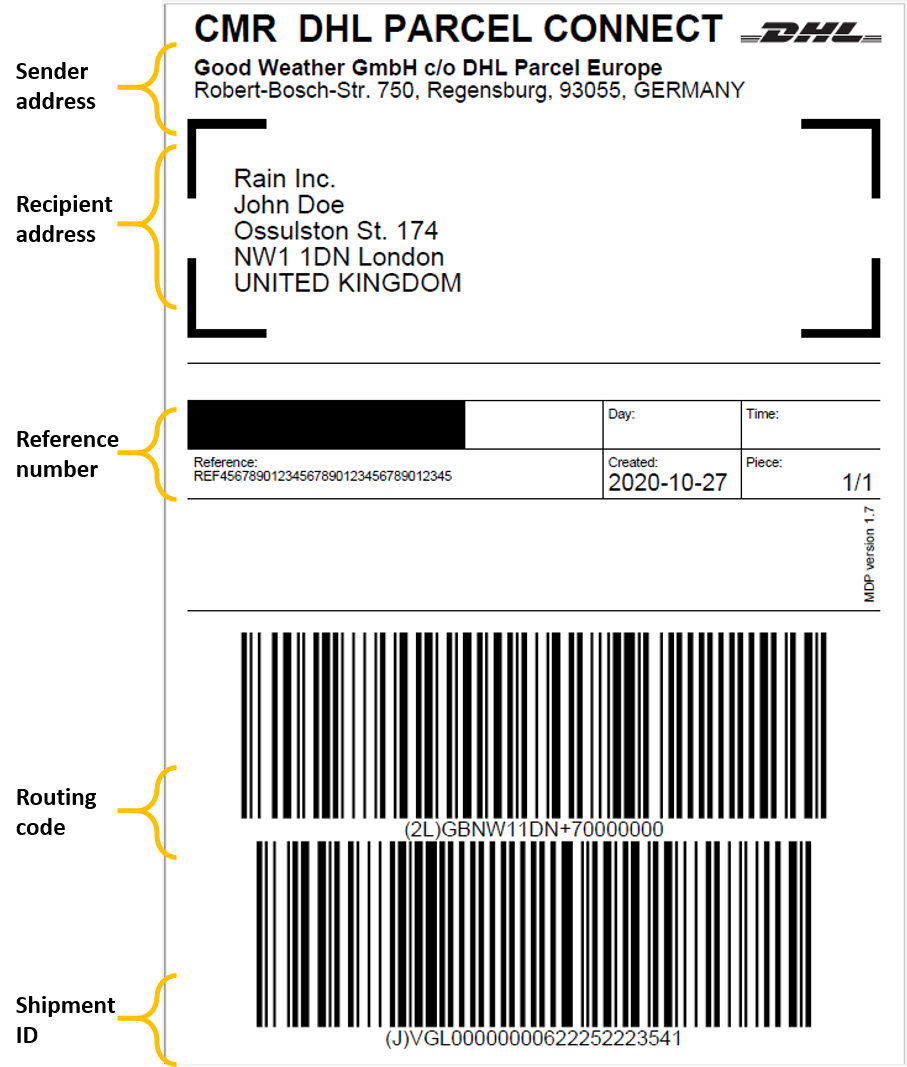
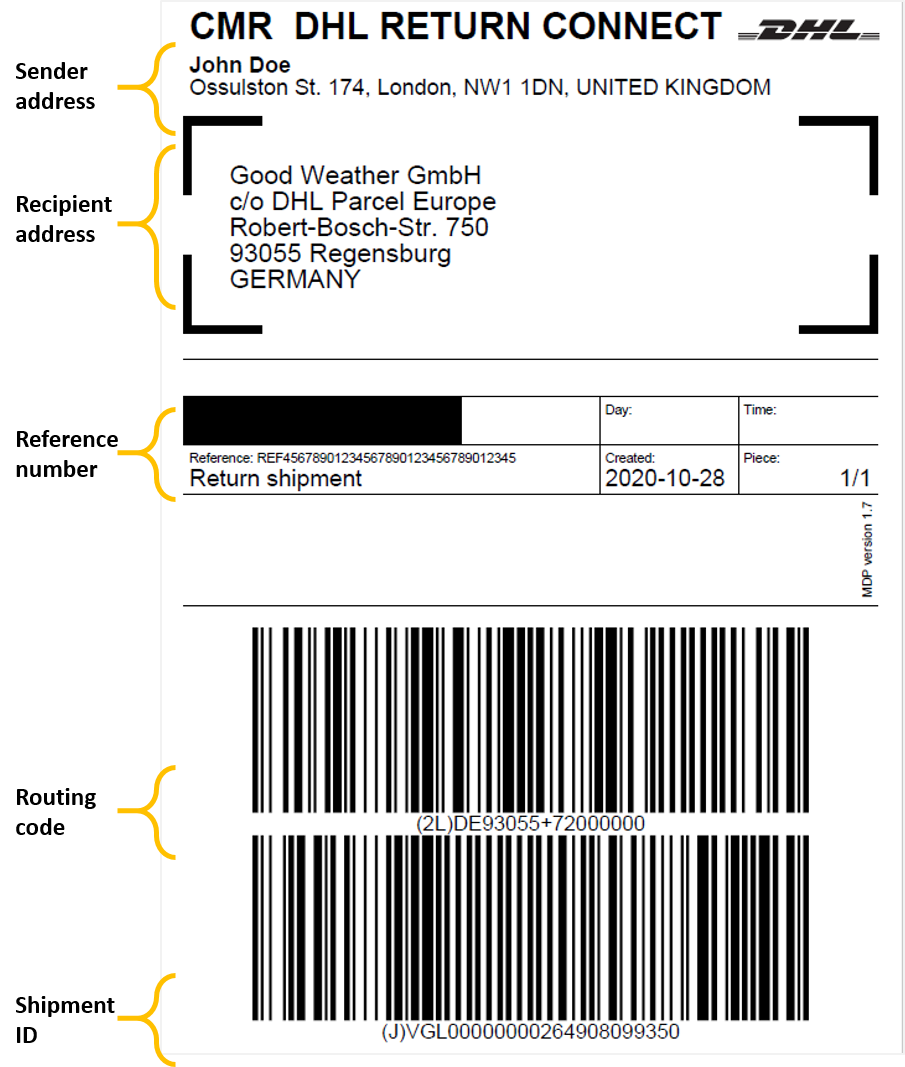
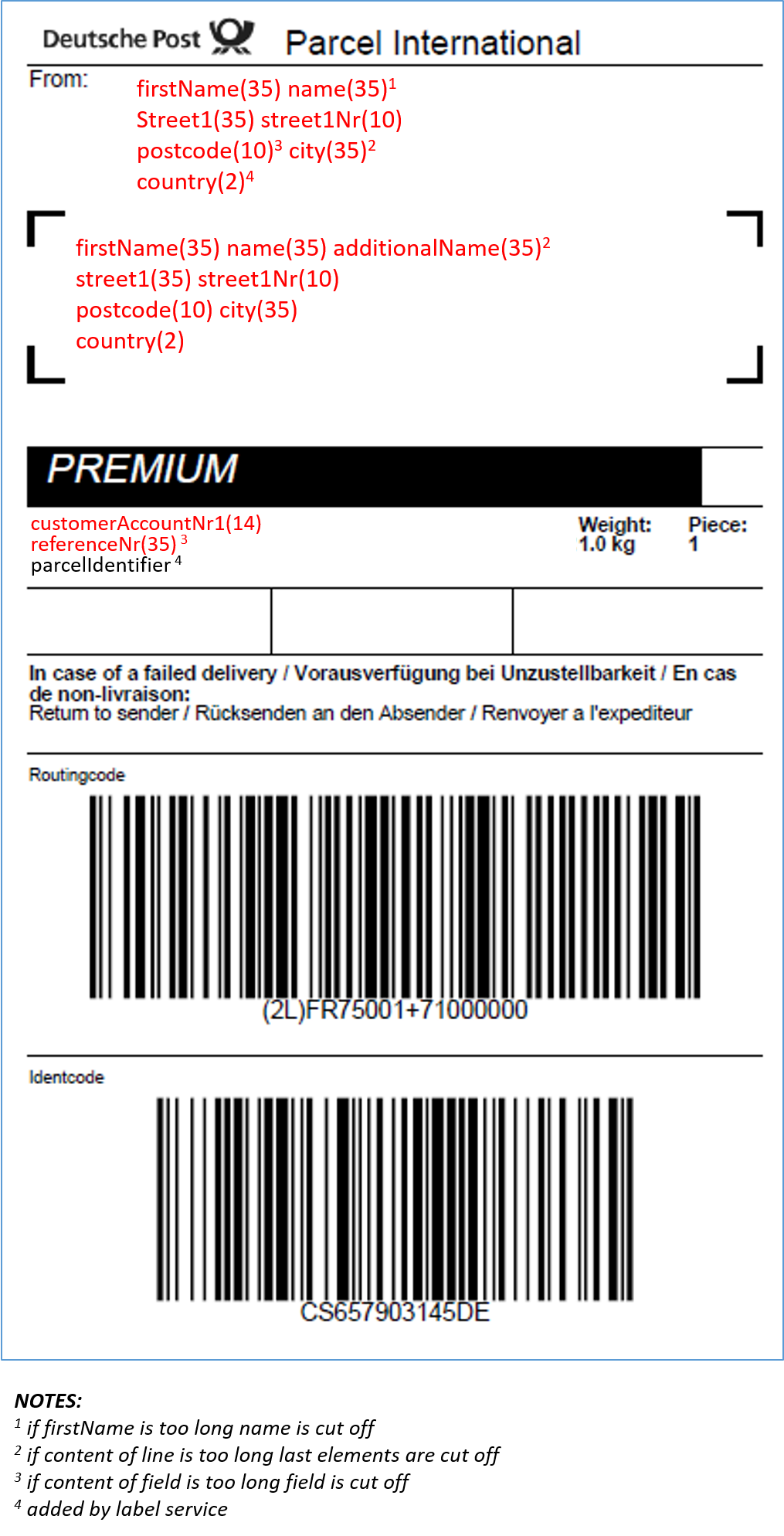
- Please see below an example DHL Parcel Connect label for shipment delivered to a door-step address as well as the respective return label. Examples for further use cases can be found here.
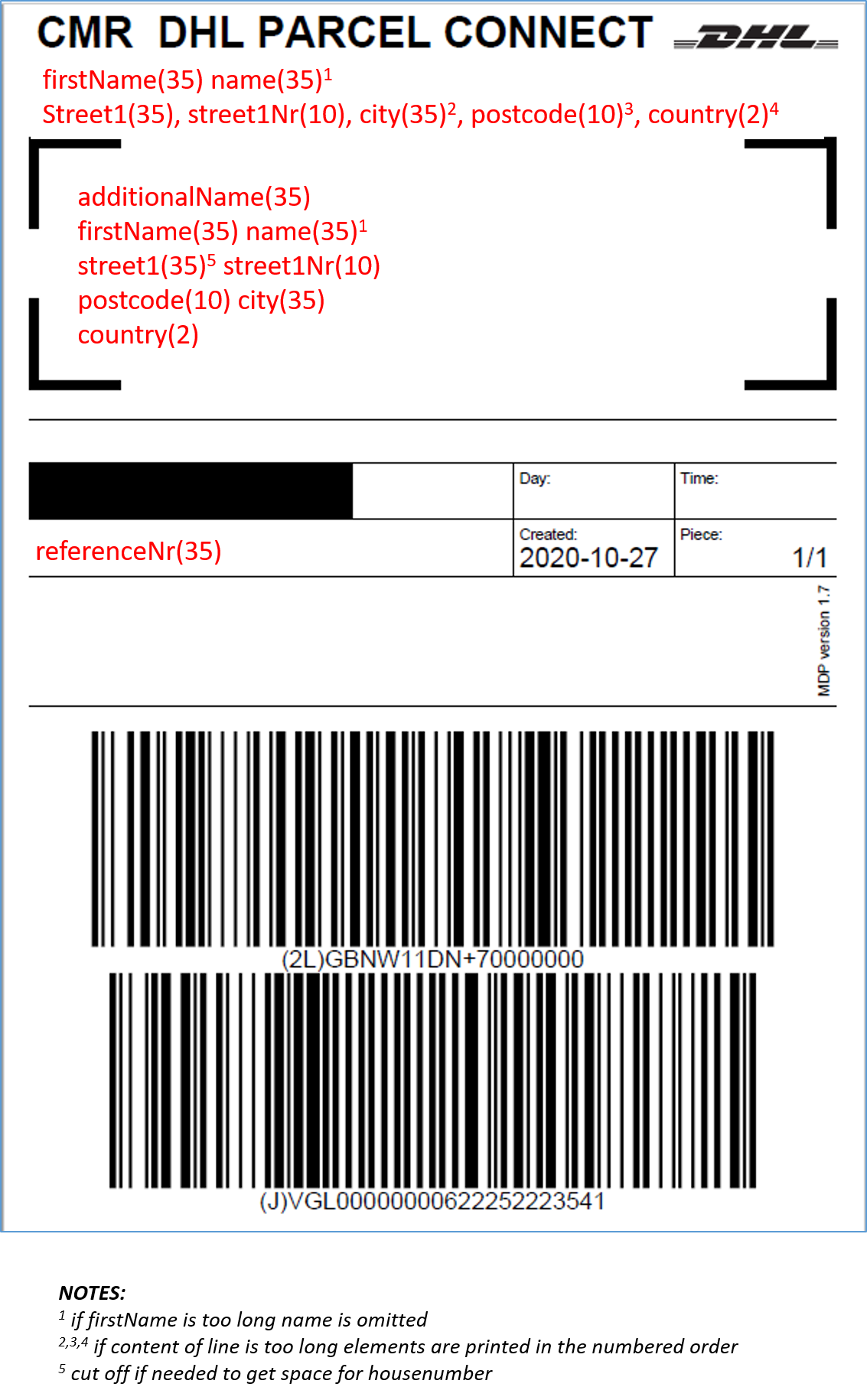
- Please note: below illustration contains max field lenghts for the addressing fields on the label. Additionally single fields might be changed for layout reasons due to character span/size during PDF creation.
Addressing to ServicePoints
- With DHL Parcel Connect it is possible, to directly address shipments to ServicePoints or Lockers in the destination country, instead of a doorstep address.
- The service is available for destinations: AT, BE, BG,CY, CZ, DE, DK, EE, ES, FI, FR, GB, GR, HR, HU, LT, LV, NL, PL, PT, RO, SE, SI, SK
- The service is not available for destinations: IE, IT, LU, NO
- The DHL Location Finder provides up-to-date address data of all available DHL and Partner locations, which can be used for direct addressing of shipments.
- It contains location information of ServicePoints, Postoffices and Lockers, including additional information such as opening hours, holiday closing times and services offered.
- The DHL Location Finder API offers to retrieve locations in an area near a specific address (within a radius of 25km).
- Please find more information on how to access and integrate the DHL Location Finder API here.
- After retrieving location address data via the DHL Location Finder API, the address data needs to be entered into the shipment data for the particular shipment.
- Apply the below mapping table to correctly map the location data fields from the DHL Location Finder API to the shipment data fields of the DHL eCommerce Solutions API - needed for DHL Parcel Connect shipments directly addressed to a ServicePoint, PostOffice or Locker.

Overview of field mappings
|
Content |
DHL Location Finder API |
DHL eCommerce Solutions API |
Example / Comment |
|
Name of Recipient |
n.a. |
CPAN/ addresses/ recipient/ name |
e.g. Hans Schmitz |
|
Type of Location |
locations/ location/ type |
CPAN/ addresses/ recipient/ type |
e.g. Servicepoint |
|
Postnummer |
n.a. |
CPAN/ addresses/ recipient/ customerIdentification |
e.g. 1234567 |
|
Name of ServicePoint |
locations/ name |
CPAN/ addresses/ recipient/ additional name |
e.g. B+B Tabakwaren |
|
Keyword of ServicePoint/ Locker |
locations/ location/ keyword |
CPAN/ addresses/ recipient/ street1 |
e.g. Postfiliale |
|
ID of ServicePoint/ Locker |
locations/ location/ keywordId |
CPAN/ addresses/ recipient/ street1Nr |
e.g. 443 |
|
Street name of the Servicepoint |
locations/ place/ address/ streetAddress |
CPAN/ addresses/ recipient/ street2 |
e.g. Monckebergstr. 7 |
|
ZIP Code of the Servicepoint |
locations/ place/ address/ postalCode |
CPAN/ addresses/ recipient/ postcode |
e.g. 20095 |
|
City of the ServicePoint |
locations/ place/ address/ addressLocality |
CPAN/ addresses/ recipient/ city |
e.g. Hamburg |
|
Country of the ServicePoint |
locations/ place/ address/ countryCode |
CPAN/ addresses/ recipient/ country |
e.g. DE |
Additional information & tipps for using both API's
- When requesting locations from the DHL Location Finder API, please make sure to only select locations offering the following "service types" in the Location Finder API:
- "parcel:pick-up" - these locations are available for any direct addressing of parcels
- "parcel: pick-up-unregistered" - these locations are available for any direct addressing of parcels
- "parcel: pick-up-registered" - these locations are available for direct addressing of parcels only, if a destination specific recipient-registration number is transmitted in the shipment data (e.g. for German Parcelstations a "Postnumber" is mandatory)
- When requesting locations from the DHL Location Finder API, please make sure to map the "type" of the selected location from the Location Finder API correctly to the DHL eCommerce Solutions API:
|
DHL Location Finder API <type> |
DHL eCommerce Solutions API <type> |
|---|---|
|
servicepoint |
parcelshop |
|
locker |
parcelstation |
|
postoffice |
postOffice |
Track & Trace
- The API offers calls to request track & trace information for individual customers’ shipments. Integrators can access information on their assigned customers’ shipments as well.
- Available options via API:
- Track & trace shipment details of a specific shipment ID
- Track & trace all shipments of a given customer ID and injection date(s)
- Next to the API channel, customers shipments can be monitored as well via public websites, e.g.: logistics.dhl
- Senders may distribute a standardized link to their recipients, to be personalized with an individual shipping ID. The link gives direct access to tracking information: https://www.dhl.com/de-en/home/tracking/tracking-parcel.html?submit=1&tracking-id=[your-shipment-ID]
- The following Track & Trace statuses are available via the Track & Trace API-service:
| Segment | Status | Detailed Status |
|---|---|---|
| Data | DATA_RECEIVED | PRENOTIFICATION_RECEIVED |
| Origin | UNDERWAY | ARRIVED_FACILITY CLEARANCE_RELEASE DEPART_FACILITY GATEWAY_ARRIVED GATEWAY_DEPARTED PARCEL_COLLECTED_AT_PARCELSHOP_BY_COURIER PARCEL_PICKED_UP_AT_ACCESSPOINT PARCEL_PICKED_UP_AT_PARCELSHOP PARCEL_PICKED_UP_AT_PARCELSTATION PARCEL_SCANNED_FOR_COLLECTION_AT_ACCESSPOINT_BY_COURIER PARCEL_SCANNED_FOR_COLLECTION_AT_PARCELSHOP_BY_COURIER PARCEL_SCANNED_FOR_COLLECTION_AT_PARCELSTATION_BY_COURIER PARCEL_SORTED_AT_GATEWAY PARCEL_SORTED_AT_HUB PICKED_UP SHIPMENT_ACCEPTANCE SHIPMENT_ACCEPTANCE_DEPOT SHIPMENT_ACCEPTANCE_PARCELSHOP SHIPMENT_ACCEPTANCE_PARCELSTATION |
| CUSTOMS | ENTRY_SUBMITTED | |
| PROBLEM | FORCE_MAJEURE SHIPMENT_STOPPED |
|
| Transit | UNDERWAY | GATEWAY_ARRIVED GATEWAY_DEPARTED |
| Destination | CUSTOMS | SHIPMENT_INSPECTION |
| UNDERWAY | ARRIVED_AT_DELIVERY_FACILITY ARRIVED_AT_INBOUND_GATEWAY ARRIVED_AT_TERMINAL CLEARANCE_RELEASE DEPART_FACILITY DEPOT_SCAN PARCEL_ARRIVED_AT_LOCAL_DEPOT PARCEL_NO_DATA PARCEL_SORTED_AT_HUB SCAN_OK_GATEWAY |
|
| IN_DELIVERY | DELIVERED_AT_ACCESSPOINT DELIVERED_AT_DEPOT DELIVERED_AT_PARCELSHOP DELIVERED_AT_PARCELSTATION DELIVERED_AT_PREFERED_NEIGHBOURS DELIVERED_AT_SAFEPLACE LOAD_VEHICLE NOTIFICATION_OF_TIME_FRAME_HAS_BEEN_SENT |
|
| INTERVENTION | INTERVENTION INTERVENTION_DELIVERY_ADDRESS_CHANGED_INTO_PARCELSHOP INTERVENTION_DELIVERY_ADDRESS_CHANGED_INTO_PARCELSTATION INTERVENTION_RECEIVER_REQUESTS_DELIVERY_AT_ACCESSPOINT INTERVENTION_RECEIVER_REQUESTS_DELIVERY_AT_NEIGHBOURS INTERVENTION_RECEIVER_REQUESTS_DELIVERY_AT_PARCELSHOP INTERVENTION_RECEIVER_REQUESTS_DELIVERY_AT_PARCELSTATION INTERVENTION_RECEIVER_REQUESTS_DELIVERY_AT_PREFERRED_NEIGHBOURS INTERVENTION_RECEIVER_REQUESTS_DELIVERY_AT_SAFE_PLACE |
|
| EXCEPTION | PARCEL_RELABELED_FOR_RETURN_TO_SHIPPER RELABELED |
|
| DELIVERED | COLLECTED_AT_ACCESSPOINT COLLECTED_AT_PARCELSHOP COLLECTED_AT_PARCELSTATION DELIVERED DELIVERED_AT_NEIGHBOURS MONEY_TRANFERED_TO_SENDER |
|
| PROBLEM | ACCESSPOINT_FULL_REDELIVER ADDRESS_UNKNOWN BAD_ADDRESS CLOSED_ON_ARRIVAL DAMAGE_RETURN DELIVERY_DATA_INCORRECT PARCELSTATION_DELIVERY_UNSUCCESFULL_RETURN FORCE_MAJEURE HELD_IN_STORAGE_CLOSED HELD_IN_STORAGE_DAMAGED INVALID_SHIPMENT_SPECIFICATION_RETURN MISCODE MISROUTED_RETURN_TO_SHIPPER MISSORT NO_MONEY_REDELIVER NO_MONEY_RETURN NOT_HOME SHIPMENT_TOO_LARGE_FOR_ACCESSPOINT SHIPMENT_TOO_LARGE_FOR_PARCELSHOP SHIPMENT_TOO_LARGE_FOR_PARCELSTATION PARCELSHOP_FULL_REDELIVER PARCELSTATION_NOT_AVAILABLE_REDELIVER_TO_PARCELSHOP RECEIVER_MOVED_OR_UNKNOWN REDELIVER_SAME_ADDRESS REFUSED_BY_RECEIVER RELABELED REPACKED_DELIVERY_DAMAGED RETURNED_NOT_COLLECTED RETURNED_TO_SHIPPER STORAGE_PERIOD_ENDED_AT_ACCESSPOINT STORAGE_PERIOD_ENDED_AT_PARCELSHOP STORAGE_PERIOD_ENDED_AT_PARCELSTATION UNCONTROLLABLE_CLEARANCE_DELAY |
|
Customs data
- The product DHL Parcel International also supports shipment to countries liable to customs. In this case, it is mandatory send a “cCustoms” request in addition to the cPAN. The cCustoms call requires information about the content of the parcel (including its value and purpose). It will forward the electronic information to the customs entities and return a CN23 document.
- The CN23 document will be returned together with the shipment label (see explanations on "Label" above). It is issed in PDF format for printout and attachment to the parcel.
- Overview of use cases:
- If you send to a non-customs destination, you don’t need to send cCustoms. If you do anyways, it will be ignored.
- If you send to a customs destination or region, cCustoms is mandatory. If you don’t send it, your shipments will be rejected.
- If either one of CPAN and/or cCustoms is incorrect, your shipments will be rejected.
Use Case Overview
Below you can find an overview of the different use cases for which you need to request different functionalities of the API. In the next section you can find a short description as well as an example request and an example response for each use case.
|
No. |
Use Case |
Access |
Shipment data |
Location finder |
T&T |
Customs data |
|
1 |
DHL Parcel Connect shipment delivered to door |
yes |
yes |
|
optional |
|
|
2 |
DHL Parcel Connect shipment delivered to Service Point (Option to include location finder) |
yes |
yes |
optional |
optional |
|
|
3 |
DHL Parcel Connect shipment delivered to locker in Germany |
yes |
yes |
optional |
optional |
|
|
4 |
DHL Parcel Return Connect shipment |
yes |
yes |
|
optional |
|
|
5 |
DHL Parcel International shipment |
yes |
yes |
|
optional |
|
|
6 |
Parcel International shipment including customs |
yes |
yes |
|
optional |
yes |
|
7 |
Track and trace your shipments |
yes |
|
|
yes |
|
|
8 |
Brexit Parcel Connect to UK |
yes |
|
|
yes |
|
|
9 |
Customer events |
yes |
yes |
|
|
|
| 10 | Parcel Return International | yes | yes |
Example Requests & Responses
Use Case 1: DHL Parcel Connect shipment delivered to door
This request enables users to inject their shipment data for door-step deliveries for DHL Parcel Connect shipments. If requested, the API will return the respective label in the desired format (PDF or ZPL).
Key success factors:
- The recipient address must be the door address of the recipient
- It is recommended to include e-mail and/or phone number to enable recipient service (e.g. re-routing)
Request
POST /ccc/send-cpan?generateLabel=true&labelFormat=pdf HTTP/1.1
Host: api-sandbox.dhl.com
Content-Type: application/json
Authorization: Bearer AJx0yDAMVnBlcBsSeTwuPpkytYz78fzgUG20aBrTyMBPeP347pVDrz

{
    "dataElement": {
        "parcelOriginOrganization": "AT",
        "parcelDestinationOrganization": "GB",
        "general": {
            "product": "ParcelEurope.parcelconnect",
            "routingCode": ""
        },
        "cPAN": {
            "addresses": {
                "sender": {
                    "type": "default",
                    "firstName": "Good Weather GmbH",
                    "name": "c/o DHL Parcel Europe",
                    "street1": "Robert-Bosch-Str.",
                    "street1Nr": "750",
                    "postcode": "93055",
                    "city": "Regensburg",
                    "country": "DE",
                    "referenceNr": "REF45678901234567890123456789012345",
                    "customerIdentification": "YOUR_ID_HERE"
                    "customerAccountNr1": "YOUR_ID_HERE"
                },
                "recipient": {
                    "type": "doorstep",
                    "firstName": "John",
                    "name": "Doe",
                    "additionalName": "Rain Inc.",
                    "mobileNr": "+441234567890",
                    "email": "john.doe@example.com",
                    "street1": "Ossulston St.",
                    "street1Nr": "174",
                    "postcode": "NW1 1DN",
                    "city": "London",
                    "country": "GB"
                }
            },
            "features": {
                "physical": {
                    "grossWeight": "1.0"
                }
            },
            "directInjection": true,
            "directInjectionDetails": {
                "directInjectionCountry": "DE",
                "directInjectionGatewayCity": "Regensburg",
                "directInjectionGatewayPostcode": "93055"
            }
        }
    }
}
Response
Depending on how the request was specified, the response may contain label in the specified format (e.g. pdf) or not (see example below). The response will also contain a status code as well as a status message both indicating whether the request could be processed successfully or not (see examples below).
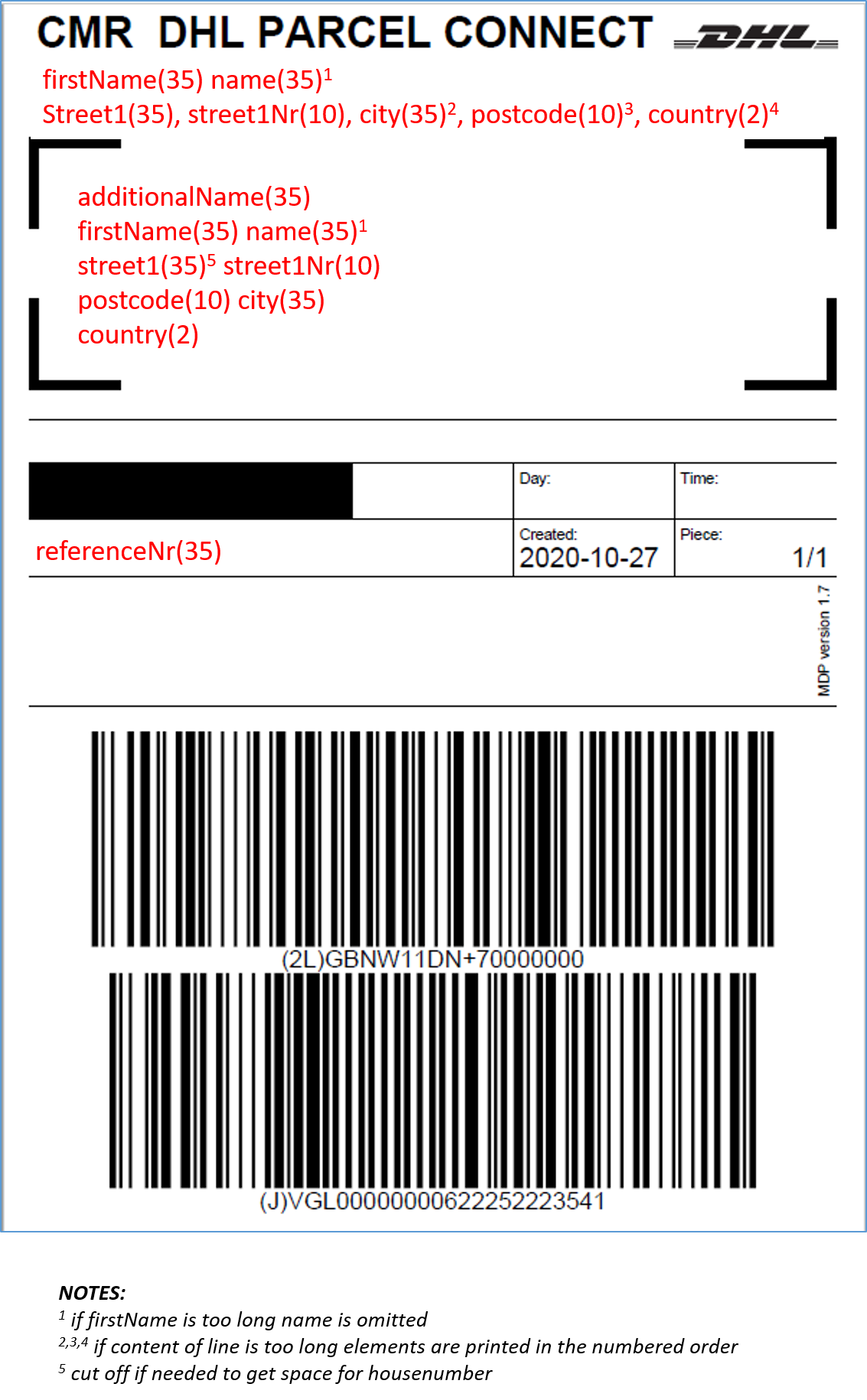
Success Response
HTTP/1.1 200
Content-Type: application/json;charset=UTF-8
shipmentId: JVGL003101234567801234
{
   "response":{
	"status":"200",
	"timestamp":"2017-03-21T06:29:55",
	"customerId":"AAAA",
	"sessionId":"f10953e8-2e73-41f4-ab4e-818ea4ac76ad",
	"statusCode":"OK",
	"statusMessage":"cPAN has been processed successfully"
	}
}
Error Response
HTTP/1.1 400
Content-Type: application/json;charset=UTF-8
shipmentId: JVGL003101234567801234
{
   "error":{
	"status":"400",
	"timestamp":"2017-03-21T06:29:55",
	"sessionId":"f10953e8-2e73-41f4-ab4e-818ea4ac76ad",
	"statusCode":"ERROR",
	"statusMessage":"Unexpected input provided"
	}
}
Use Case 2: DHL Parcel Connect shipment delivered to Service Point (Option to include location finder - see below)
This request enables users to inject their shipment data for ServicePoint deliveries for DHL Parcel Connect shipments. The sender needs to know the desired ServicePoint address. If requested, the API will return the respective label in the desired format (PDF or ZPL).
Key success factors:
- It is mandatory for ServicePoint shipments to include the following parameters in the address: name of recipient, name of service point, keyword, servicepointID, street, housenumber, ZIP code, city, country
- Only for directly addressed shipments to German ServicePoints (aka „Postfiliale“ – See Use Case 4) the attributes which contain the street and house number of the shops are optional.
- It is recommended to include phone numbers for SMS notification to create higher pick up rates
In addition you have the option to use a location address instead of a doorstep address, by accessing our DHL ServicePoint database (i.e. DHL Location Finder API). If the location data of the ServicePoint is not known by the recipient already, the recipient can request this data using the API. When sending the shipment data to DHL, the retrieved location information needs to be integrated into the respective shipment data (cPAN), by using the mapping table shown below:
Key success factors:
- Webshop layout with integrated DHL Location Finder lets the recipient choose the preferred ServicePoint
- Shipments to LU: Please not that there is an exception for shipments to LU as address data needs to be entered differently. In case you want to send shipments to lockers in LU, please reach out to us for further instructions
Request
POST /ccc/send-cpan?generateLabel=true&labelFormat=pdf HTTP/1.1

{
    "dataElement": {
        "parcelOriginOrganization": "AT",
        "parcelDestinationOrganization": "DE",
        "general": {
            "product": "ParcelEurope.parcelconnect",
            "routingCode": ""
        },
        "cPAN": {
            "addresses": {
                "sender": {
                    "type": "default",
                    "firstName": "Good Weather GmbH",
                    "name": "c/o DHL Parcel Europe",
                    "street1": "Robert-Bosch-Str.",
                    "street1Nr": "750",
                    "postcode": "93055",
                    "city": "Regensburg",
                    "country": "DE",
                    "referenceNr": "REF45678901234567890123456789012345",
                    "customerIdentification": "YOUR_ID_HERE"
                    "customerAccountNr1": "YOUR_ID_HERE"
                },
                "recipient": {
                    "type": "parcelshop",
                    "firstName": "John",
                    "name": "Doe",
                    "additionalName": "Rain Inc.",
                    "mobileNr": "+491234567890",
                    "email": "john.doe@example.com",
                    "street1": "DHL Paketshop",
                    "street1Nr": "414",
                    "postcode": "53111",
                    "city": "Bonn",
                    "country": "DE",
                    "customerIdentification": ""
                }
            },
            "features": {
                "physical": {
                    "grossWeight": "1.0"
                }
            },
            "directInjection": true,
            "directInjectionDetails": {
                "directInjectionCountry": "DE",
                "directInjectionGatewayCity": "Regensburg",
                "directInjectionGatewayPostcode": "93055"
            }
        }
    }
}
Response
Depending on how the request was specified, the response may contain label in the specified format (e.g. pdf) or not (see example below). The response will also contain a status code as well as a status message both indicating whether the request could be processed successfully or not (see examples below).
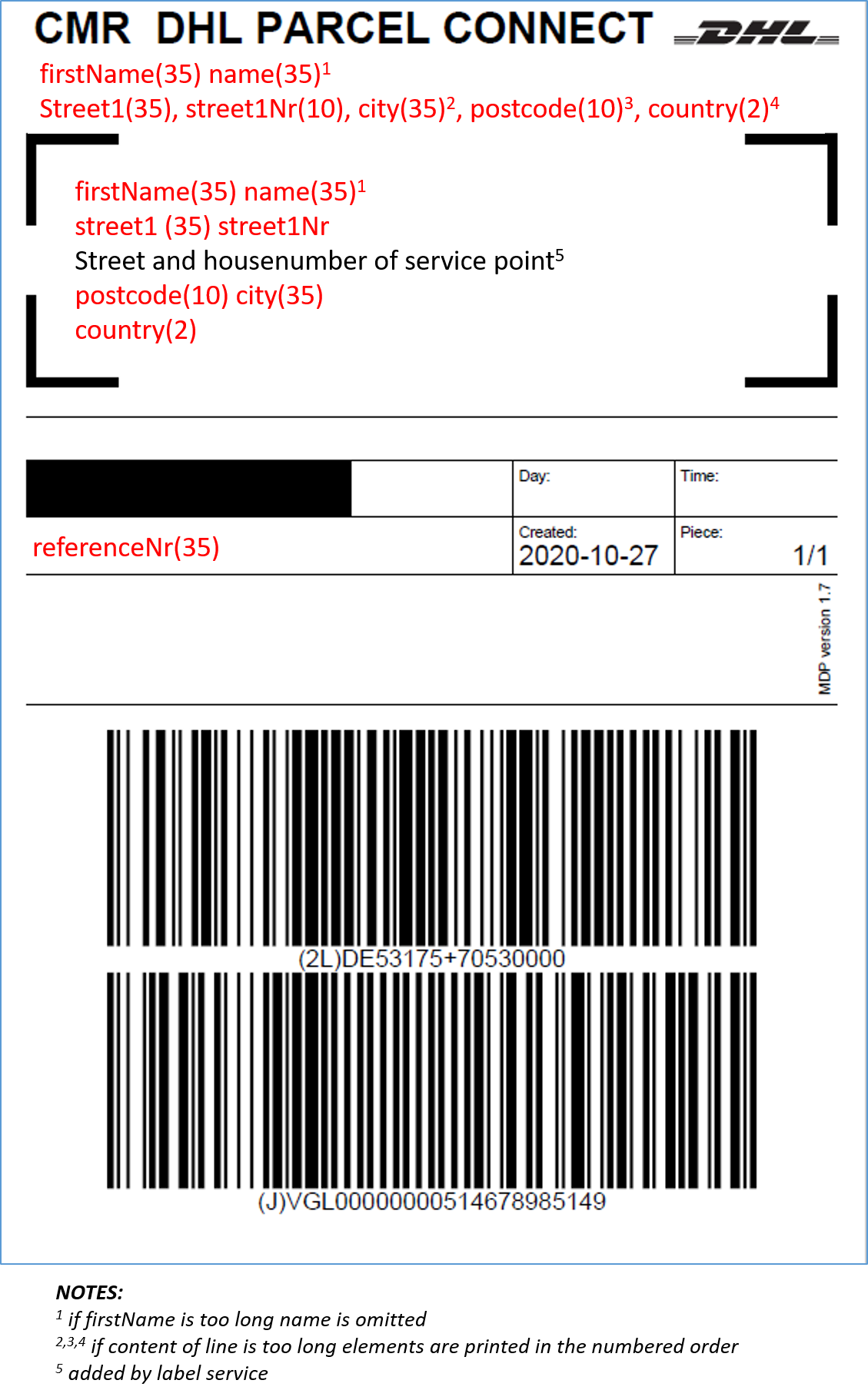
Success Response
HTTP/1.1 200
Content-Type: application/json;charset=UTF-8
shipmentId: JVGL003101234567801234
{
   "response":{
	"status":"200",
	"timestamp":"2017-03-21T06:29:55",
	"customerId":"AAAA",
	"sessionId":"f10953e8-2e73-41f4-ab4e-818ea4ac76ad",
	"statusCode":"OK",
	"statusMessage":"cPAN has been processed successfully"
	}
}
Error Response
HTTP/1.1 400
Content-Type: application/json;charset=UTF-8
shipmentId: JVGL003101234567801234
{
   "error":{
	"status":"400",
	"timestamp":"2017-03-21T06:29:55",
	"sessionId":"f10953e8-2e73-41f4-ab4e-818ea4ac76ad",
	"statusCode":"ERROR",
	"statusMessage":"Unexpected input provided"
	}
}
Use Case 3: DHL Parcel Connect shipment delivered to locker in Germany
This request enables the user to inject their shipment data for shipments delivered to lockers in Germany. To make use of DHL lockers in Germany, customers need to provide an identification number for each recipient (“PostNummer”), as German recipients need to be registered to receive locker shipments. The PostNummer needs to be inserted into the “customerIdentification” field of the recipient. If requested, the API will return the respective label in the desired format (PDF or ZPL).
Key success factors:
- The attributes which contain the street and house number of the shops are optional.
- It is recommended to include phone numbers for SMS notification to create higher pick up rates
- Shipments to LU: Please note that there is an exception for shipments going to LU as address data needs to be entered differently. In case you want to send shipments to lockers in LU, please reach out to us for further instructions.
Request
POST /ccc/send-cpan?generateLabel=true&labelFormat=pdf HTTP/1.1

{
    "dataElement": {
        "parcelOriginOrganization": "AT",
        "parcelDestinationOrganization": "DE",
        "general": {
            "product": "ParcelEurope.parcelconnect",
            "routingCode": ""
        },
        "cPAN": {
            "addresses": {
                "sender": {
                    "type": "default",
                    "firstName": "Good Weather GmbH",
                    "name": "c/o DHL Parcel Europe",
                    "street1": "Robert-Bosch-Str.",
                    "street1Nr": "750",
                    "postcode": "93055",
                    "city": "Regensburg",
                    "country": "DE",
                    "referenceNr": "REF45678901234567890123456789012345",
                    "customerIdentification": "YOUR_ID_HERE"
                    "customerAccountNr1": "YOUR_ID_HERE"
                },
                "recipient": {
                    "type": "parcelstation",
                    "firstName": "John",
                    "name": "Doe",
                    "additionalName": "Rain Inc.",
                    "mobileNr": "+491234567890",
                    "email": "john.doe@example.com",
                    "street1": "DHL Packstation",
                    "street1Nr": "144",
                    "postcode": "53175",
                    "city": "Bonn",
                    "country": "DE",
                    "customerIdentification": "1234567890"
                }
            },
            "features": {
                "physical": {
                    "grossWeight": "1.0"
                }
            },
            "directInjection": true,
            "directInjectionDetails": {
                "directInjectionCountry": "DE",
                "directInjectionGatewayCity": "Regensburg",
                "directInjectionGatewayPostcode": "93055"
            }
        }
    }
}
Response
Depending on how the request was specified, the response may contain label in the specified format (e.g. pdf) or not (see example below). The response will also contain a status code as well as a status message both indicating whether the request could be processed successfully or not (see examples below).
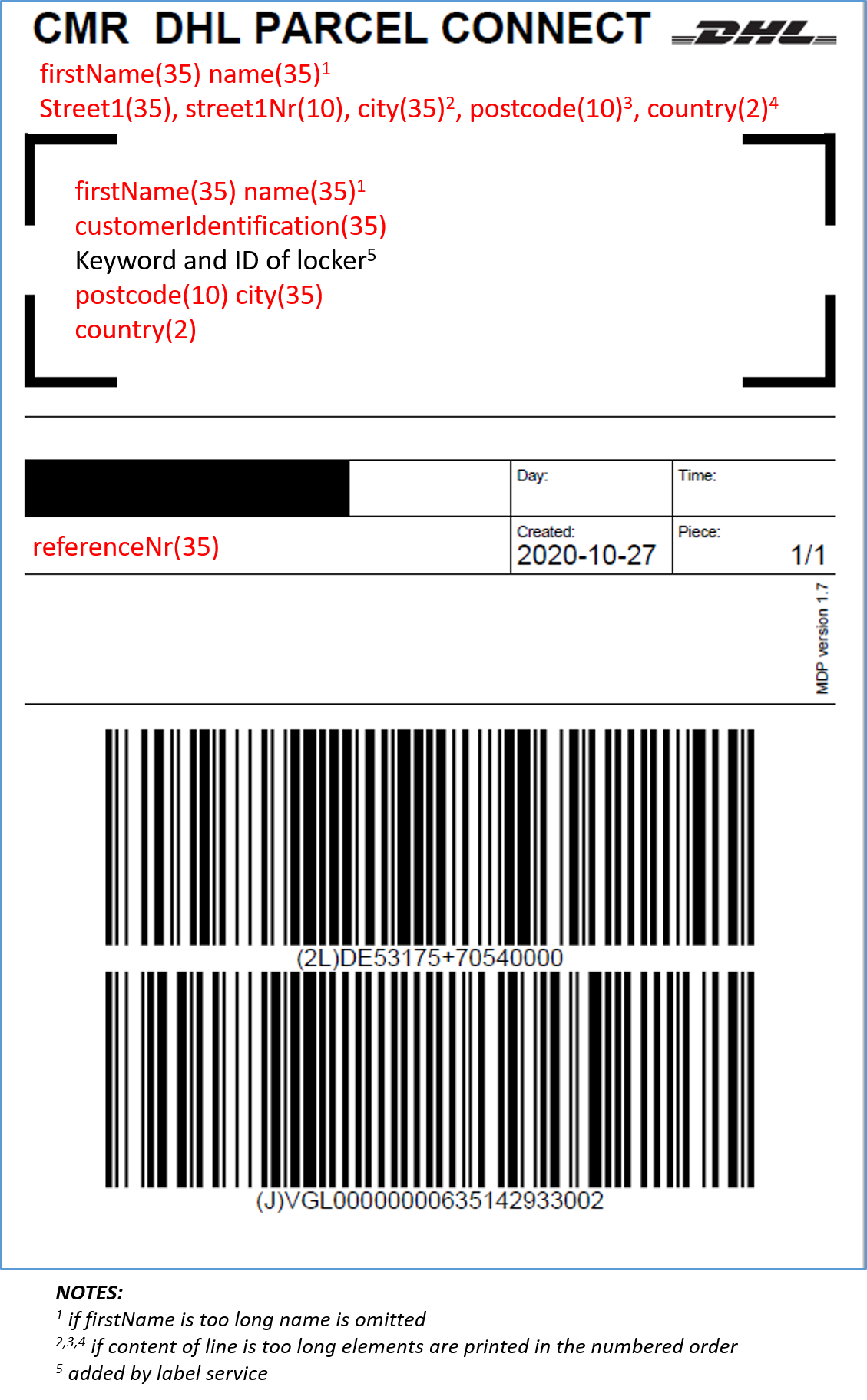
Success Response
HTTP/1.1 200
Content-Type: application/json;charset=UTF-8
shipmentId: JVGL003101234567801234
{
   "response":{
	"status":"200",
	"timestamp":"2017-03-21T06:29:55",
	"customerId":"AAAA",
	"sessionId":"f10953e8-2e73-41f4-ab4e-818ea4ac76ad",
	"statusCode":"OK",
	"statusMessage":"cPAN has been processed successfully"
	}
}
Error Response
HTTP/1.1 400
Content-Type: application/json;charset=UTF-8
shipmentId: JVGL003101234567801234
{
   "error":{
	"status":"400",
	"timestamp":"2017-03-21T06:29:55",
	"sessionId":"f10953e8-2e73-41f4-ab4e-818ea4ac76ad",
	"statusCode":"ERROR",
	"statusMessage":"Unexpected input provided"
	}
}
Use Case 4: DHL Parcel Return Connect shipment
The following request enables the user to send shipment data for a DHL Parcel Return Connect Shipment. If requested, the API will return the respective label in the desired format (PDF or ZPL).
Key success factors:
- The Return product needs to be dropped-off by the customer in a local ServicePoint or PostOffice in the country of residency.
- DHL Return Connect offers a public website to search for drop-off locations all accross Europe: https://finder.dhlparcel.com/
- Make sure to inform your recipients (i.e. consumers) about where they can search for possible drop off points for returns in their region, e.g. by distributing this link (https://finder.dhlparcel.com/)
- It is recommended to additionally generate return instructions. Return instructions contain handling information to help return senders (i.e. consumers) to correctly handle the return shipment. The instructions are issued by DHL in all local European languages and can be requested via our contact form (add link).
Request
POST /ccc/send-cpan?generateLabel=true&labelFormat=pdf HTTP/1.1
Host: api-sandbox.dhl.com
Content-Type: application/json
Authorization: Bearer AJx0yDAMVnBlcBsSeTwuPpkytYz78fzgUG20aBrTyMBPeP347pVDrz

{
    "dataElement": {
        "parcelOriginOrganization": "GB",
        "parcelDestinationOrganization": "DE",
        "general": {
            "product": "ParcelEurope.return.network"
        },
        "cPAN": {
            "addresses": {
                "sender": {
                    "type": "default",
                    "firstName": "John",
                    "name": "Doe",
                    "additionalName": "Rain Inc.",
                    "mobileNr": "+441234567890",
                    "email": "john.doe@example.com",
                    "street1": "Ossulston St.",
                    "street1Nr": "174",
                    "postcode": "NW1 1DN",
                    "city": "London",
                    "country": "GB",
                    "referenceNr": "REF45678901234567890123456789012345",
                    "customerIdentification": "YOUR_ID_HERE"
                    "customerAccountNr1": "YOUR_ID_HERE"
                },
                "recipient": {
                    "type": "doorstep",
                    "firstName": "",
                    "name": "c/o DHL Parcel Europe",
                    "additionalName": "Good Weather GmbH",
                    "street1": "Robert-Bosch-Str.",
                    "street1Nr": "750",
                    "postcode": "93055",
                    "city": "Regensburg",
                    "country": "DE"
                }
            },
            "features": {
                "physical": {
                    "grossWeight": "1.0"
                }
            }
        }
    }
}
Response
Depending on how the request was specified, the response may contain label in the specified format (e.g. pdf) or not (see example below). The response will also contain a status code as well as a status message both indicating whether the request could be processed successfully or not (see examples below).
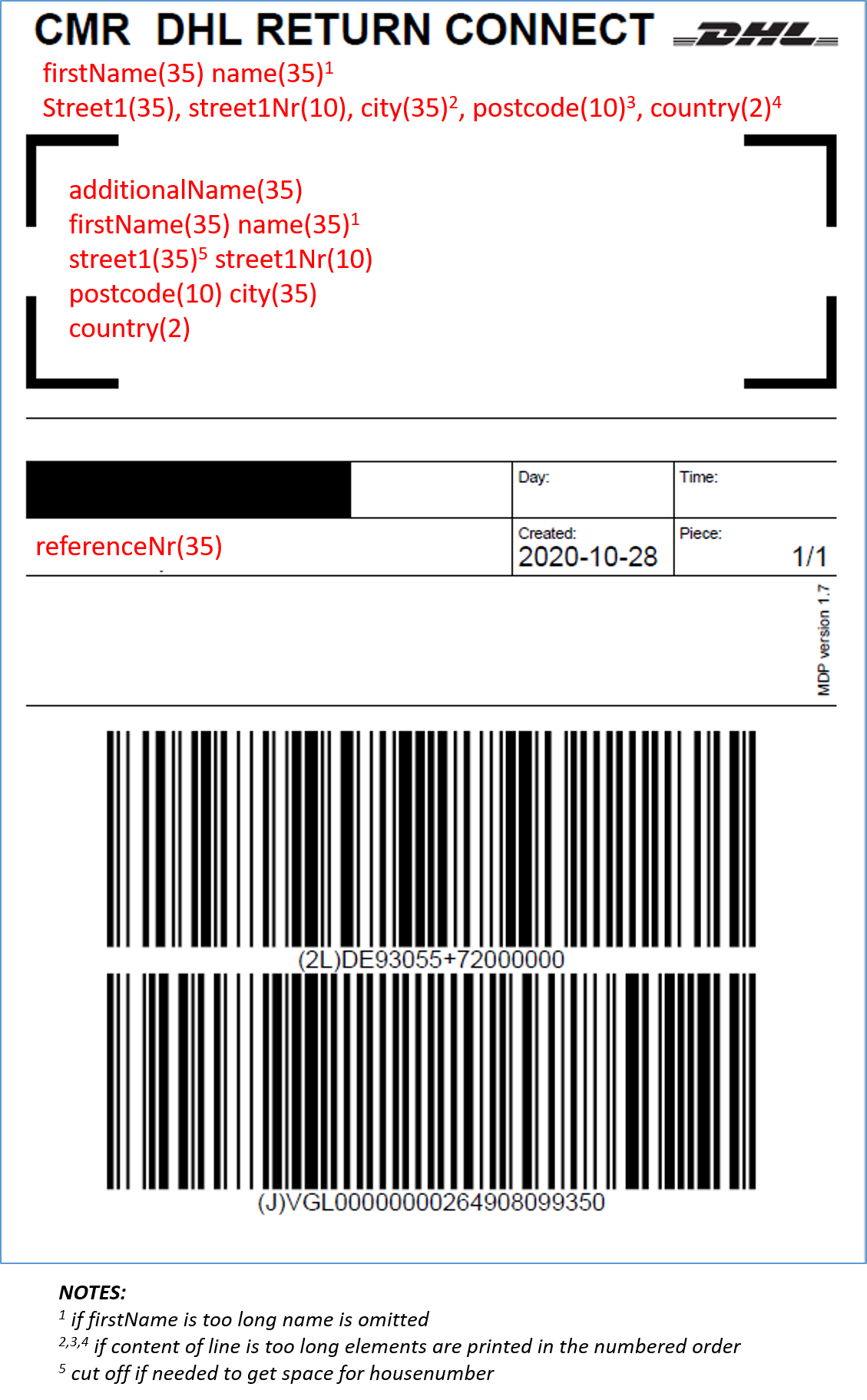
Success Response
HTTP/1.1 200
Content-Type: application/json;charset=UTF-8
shipmentId: JVGL003101234567801234
{
   "response":{
	"status":"200",
	"timestamp":"2017-03-21T06:29:55",
	"customerId":"AAAA",
	"sessionId":"f10953e8-2e73-41f4-ab4e-818ea4ac76ad",
	"statusCode":"OK",
	"statusMessage":"cPAN has been processed successfully"
	}
}
Error Response
HTTP/1.1 400
Content-Type: application/json;charset=UTF-8
shipmentId: JVGL003101234567801234
{
   "error":{
	"status":"400",
	"timestamp":"2017-03-21T06:29:55",
	"sessionId":"f10953e8-2e73-41f4-ab4e-818ea4ac76ad",
	"statusCode":"ERROR",
	"statusMessage":"Unexpected input provided"
	}
}
Use Case 5: DHL Parcel International shipment
This request enables the user to inject their shipment data for DHL Parcel International shipments. If requested, the API will return the respective label in the desired format (PDF or ZPL).
Key success factors:
- Please note: If “customsDocCount” in your response is 1 or more, you need to additionally send a “cCustoms” request as this lane requires custom clearance (Please see Use Case 6).
Request
POST /ccc/send-cpan?generateLabel=true&labelFormat=pdf HTTP/1.1
Host: api-sandbox.dhl.com
Content-Type: application/json
Authorization: Bearer 47gbtqPg5cEOfmv2FXGWNe4lFyHrwM3jZfurBGGCCdex7SRXXbAYrV

{
    "dataElement": {
        "parcelOriginOrganization": "NL",
        "parcelDestinationOrganization": "US",
        "general": {
            "product": "ParcelEurope.parcelinternational"
        },
        "cPAN": {
            "addresses": {
                "sender": {
                    "type": "default",
                    "firstName": "",
                    "name": "Good Weather GmbH",
                    "street1": "Beulingstraat",
                    "street1Nr": "17a",
                    "postcode": "1017 BA",
                    "city": "Amsterdam",
                    "country": "NL",
                    "referenceNr": "REF45678901234567890123456789012345",
                    "customerIdentification": "6266404794",
                    "customerAccountNr1": "YOUR_ID_HERE"
                },
                "recipient": {
                    "type": "doorstep",
                    "firstName": "John",
                    "name": "Doe",
                    "additionalName": "Rain Inc.",
                    "mobileNr": "+1234567890",
                    "email": "john.doe@example.com",
                    "street1": "Long Street",
                    "street1Nr": "16",
                    "postcode": "NJ 07305",
                    "city": "New York City",
                    "country": "US"
                }
            },
            "features": {
                "physical": {
                    "grossWeight": "1.0"
                },
                "undeliverableInstruction": "Return"
            }
        }
    }
}
Response
Depending on how the request was specified, the response may contain label in the specified format (e.g. pdf) or not (see example below). The response will also contain a status code as well as a status message both indicating whether the request could be processed successfully or not (see examples below).
Success Response
HTTP/1.1 200
Content-Type: application/json;charset=UTF-8
shipmentId: JVGL003101234567801234
{
   "response":{
	"status":"200",
	"timestamp":"2017-03-21T06:29:55",
	"customerId":"AAAA",
	"sessionId":"f10953e8-2e73-41f4-ab4e-818ea4ac76ad",
	"statusCode":"OK",
	"statusMessage":"cPAN has been processed successfully"
	}
}
Error Response
HTTP/1.1 400
Content-Type: application/json;charset=UTF-8
shipmentId: JVGL003101234567801234
{
   "error":{
	"status":"400",
	"timestamp":"2017-03-21T06:29:55",
	"sessionId":"f10953e8-2e73-41f4-ab4e-818ea4ac76ad",
	"statusCode":"ERROR",
	"statusMessage":"Unexpected input provided"
	}
}
Use Case 6: DHL Parcel International shipment including customs
This request enables the user to inject their shipment data for DHL Parcel International shipments, if custom clearance is required. In this case, it is mandatory send a “cCustoms” request after sending the cPAN (See Use Case 6 for a cPAN example). The cCustoms call requires information about the content of the parcel (including its value and purpose). It will forward the electronic information to the customs entities and on demand return a CN23 document as PDF for printout and attachment to the parcel.
Key success factors:
- Always send cCustoms if you send to a customs destination or region as it is mandatory. If not provided, the shipment will be rejected.
- Make sure that both cPAN and cCustoms are correct; otherwise the system will reject the shipment.
- CPAN request needs to be send before cCustoms and the parcelIdentifier is mandatory here
- When sending in your cPAN, “customsDocCount” in the response informs you about the amount of CN23 printouts required for that specific shipment.
Request
POST ccc/send-cCustoms?generateCustomsDocument=true HTTP/1.1
Host: api-sandbox.dhl.com
Content-Type: application/json
Authorization: Bearer AJx0yDAMVnBlcBsSeTwuPpkytYz78fzgUG20aBrTyMBPeP347pVDrz

{
    "dataElement": {
        "version": "0200",
        "parcelOriginOrganization": "NL",
        "parcelDestinationOrganization": "US",
        "general": {
            "parcelIdentifier": "CY657904000DE",
            "timestamp": "2020-12-04T14:13:58.798000",
            "product": "ParcelEurope.parcelinternational",
            "routingCode": "2LJP5300002+71000000",
            "customerIdentification": "5012345678"
        },
        "cCustoms": {
            "CustomsIDs": {
                "sender": [{
                    "idType": "VAT",
                    "identifier": "789012"
                }]
            },
            "shippingFee": {
                "currency": "EUR",
                "value": "5.50"
            },
            "goodsDescription": {
                "general": {
                    "goodsClassification": "ProductSample",
                    "currency": "EUR"
                },
                "item": [{
                        "description": "Tea, green",
                        "customsTariffNumber": "902100",
                        "originCountry": "NL",
                        "quantity": "2",
                        "netWeight": "0.100",
                        "value": "8.00"
                    },
                    {
                        "description": "Sneakers",
                        "customsTariffNumber": "640411",
                        "originCountry": "NL",
                        "quantity": "1",
                        "netWeight": "0.400",
                        "value": "49.99"
                    }
                ]
            },
            "customsDocuments": {
                "document": [{
                    "docType": "Invoice",
                    "identifier": "Inv-2020-12345"
                }]
            },
            "comment": "Some additional information for customs authorities"
        }
    }
}
Response
Depending on how the request was specified, the response may contain a CN23 document in the specified format (e.g. pdf) or not . The response will also contain a status code as well as a status message both indicating whether the request could be processed successfully or not (see examples below).
Success Responses
Scenario 1: without CN23
HTTP/1.1 200
Content-Type: application/json;charset=UTF-8
{
   "response":{
	"status":"200",
	"timestamp":"2020-08-06T10:31:55",
	"customerId":"EKPTest001",
	"sessionId":"f10953e8-2e73-41f4-ab4e-818ea4ac76ad",
	"statusCode":"OK",
	"statusMessage":"cCustoms has been processed successfully"
	}
}
Scenario 2: with CN23
HTTP/1.1 200
Content-Type: application/pdf;charset=UTF-8
CN23 document as PDF.
Error Responses
HTTP/1.1 200
Content-Type: application/json;charset=UTF-8
{
   "error":{
	"status":"400",
	"timestamp":"2020-08-06T10:32:55",
	"sessionId":"a10953e8-2e73-41f4-ab4e-818ea4ac76ad",
	"statusCode":"ERROR",
	"statusMessage":"Unexpected input provided"
	}
}
Use Case 7: Track and trace your shipment
The API offers a full track and trace functionality for the shipments of each user. It is possible to request the status information on singular shipment or account level.
GET /ccc/track-trace?shipmentId=JVGL00000000600337158749  HTTP/1.1
Host: api-sandbox.dhl.com
Content-Type: application/json
Authorization: Bearer AJx0yDAMVnBlcBsSeTwuPpkytYz78fzgUG20aBrTyMBPeP347pVDrz

{
   "barcode": "JVGL00000000600337158749",
   "barcodes": ["JVGL00000000600337158749"],
   "date": "2018-09-21T08:07:02.000Z",
   "events":    [
        {
         "parcelId": "2644d961-2a6e-45a7-86ba-1dc808841bc6",
         "category": "DATA_RECEIVED",
         "leg": {
            "accountId": "00000000",
            "network": "MDP"
         },
         "localTimestamp": "2018-09-21T09:52:45.018+02:00",
         "status": "PRENOTIFICATION_RECEIVED",
         "timestamp": "2018-09-21T07:52:45.018Z",
         "type": "LEG_EVENT"
          },
        {
         "category": "UNDERWAY",
         "facility": "Ottendorf-Okrilla-01458",
         "localTimestamp": "2018-09-21T09:54:59.000+02:00",
         "leg": {"network": "CDEx"},
         "status": "PICKED_UP",
         "timestamp": "2018-09-21T07:54:59.000Z",
         "type": "PIECE_EVENT"
          },
        {
         "category": "UNDERWAY",
         "facility": "Frankfurt-60327",
         "localTimestamp": "2018-09-21T09:56:02.000+02:00",
         "leg": {"network": "CDEx"},
         "status": "GATEWAY_DEPARTED",
         "timestamp": "2018-09-21T07:56:02.000Z",
         "type": "PIECE_EVENT"
          },
        {
         "category": "UNDERWAY",
         "facility": "Liége-4000",
         "localTimestamp": "2018-09-21T09:56:51.000+02:00",
         "leg": {"network": "CDEx"},
         "status": "GATEWAY_ARRIVED",
         "timestamp": "2018-09-21T07:56:51.000Z",
         "type": "PIECE_EVENT"
          },
        {
         "category": "UNDERWAY",
         "facility": "Turnhout-2300",
         "localTimestamp": "2018-09-21T09:58:07.000+02:00",
         "leg": {"network": "CDEx"},
         "status": "GATEWAY_DEPARTED",
         "timestamp": "2018-09-21T07:58:07.000Z",
         "type": "PIECE_EVENT"
          },
        {
         "category": "UNDERWAY",
         "facility": "Roermond-6043JR",
         "localTimestamp": "2018-09-21T10:02:16.000+02:00",
         "leg": {"network": "CDEx"},
         "status": "ARRIVED_AT_INBOUND_GATEWAY",
         "timestamp": "2018-09-21T08:02:16.000Z",
         "type": "PIECE_EVENT"
          },
        {
         "category": "DATA_RECEIVED",
         "localTimestamp": "2018-09-21T10:03:04.000+02:00",
         "leg": {"network": "ECOMMERCE"},
         "status": "PRENOTIFICATION_RECEIVED",
         "timestamp": "2018-09-21T08:03:04.000Z",
         "type": "PIECE_EVENT"
          },
        {
         "category": "LEG",
         "leg":          {
            "accountId": "49538108",
            "network": "ECOMMERCE"
         },
         "localTimestamp": "2018-09-21T10:04:03.000+02:00",
         "status": "LEG_CREATED",
         "timestamp": "2018-09-21T08:04:03.000Z",
         "type": "LEG_EVENT"
          },
        {
         "category": "DELIVERED",
         "facility": "Luyksgestel-5575AE",
         "localTimestamp": "2018-09-21T10:07:02.000+02:00",
         "leg": {"network": "CDEx"},
         "status": "DELIVERED",
         "timestamp": "2018-09-21T08:07:02.000Z",
         "type": "PIECE_EVENT"
          }
   ],
   "type": "SHIPMENT",
   "deliveredAt": "2018-09-21T10:07:02.000+02:00"
}
Use Case 8: DHL Brexit - Parcel Connect shipments to UK
The request enables the user to load list of all shipments for DHL Parcel Connect to UK which refers to a truck and specifies all shipments that have been loaded onto the truck.
Key success factors:
- Always transport destination should be GB
- For all shipment identifiers given in the load list a corresponding cPAN and cCustoms are sent and processed successfully
- Make sure that referenced shipment has product ParcelConnect and destination as GB
- If one or more of these requirements are not satisfied, CCC rejects the message
- If the cloadlist is rejected because of missing cPAN/cCustoms messages, the response includes the corresponding parcel identifiers for the shipments and the information whether cPAN and/or cCustoms is missing
Request
POST ccc/send-cloadlist HTTP/1.1
Host: api-sandbox.dhl.com
Content-Type: application/json
Authorization: Bearer AJx0yDAMVnBlcBsSeTwuPpkytYz78fzgUG20aBrTyMBPeP347pVDrz

{
	"dataElement": {
		"version":"0200",
		"transportOrigin": "CZ",
		"transportDestination": "GB",
		"general": {
			"MRN": "16DE485100011122M7",
			"timestamp": "2020-12-04T10:30:28Z",
			"customerIdentification": "7000100904"
		},
		"cLoadlist": {
			"transportDetails":{
				"truckNumber": "LX - ZO 999",
				"trailerNumber": "12345ZQW",
				"sealNumber": "12345"
			},
			"shipmentIdentifiers":[
						"JVGL00000000529695831071",
						"JVGLCH0373883135",
						"JVGL00000000186904774161",
						"JVGL00000000012266956717",
						"9872354547"
				]
			}
		}
}
Response
Depending on how the request was specified, If the cloadlist is rejected because of missing cPANs / cCustoms messages, the response includes the corresponding parcel identfiers for the shipments, and the information whether cPAN and/or cCustoms is missing. The response will also contain a status code as well as a status message both indicating whether the request could be processed successfully or not (see examples below).
Success Responses
Scenario 1: without rejected shipment details
HTTP/1.1 200
Content-Type: application/json;charset=UTF-8
{
    "response": {
        "status": "200",
        "statusCode": "OK",
        "statusMessage": "cLoadList is successfully processed",
        "timestamp": "2021-01-20T04:32:49",
        "sessionId": "fd075dac-5214-41ad-89ad-e47f614bf237"
    }
}
Scenario 2: with rejected shipment details
HTTP/1.1 200
Content-Type: application/pdf;charset=UTF-8
{
    "response": {
        "status": "200",
        "statusCode": "ERROR",
        "statusMessage": "cLoadList is rejected due to validation error. Please refer shipment details for error details.",
        "timestamp": "2021-01-20T08:46:04",
        "sessionId": "8d8ea0ed-4840-4d2c-a44e-43be212d49b9",
        "shipmentIDetails": [
            {
                "shipmentIdentifier": "JVGL00000000529695831071",
                "errorCode": "CL0001",
                "errorMessage": "Both cPAN and cCustom is missing in CCC."
            },
            {
                "shipmentIdentifier": "JVGL00000000012266956717",
                "errorCode": "CL0002",
                "errorMessage": "Both cPAN and cCustoms exists in CCC with different destination country."
            },
            {
                "shipmentIdentifier": "9872354547",
                "errorCode": "CL0003",
                "errorMessage": "cPAN exists with different product and cCustoms exists with different destination country in CCC."
            },
            {
                "shipmentIdentifier": "JVGL00000000186904774161",
                "errorCode": "CL0005",
                "errorMessage": "Both cPAN and cCustoms exists in CCC with different product."
            },
            {
                "shipmentIdentifier": "JVGLCH0373883135",
                "errorCode": "CL0007",
                "errorMessage": "cCustoms is missing in CCC."
            }
        ]
    }
}
Error Responses
HTTP/1.1 200
Content-Type: application/json;charset=UTF-8
{
   "error":{
	"status":"400",
	"timestamp":"2020-08-06T10:32:55",
	"sessionId":"a10953e8-2e73-41f4-ab4e-818ea4ac76ad",
	"statusCode":"ERROR",
	"statusMessage":"Unexpected input provided"
	}
}
Use Case 9: DHL Process customer events
The request enables the user to accept and forward events from external parties in order to support e.g. billing or customer services processes
Key success factors:
- eConnectprovides a service that enables external parties to send in events with dedicated event types for pre-advised parcels
- eConnect ensures that only events by authorized users are accepted
- A user is authorized if he is known to eConnect, is authorized to send in events on behalf of the sender of the parcel
- If one or more of these requirements are not satisfied, eConnect rejects the message
Request
POST ccc/send-cevent HTTP/1.1
Host: api-sandbox.dhl.com
Content-Type: application/json
Authorization: Bearer AJx0yDAMVnBlcBsSeTwuPpkytYz78fzgUG20aBrTyMBPeP347pVDrz

{
	"dataElement": {
	"version":"0200",
    	"parcelOriginOrganization": "AT",
    	"parcelDestinationOrganization": "FR",
		"general": {
            "parcelIdentifier": "CS657901017DE",
            "timestamp": "2021-02-25T12:17:00Z",
            "product": "ParcelConnect",
			"customerIdentification": "5068100904"
              },
    	"cEvent": {
			"eventType": " HandoverFromCustomer ",
			"eventTime": 2021-02-25T10:30:28Z",
			"eventLocation": "Salzburg",
			"eventCountry": "AT",
			"eventCapturedBy": "SomeCarrier",
			"comment": " optional comment on event; will be stored but not evaluated "
		}

	}
}
Response
Depending on how the request was specified, If the cEvent is rejected because of validating event types or user is not authorized for sending specific events, the response includes the reason with detailed error message. The response will also contain a status code as well as a status message both indicating whether the request could be processed successfully or not (see examples below).
Success Responses
HTTP/1.1 200
Content-Type: application/pdf;charset=UTF-8
{
    "response": {
        "status": "200",
        "statusCode": "OK",
	"customerId": "5011122122",
        "statusMessage": "cEvent has been processed successfully",
        "timestamp": "2021-05-26T04:32:49",
        "sessionId": " b32e57d0-40d7-4849-baef-5e02abd5b932"
    }
}
Error Responses
HTTP/1.1 200
Content-Type: application/json;charset=UTF-8
{
   "error":{
	"status":"400",
	"timestamp":"2020-08-06T10:32:55",
	"sessionId":"a10953e8-2e73-41f4-ab4e-818ea4ac76ad",
	"statusCode":"ERROR",
	"statusMessage":"Unexpected input provided"
	}
}
Use Case 10: DHL Parcel Return International shipment
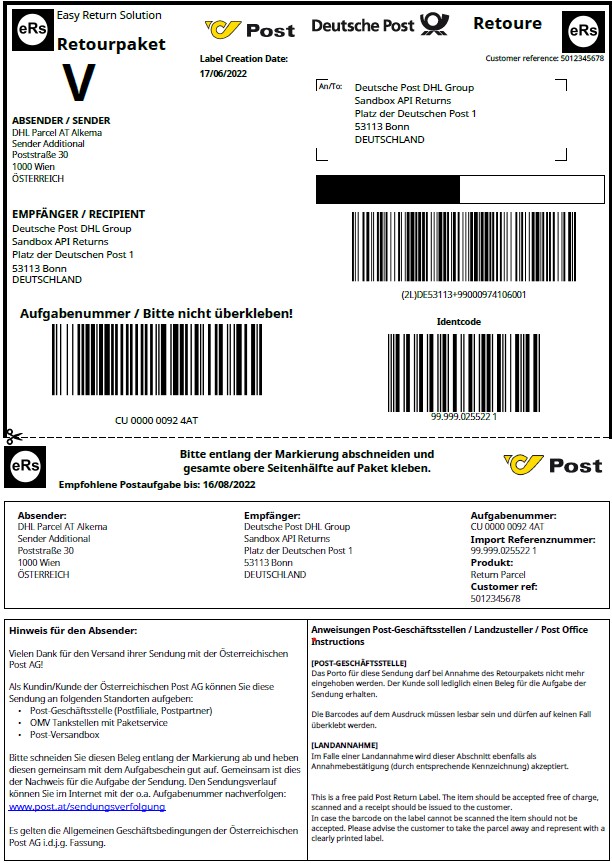
The following request enables the user to send shipment data for a DHL Parcel Return International Shipment to handle the parcels returned by the customers from outside Europe to Europe. If requested, the API will return the respective Rosy label in the desired format (PDF or ZPL).
Key success factors:
In order to use the feature of Return International/Return Consolidation, the customer must be authorized to use the consolidation feature i.e., the Consolidation_Flag must be set to "true" in customer configuration. Please contact your DHL representative
The consolidation attribute in CPAN and generateLabel parameter must be set to "true".
Configure the return address; the values for locationId, type, name, phoneNr, email, street, postcode, city and country must be supplied when requesting for configuration. Please contact your DHL representative.
Configure the hub address; the values for locationId, customerId, hubId must be supplied when requesting for configuration. Please contact your DHL representative.
The OrganizationId must be enabled for Rosy API call using basic authentication.
Request
POST /ccc/send-cpan?generateLabel=true HTTP/1.1
Content-Type: application/json

{
    "dataElement": {
        "parcelOriginOrganization": "AT",
        "parcelDestinationOrganization": "FR",
        "general": {
      "parcelIdentifier":"CPAN202206151450",
            "timestamp":"2022-06-15T14:50:15",
            "product": "ParcelEurope.return.international",
            "routingCode": "2LFR00017+70000002"
        },
        "cPAN": {
            "addresses": {
                "sender": {
                    "type": "default",
                    "firstName": "DHL Parcel AT",
                    "name": "Alkema",
                    "additionalName": "Sender Additional",
                    "mobileNr": "+49 234343",
                    "phoneNr": "+49 565656",
                    "email": "sender@email.com",
                    "street1": "Poststraße",
                    "street1Nr": "30",
                    "postcode": "1000",
                    "city": "Wien",
                    "country": "AT",
                    "referenceNr": "Reference Number",
                    "customerIdentification": "5012345678",
                    "customerAccountNr1":""
                },
                "recipient": {
                    "type": "default",
                    "name": " ",
                    "street1": " ",
                    "postcode": " ",
                    "city": " ",
                    "country": " ",
                    "locationId" : "warehouse_5"
                }
            },
            "features": {
                "physical": {
                    "grossWeight": "1.800",
                    "volume": "0.5",
                    "length": "0.2",
                    "height": "0.2",
                    "width": "0.3"
                },
                "bulky": true,
                "consolidation":true
            }
        }
    }
}
Response
Depending on how the request was specified, the response may contain label in the specified format (e.g. pdf) or not (see example below).
Success Response
HTTP/1.1 200
Content-Type: application/pdf
shipmentId: 999990255221
Error Response
HTTP/1.1 603
Content-Type: application/json
{
    "error": {
        "status": "603",
        "timestamp": "2022-06-17T13:31:09",
        "customerId": "5012345678",
        "sessionId": "39c981fd-42fa-42b9-83d2-9919f159a8c3",
        "statusCode": "ERROR",
        "statusMessage": "Criteria is not fullfilled, consolidation flag should be always [true] for product [ParcelEurope.return.international]."
    }
}
Request Specification
Structure of cPAN data elements (shipping data)
Input Elements (Y=Yes, N=No, C=Conditional, N/A=Not Applicable)
|
Node |
Required |
Description |
Data Type |
MaxLength |
|
dataElement- |
Y |
Container for the request data. |
||
|
parcelOriginOrganization |
Y |
This field indicates the origin country of the parcel. The value is a ISO-3166 two-letter country code. It is mandatory to use capital letters (e.g. FR) |
String |
2 |
|
parcelDestinationOrganization |
Y |
This indicates which country is the recipient of the parcel. The value is a ISO-3166 two-letter country code. It is mandatory to use capital letters (e.g. FR) |
String |
2 |
|
general- |
Y |
Container for the general data of request. |
||
|
parcelIdentifier |
C |
This describes the identifier that is used for parcel tracking. Product DHL Parcel Connect/Return Connect: Product DHL Parcel International: |
String |
50 |
|
timestamp |
Y |
Timestamp at which the request data is passed to DHL eCS Europe API. This must be stated in the structure: YYYY-MM-DDThh:mm:ssZ (or) YYYY-MM-DDThh:mm:ss+hh:mm (or) YYYY-MM-DDThh:mm:ss-hh:mm |
dateTime |
|
|
product |
Y |
This is the product of the parcel. Please use: |
String |
50 |
|
routingCode |
C |
Routing code - Product DHL Parcel Connect/Return Connect: Product DHL Parcel International: |
String |
50 |
|
cPAN- |
Y |
Container for the parcel sender, receiver and parcel feature details. |
||
|
addresses- |
Y |
Container for the parcel sender and receiver details. |
||
|
sender- |
Y |
Container for the parcel sender details. |
||
|
type |
Y |
Type of the sender address. Type "default" is mandatory for DHL eCS Europe API. |
String |
35 |
|
firstName |
N |
If first name is available, fill in this field. Content can also be put into “name” field. |
String |
35 |
|
name |
Y |
This is the main field for describing the name. It must contain the surname, optionally also the first name. |
String |
35 |
|
additionalName |
N |
If further name field is required, use this field. |
String |
35 |
|
mobileNr |
N |
Sender's phone number, used for SMS notification. |
String |
35 |
|
phoneNr |
N |
Sender's phone number (optional) |
String |
35 |
|
|
N |
Sender's email address, used for mail notification Must contain the "@" character |
String |
70 |
|
street1 |
Y |
This field must contain the street name of the sender address. Optionally also the housenumber. |
String |
35 |
|
street1Nr |
C |
If the house number is not part of “Street1”, this field can be used. |
String |
10 |
|
street2 |
N |
Alternative street name of the sender address. Optionally also the house number. |
String |
35 |
|
street2Nr |
N |
If the house number is not part of “Street2”, this field can be used. |
String |
10 |
|
postcode |
Y |
The postcode/zipcode of the sender of the parcel. |
String |
17 |
|
city |
Y |
City name of the sender's address |
String |
35 |
|
country |
Y |
Country of sender. The value is a ISO-3166 two-letter country code. It is recommended to use capital letters (e.g. FR), small letters will also be accepted. |
String |
2 |
|
referenceNr |
N |
Customer-specific reference number, which will also appear on the label. |
String |
35 |
|
customerIdentification |
Y |
Individual customer ID of sender. Content needs to be aligned with DHL (e.g. EKP). |
String |
35 |
|
customerAccountNr1 |
C |
Additional account information. Needs to be aligned with DHL (e.g. AccNo). |
String |
35 |
|
recipient- |
Y |
Container for the parcel recipient details. |
||
|
type |
Y |
Type of the recipient address. Product DHL Parcel Connect/Return Connect: |
String |
35 |
|
firstName |
N |
If first name is available, fill in this field. Content can also be put into “name” field. |
String |
35 |
|
name |
Y |
This is the main field for describing the name. It must contain the surname, optionally also the first name. |
String |
35 |
|
additionalName |
N |
If a further name field is required, use this field. |
String |
35 |
|
mobileNr |
C |
Recipient mobile number, used for SMS notification in some scenarios (e.g. service point delivery). |
String |
35 |
|
phoneNr |
N |
Recipient fixed line phone number. |
String |
35 |
|
|
C |
Recipient email address, used for email notification. Must contain the "@" character. Mandatory, if addressed to an access point. |
String |
70 |
|
street1 |
Y |
This field must contain the street name of the recipient’s address. Optionally also the house number. Note: in case of direct addressing to service points the “keyword” has to be included here. (Source: LocationFinder) |
String |
35 |
|
street1Nr |
C |
If the housenumber is not part of “Street1”, this field can be used. Note: in case of direct addressing to service points the “keywordId” has to be included here. (Source: LocationFinder) |
String |
10 |
|
street2 |
N |
Additional street name of the recipient address. Optionally also the housenumber. Note: in case of direct addressing to service points the “streetAddress” has to be included here. It contains street name and optionally also street number (Source: LocationFinder) |
String |
35 |
|
street2Nr |
N |
If the housenumber is not part of “Street2”, this field can be used. Note: in case of direct addressing to service points this field can needs to be left empty or populated with housenumber if not included in “Street2”. |
String |
10 |
|
postcode |
Y |
The postcode/zipcode of the recipient of the item. |
String |
17 |
|
city |
Y |
The name of the city of the recipient address for delivery. |
String |
35 |
|
country |
Y |
Country of recipient as ISO 3166-1 alpha two letter country code. It is recommended to use capital letters (e.g. FR), small letters will also be accepted. |
String |
2 |
|
customerIdentification |
N |
Optional field for individual customer ID of recipient, e.g. EKP Note: in case of direct addressing to German parcel stations this field must contain the “Postnumber” (see Use Case) |
String |
35 |
|
keywordId |
C |
Represents the “****” |
String |
|
|
locationId |
N |
For ParcelEurope.return.international product, this field is used to retrieve the RosyReceiverId. In case if this field is missing in the cPAN then customerIdentification parameter value is used to retrieve the RosyReceiverId. |
String |
|
|
features- |
Y |
Container for features of the product |
||
|
physical- |
Y |
Container for the physical attributes of a parcel |
||
|
grossWeight |
Y |
Gross weight of the parcel in kilogram (kg). This must be stated in the structure: nn.nnn |
Decimal |
6 |
|
volume |
N |
Volume of the parcel in cubic meter (m^3). This must be stated in the structure: nn.nn |
Decimal |
5 |
|
length |
N |
Length of the parcel in meter (m). This must be stated in the structure: nn.nn |
Decimal |
5 |
|
height |
N |
Height of the parcel in meter (m). This must be stated in the structure: nn.nn |
Decimal |
5 |
|
width |
N |
Width of the parcel in meter (m). This must be stated in the structure: nn.nn |
Decimal |
5 |
|
bulky |
N |
Any parcel with irregular shape or any kind of packaging that prevents automated sorting are selectable as “bulky” (True/false). For details please contact DHL representative. |
Boolean |
|
|
extraInsurance |
N |
Insert only, if extra insurance is required and aligned with your DHL representative. The possible values of "A" or "B" represent clauses from the customer contract. |
String |
|
|
cod- |
C |
Optional container for the Cash-On-Delivery (COD) details. The feature is only available for specific lanes please contact your DHL representative. |
||
|
sepa- |
C |
Container for COD in case of Sepa banking transfers. |
||
|
amount |
C |
The amount to be charged. Mandatory incase This must be stated in the structure: nnnnnnnnn.nnn |
Decimal |
13 |
|
currency |
C |
Currency abbreviation according to ISO 4217 alpha-3 currency codes. Mandatory if, cod sepa is true. |
String |
3 |
|
bankAccountHolder |
C |
Name of the party on behalf of which the beneficiary receives the payment. Mandatory if, cod sepa is true. |
String |
70 |
|
IBAN |
C |
IBAN of bank account for SEPA-countries only. Mandatory if, cod sepa is true. |
String |
34 |
|
BIC |
C |
BIC of bank account for SEPA-countries only. Mandatory if, cod sepa is true. |
String |
11 |
|
bankName |
C |
The name of bank Mandatory if, cod sepa is true. |
String |
35 |
|
bankLocation |
N |
The location of bank. |
String |
35 |
|
intendedPurpose |
C |
Underlying reason for the payment transaction. Mandatory if, cod sepa is true. |
String |
70 |
|
consolidation |
N |
This field is available for use only for ParcelEurope.return.network or ParcelEurope.return.international product's. For product ParcelEurope.return.international the field is mandatory The valid values are either "true" or "false". generateLabel parameter must be set to "true" when consolidation flag is used for return.international product |
String |
|
|
directInjection- |
C |
It is mandatory to set this parameter to “true” in case shipments will be injected directly by the customer into the DHL network (no pickup by courier). |
Boolean |
|
|
directInjectionDetails- |
C |
Group for details on directly injected parcels. Mandatory if directInjection is true |
||
|
directInjectionCountry |
Y |
Country where injection takes place. The value is a ISO-3166 two-letter country code. |
String |
2 |
|
directInjectionGatewayCity |
Y |
Location of gateway where injection takes place. |
String |
35 |
|
directInjectionGatewayPostcode |
Y |
Postcode of gateway where injection takes place. |
String |
10 |
Structure of cCustoms data elements
|
Node |
Required |
Description |
Data Type |
MaxLength |
|
|
Y |
Container for the request data. |
||
|
|
Y |
This field indicates the origin country of the parcel. The value is a ISO-3166 two-letter country code. |
String |
2 |
|
|
Y |
This indicates which country is the recipient of the parcel. The value is a ISO-3166 two-letter country code. |
String |
2 |
|
|
Y |
Container for the general data of request. |
||
|
|
Y |
This is the identifier of the parcel. It needs to match with the identifier of the cPAN. |
String |
50 |
|
|
Y |
Timestamp at which the request data transferred to CCC system. This must be stated in the structure: YYYY-MM-DDThh:mm:ssZ (or) YYYY-MM-DDThh:mm:ss+hh:mm (or) YYYY-MM-DDThh:mm:ss-hh:mm |
dateTime |
|
|
|
Y |
Parcel product used. Please use: |
String |
50 |
|
|
C |
This is the routing code of the parcel. It needs to match with the routing code of the cPAN (as specified in the label specification). |
String |
50 |
|
|
Y |
Individual customer ID, e.g. EKP. |
String |
50 |
|
|
Y |
Container for the cCustoms details of request. |
||
|
|
C |
Container for the customsIDs for sender and recipient Needs to be included only if customsID information for the sender and/or recipient shall be specified |
||
|
|
C |
Container for the sender customsIDs. Needs to be included if customsID information for the recipient shall be specified |
||
|
|
Y |
Type of identification number Possible values: EORI or VAT |
String |
35 |
|
|
Y |
Sender identification number will be used by customs authorities to uniquely identify the sender The concrete EORI or VAT number |
String |
35 |
|
|
C |
Container for the recipient customsIDs Needs to be included if customsID information for the recipient shall be specified |
||
|
|
Y |
Type of identification number Possible values: EORI or VAT |
String |
35 |
|
|
Y |
Recipient identification number will be used by customs authorities to uniquely identify the sender The concrete EORI or VAT number |
String |
35 |
|
|
C |
Transport fees that sender charges to recipient Mandatory for Parcel International shipments |
||
|
|
Y |
Currency of shipping fee. ISO 4217: For example "EUR” |
String |
3 |
|
|
Y |
Shipping fee to be paid by the recipient. Format: xx.xx ("." as separator, 2 decimals) Can be “0,00” if shipping is free. |
Decimal |
|
|
|
Y |
Container for the description of all the items in the shipment |
||
|
|
Y |
General information that refers to all items in the shipment |
||
|
|
Y |
Classification of the items in the shipment, from a customs perspective (e.g. Sale of goods) Possible values: Other, CommercialGoods, ReturnedItem, Gift, ProductSample, Documents |
String |
35 |
|
|
Y |
Currency in which item values of the items are given ISO 4217: For example "EUR” |
String |
3 |
|
|
Y |
Container for the item details. |
||
|
|
Y |
Precise, textual description of the item type. For example “T-Shirts with short sleeve” |
String |
35 |
|
|
O |
International "product number" of the item type Optional, but recommended for Parcel International shipments Possible values: 6, 8 or 10 digits |
String |
10 |
|
|
C |
Country in which the item was manufactured. ISO-3166 two-letter country code. |
String |
2 |
|
|
Y |
Total number of items of a the described type that are contained in the parcel |
Integer |
|
|
|
Y |
Net weight of all Items of the described type (= weight of an individual item of the described type * quantity) Kg, format: xx.xxx ("." as separator, 3 decimals) |
Decimal |
|
|
|
Y |
Gross value (incl. VAT) of all Items of the described type (= value of an indivudal item of the described tpye * quantity). Format: xx.xx ("." as separator, 2 decimals) |
Decimal |
|
|
|
Y |
Container for the customsDocuments details. Gives information on (printed) customs-relevant documents that are attached to shipments, e.g. commercial invoice |
||
|
|
Y |
Container for information on an individual document. |
||
|
|
Y |
Classification of the document Possible values: |
String |
|
|
|
Y |
Identifier of the document.
|
String |
40 |
|
|
C |
Additional information for customs authorities. |
String |
80 |
Structure of connectPlus data elements
|
Node |
Required |
Description |
Data Type |
MaxLength |
|
dataElement- |
Y |
Container for the request data. |
||
|
label- |
Y |
Container for the label request |
|
|
|
format |
Y |
Mime type of the label. Example: pdf, png or zpl |
String |
|
|
labelSize |
Y |
Size of the label. Example: 10X15 (default),10x20 |
String |
|
|
parcelOriginOrganization |
Y |
This field indicates the origin country of the parcel. The value is a ISO-3166 two-letter country code. It is mandatory to use capital letters (e.g. FR) |
String |
10 |
|
parcelDestinationOrganization |
Y |
This indicates which country is the recipient of the parcel. The value is a ISO-3166 two-letter country code. It is mandatory to use capital letters (e.g. FR) |
String |
10 |
|
general- |
Y |
Container for the general data of request. |
||
|
shipmentID |
C |
This describes the identifier that is used for parcel tracking. |
String |
50 |
|
timestamp |
Y |
Timestamp at which the request data is passed to DHL eCS Europe API. This must be stated in the structure: YYYY-MM-DDThh:mm:ssZ (or) YYYY-MM-DDThh:mm:ss+hh:mm (or) YYYY-MM-DDThh:mm:ss-hh:mm |
dateTimeStamp |
|
|
product |
Y |
This is the product of the parcel. (E.g: ParcelEurope.connectPlus) |
String |
50 |
|
pallet |
C |
Pallet as specified for ConnectPlus product. |
Boolean |
True/False |
|
routingCode |
C |
Routing code - |
String |
50 |
|
shipment- |
Y |
Container for the parcel sender, receiver and parcel feature details. |
||
|
addresses- |
Y |
Container for the parcel sender and receiver details. |
||
|
sender- |
Y |
Container for the parcel sender details. |
||
|
firstName |
N |
If first name is available, fill in this field. Content can also be put into “name” field. |
String |
35 |
|
name |
Y |
This is the main field for describing the name. It must contain the surname, optionally also the first name. |
String |
35 |
|
additionalName |
N |
If further name field is required, use this field. |
String |
35 |
|
mobileNr |
N |
Sender's phone number, used for SMS notification. |
String |
35 |
|
phoneNr |
N |
Sender's phone number (optional) |
String |
35 |
|
email |
N |
Sender's email address, used for mail notification Must contain the "@" character |
String |
70 |
|
street1 |
Y |
This field must contain the street name of the sender address. Optionally also the housenumber. |
String |
35 |
|
street1Nr |
C |
If the house number is not part of “Street1”, this field can be used. |
String |
10 |
|
street2 |
N |
Alternative street name of the sender address. Optionally also the house number. |
String |
35 |
|
street2Nr |
N |
If the house number is not part of “Street2”, this field can be used. |
String |
10 |
|
Street3 |
N |
Alternative street name of the sender address. |
String |
35 |
|
Street3Nr |
N |
If the house number is not part of “Street3”, this field can be used. |
String |
10 |
|
postcode |
Y |
The postcode/zipcode of the sender of the parcel. |
String |
17 |
|
city |
Y |
City name of the sender's address |
String |
35 |
|
country |
Y |
Country of sender. The value is a ISO-3166 two-letter country code. It is recommended to use capital letters (e.g. FR), small letters will also be accepted. |
String |
2 |
|
referenceNr |
N |
Customer-specific reference number, which will also appear on the label. |
String |
35 |
|
customerIdentification |
Y |
Individual customer ID of sender. Content needs to be aligned with DHL (e.g. EKP). |
String |
35 |
|
customerAccountNr1 |
C |
Additional account information. Needs to be aligned with DHL (e.g. AccNo). |
String |
35 |
|
recipient- |
Y |
Container for the parcel recipient details. |
||
|
firstName |
N |
If first name is available, fill in this field. Content can also be put into “name” field. |
String |
35 |
|
name |
Y |
This is the main field for describing the name. It must contain the surname, optionally also the first name. |
String |
35 |
|
additionalName |
N |
If a further name field is required, use this field. |
String |
35 |
|
mobileNr |
C |
Recipient mobile number, used for SMS notification in some scenarios (e.g. service point delivery). |
String |
35 |
|
phoneNr |
N |
Recipient fixed line phone number. |
String |
35 |
|
email |
C |
Recipient email address, used for email notification. Must contain the "@" character. Mandatory, if addressed to an access point. |
String |
70 |
|
street1 |
Y |
This field must contain the street name of the recipient’s address. Optionally also the house number. |
String |
35 |
|
street1Nr |
C |
If the housenumber is not part of “Street1”, this field can be used. |
String |
10 |
|
street2 |
N |
Additional street name of the recipient address. Optionally also the housenumber. |
String |
35 |
|
street2Nr |
N |
If the housenumber is not part of “Street2”, this field can be used. |
String |
10 |
|
postcode |
Y |
The postcode/zipcode of the recipient of the item. |
String |
17 |
|
city |
Y |
The name of the city of the recipient address for delivery. |
String |
35 |
|
country |
Y |
Country of recipient as ISO 3166-1 alpha two letter country code. It is recommended to use capital letters (e.g. FR), small letters will also be accepted. |
String |
2 |
|
features- |
Y |
Container for features of the product |
||
|
gogreen |
N |
Set to true in order deliver the parcel with CO2 offset. |
Boolean |
|
|
extraInsurance |
N |
Insert only if extra insurance is required and aligned with your DHL representative. The possible values of "A" or "B" represent clauses from the customer contract. |
String |
|
|
Pieces- |
Y |
This indicates number of pieces per shipment. |
|
|
|
parcelidentifier |
C |
Shipment Identifier used for tracking of the parcel. |
String |
50 |
|
pieceNr |
C |
PieceNr as specified for ConnectPlus product |
String |
50 |
|
referenceNr2 |
N |
referenceNr as specified for ConnectPlus product |
String |
35 |
|
features- |
Y |
Container for features of the product |
|
|
|
physical- |
Y |
Container for the physical attributes of a parcel |
||
|
grossWeight |
Y |
Gross weight of the parcel in kilogram (kg). This must be stated in the structure: nn.nnn |
Decimal |
6 |
|
volume |
N |
Volume of the parcel in cubic meter (m^3). This must be stated in the structure: nn.nn |
Decimal |
5 |
|
length |
N |
Length of the parcel in meter (m). This must be stated in the structure: nn.nn |
Decimal |
5 |
|
height |
N |
Height of the parcel in meter (m). This must be stated in the structure: nn.nn |
Decimal |
5 |
|
width |
N |
Width of the parcel in meter (m). This must be stated in the structure: nn.nn |
Decimal |
5 |
|
Non-conveyable |
C |
Any parcel with irregular shape or any kind of packaging that prevents automated sorting are selectable as “bulky” (True/false). For details please contact DHL representative. |
Boolean |
True/False |
|
DGLQ |
C |
Dangerous goods in limited quantity. If material in the piece is DGLQ, this must be provided = True. |
Boolean |
True/False |
|
DGLQweight |
C |
DGLQweight of the piece in kilogram (kg). This must be stated in the structure: n in kg. (Example: rounded up 2.3 à 3 kg) |
String |
|
Structure of cEvent data elements
|
Node |
Required |
Description |
Data Type |
MaxLength |
|
dataElement- |
Y |
Container for the request data. |
|
|
|
parcelOriginOrganization |
Y |
2-digit country code of the country of origin of the parcel the event refers to |
String |
2 |
|
parcelDestinationOrganization |
Y |
2-digit country code of the country of destination of the parcel the event refers to |
String |
2 |
|
general- |
Y |
Container for the general data of request. |
|
|
|
parcelIdentifier |
Y |
identifier of the parcel the event refers to |
String |
50 |
|
timestamp |
Y |
Timestamp at which the request data transferred to eConnect system. This must be stated in the structure: YYYY-MM-DDThh:mm:ssZ (or) YYYY-MM-DDThh:mm:ss+hh:mm (or) YYYY-MM-DDThh:mm:ss-hh:mm |
dateTime |
|
|
customerIdentification |
Y |
customer number of the sender for the shipment Note: It will be checked whether the sender of the event message is authorized to send in event message on behalf of the sender of the shipment |
String |
50 |
|
cEvent- |
Y |
Container for the cEvent details of request. |
|
|
|
eventType |
Y |
type of the event; possible values: currently only "handoverFromCustomer" Note: - It will checked whether the sender of the event message is authorized to send in event of the type specified here - Internally, in CDEx, this event will be mapped to "E0G" which is a completely new event type |
String |
|
|
eventTime |
Y |
date & time at which the event was captured |
String |
|
|
eventLocation |
Y |
Name of the city where the event was captured |
String |
|
|
eventCountry |
Y |
2-digit country code of the country in which the event was captured |
String |
2 |
|
eventCapturedBy |
O |
Name of the person / company that captured the event |
String |
50 |
|
comment |
O |
Free text that gives additional information on the event |
String |
50 |
DHL eCommerce Solutions Europe is always here to help you out.
Please use the contact forms according to your need:
Testing / Getting started
Should we conduct all testing against the sandbox API or are we also able to test towards the production API?
First we kindly ask you to do all testing against the Sandbox, until you have finalized your flow with working requests/replies. Then we will do an approval of label & request data. After that you will receive PROD credentials for real-life shipment tests (e.g. with a couple of customer shipments).
Note: usually a limited amount of test shipments against the production environment remain without consequence, if there are no scan events performed by DHL and no additional services are requested (e.g. pickup-requests).
Do you have any Postman collections of the different requests that you could share with us?
Unfortunately we do not share those at the moment, they are only used internally by our developer team.
Sending shipments
Which information is mandatory to enter to be able to book a shipment?
Please see our request spec for details on each field.
Do you have package volume and weight validations on your side through the API, or do we need to have all the validations on our side?
We have a validation service for several aspects of the shipment, but that is currently inactive for self-labeling customers. Only active for API-label customers.
Which package types should be available?
The allowed packaging types per product and shipment can be obtained from the product information (see overview section) and need to be obeyed. On the API-call there is no package-type field, so from IT-integration perspective the type of packaging does not have relevance.
Is it possible to ask for status files through customer ID or shipment ID?
This is unfortunately not possible as we do not offer FTP transmission and the API does not push statuses. Track and trace is currently offered via API calls on shipment or customer level only, no status files are provided.
Label
How do we request the label through the API, do you have any examples?
This is part of the GET request, it is defined here.
Is it possible to send in a parcel ID/parcelIdentifier while also requesting a label, so that the label would contain the customers own parcel ID?
This is not supported at the moment. Either you use our API-generated label, which will come with a dedicated number range starting with “JVGL…” or you create the label yourself, applying a different number range.
Do you have any restrictions on which kinds of parcel ID’s you are accepting?
The following options exist for identifiers:
- ASC MH10 in symbology Code 128 barcode, max. 35digits (alphanumeric characters)
- GS1 (former EAN), starting with an FNC1 character in symbology Code GS1 128, 20digits (numerical)
It is permitted that the routing barcode is shown in one license plate barcode format (i.e. ASC MH10) while the identifier is shown in another license plate barcode format (i.e. GS1)
Service Points
When we request available service points from the API, does the receiving address need to look exactly like in your specification?
The minimum requirement is to provide a correct zip code and city.
How should the service point be sent in the EDI to you?
It is essential to map the retrieved service point addressing information to the correct API fields. Please see our example CPAN for this use case here.
Is it possible to search by ServicepointID via the API?
This search option is not available at the moment.
Integrators
Are the EDI credentials unique to the integrator or to the customer?
Generally the credentials are customer-unique. Only in case the service is cloud-based (and not installed on customers premises), we can issue a central pair of credentials to you, so that it is integrator-unique.
Specifics for the use of DHL eCommerce Solutions Europe API
To register for the use of and/or access to DHL eCommerce Solutions' Europe API and the underlying API Services (create shipment, generate label, track & trace, parcel shop finder) – hereinafter referred to as DHL eCommerce Solutions Europe API – you and/or the entity you are authorized to represent (hereinafter "You"/"Your") need to have an account with and/or have entered into a Customer Services Agreement with one of DHL eCommerce Solutions’ legal entities. If You engage an external developer or other IT services provider to represent You and to develop Your Application according to the General Developer Portal Terms of Use and these special API terms & conditions (also referred to as "Legal Terms"), You are liable for the acts or omissions of such third party in connection with the access to and/or usage of the DHL eCommerce Solutions Europe API.
These Legal Terms and the General Developer Portal Terms of Use govern your usage of and/or access to the DHL eCommerce Solutions Europe API including the API Services and, unless otherwise stated herein, do not replace and/or modify any other DHL eCommerce Solutions terms and conditions of Carriage, Customer Services Agreements and/or any other agreements, contracts or SOWs with DHL eCommerce Solutions or any of its affiliates, which govern services or products provided to you (separately, each an "Agreement"). Notwithstanding the foregoing, you expressly acknowledge and agree that solely with respect to your use of and access to the DHL eCommerce Solutions Europe API these Legal Terms and the General Developer Portal Terms of Use shall have preference over the terms and conditions in an Agreement, unless any terms and conditions in an Agreement specifically address the use of/access to the DHL eCommerce Solutions Europe API by You, in which case the specific terms and conditions of the Agreement shall prevail with respect to Your use of/access to the DHL eCommerce Solutions Europe API.
You shall use the services and/or data that You receive via the DHL eCommerce Solutions Europe API only for the legitimate contractual purposes and only in connection with DHL eCommerce Solutions' carriage services.
The following prerequisites and/or restrictions apply for the usage of data or information received via the DHL eCommerce Solutions Europe API:
Parcel shop finder
Data requested and received via this API, such as addresses of DHL Service Point locations, location types, services at location, is hereinafter referred to as “Location Data”.
Such Location Data is provided to You and/or the entity you are authorized to represent (hereinafter “You”/”Your”) via the DHL eCommerce Solutions Europe API under the following prerequisites and/or restrictions:
- You shall only publish, display and/or otherwise use the Location Data in connection with location data of other logistics/transportation services providers (e.g. show DPDHL´s locations together with locations of other transportation and/or logistics services providers on a website – a comparison portal for example – or any other (electronic) channel and/or medium), provided that You
- always show and/or display all DPDHL locations, that are available at the according address and that have been provided to You via the DHL eCommerce Solutions Europe (i.e. without dismissing single locations), and
- do not specifically select and/or recommend single locations thus contradicting DPDHL´s business interests.
- You shall not store and/or modify Location Data in any form; it is especially prohibited to analyze and/or derive data/information for competitive purposes from the Location Data without our prior written consent.
Label
The API Service "label" provides You with the possibility to create and download labels for singular shipments. Please note that the creating and/or downloading of a label does not constitute the contract of carriage. Such contract will be concluded once the labeled package is handed over or picked up and accordingly accepted by DHL eCommerce Solutions
Track & Trace
Data requested and received via this API, such as transport status, estimated delivery date, is hereinafter referred to as "Tracking Data".
Tracking Data is Confidential Information in the meaning of section "Communication" of the General Developer Portal Terms of Use. Other than set forth below You must not reveal and/or provide third parties with the Tracking Data and/or analyze, modify such data in any form and/or derive data/information especially for competitive purposes from it without DHL eCommerce Solutions' prior written consent.
Tracking Data is provided to You and/or the entity you are authorized to represent (hereinafter “You”/”Your”) under the prerequisite, that You retrieved the according tracking number in compliance with the applicable law, especially in the field of data protection and competition law and that You use the Tracking Data solely for Your own or Your customers’ legitimate tracking purposes.
You shall not combine Tracking Data with advertisement or present it in a way that it could be regarded as advertisement.
Unless otherwise agreed, You shall delete the Tracking Data 90 days after the delivery (of the shipment) to the recipient is completed. DHL eCommerce Solutions shall not be required to provide Tracking Data to You that is older than 90 days from the delivery date.
The use and submission of Tracking Data – including submission to any of Your subcontractors – shall always be in compliance with applicable laws and regulations, including – without limitation – data protection laws and competition/antitrust law.
If You are neither the shipper/sender nor the recipient of packages the Tracking Data refers to,
- You shall ensure, that you are duly authorized to act on behalf of the sender and/or the recipient;
- You shall make the sender and/or the recipient aware of the restrictions set out in this User Guide just as the General Developer Portal Terms of Use;
- You shall make the sender aware of the necessity to inform the recipient transparently about the processing of his/her personal data according to applicable data protection laws;
- You shall inform the sender and/or recipient transparently that the use of Your Application may result in the disclosure of data being subject to postal secrecy and data protection laws to third parties (including You).
1.0.5
- Initial release
ConnectPlus Swagger update
cCustoms Schema update
cCustoms schema update with examples for GB scenario