
Best for:
- Finding all DHL pick-up and drop-off points to send and receive packages
- Integrating multiple types of Deutsche Post DHL locations
- Locations in Germany and many countries worldwide
The DHL Location Finder API provides data on DHL Service Points which a user needs for sending and receiving packages.
Users of this API can:
- Retrieve DHL Service Points near a specific location based on either address information or geographical coordinates
- Determine which services are offered at a DHL Service Point
- Get information about opening hours and holiday closing times of each DHL Service Point
Scope
The API covers locations from the following DHL divisions: 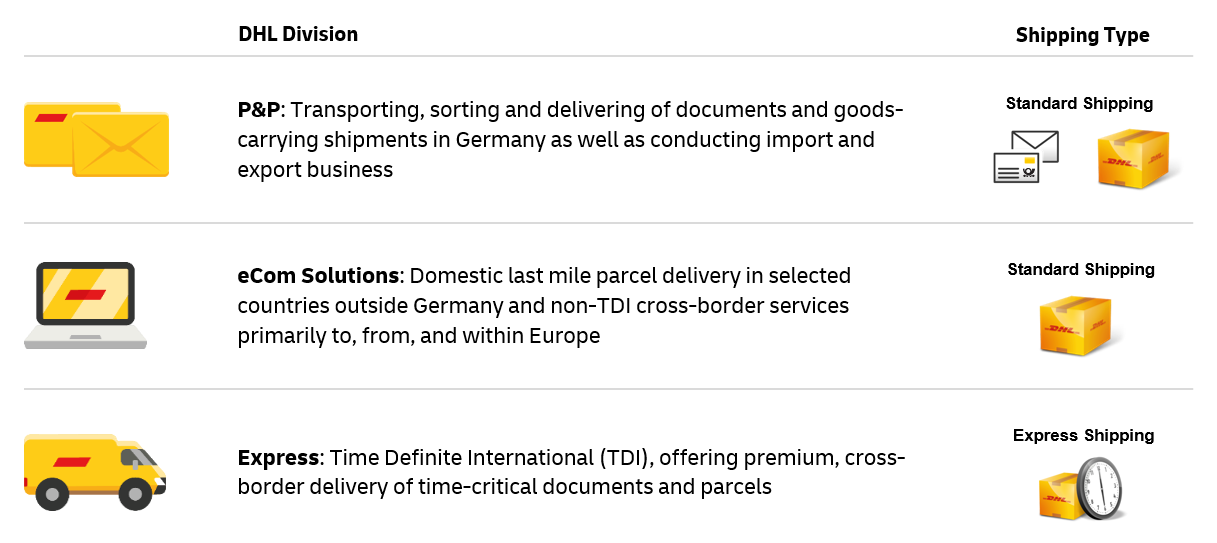
Post & Parcel Germany (P&P) and eCommerce Solutions countries available through this API are:
Austria (AT), Belgium (BE), Bulgaria (BG), Cyprus (CY), Czechia (CZ), Germany (DE), Denmark (DK), Estonia (EE), Spain (ES), Finland (FI), France (FR), United Kingdom of Great Britain and Northern Ireland (GB), Greece (GR), Croatia (HR), Hungary (HU), Italy (IT), Lithuania (LT), Luxembourg (LU), Latvia (LV), Netherlands (NL), Norway (NO), Poland (PL), Portugal (PT), Romania (RO), Sweden (SE), Slovenia (SI) and Slovakia (SK)
DHL Express countries available through this API are:
United Arab Emirates (AE), Afghanistan (AF), Albania (AL), Armenia (AM), Angola (AO), Argentina (AR), Austria (AT), Australia (AU), Bosnia and Herzegovina (BA), Barbados (BB), Bangladesh (BD), Belgium (BE), Burkina Faso (BF), Bulgaria (BG), Bahrain (BH), Benin (BJ), Bermuda (BM), Brunei Darussalam (BN), Bolivia (BO), Brazil (BR), Bahamas (BS), Bhutan (BT), Botswana (BW), Belarus (BY), Canada (CA), Congo (CG), Switzerland (CH), Côte d'Ivoire (CI), Cook Islands (CK), Chile (CL), China (CN), Colombia (CO), Costa Rica (CR), Cabo Verde (CV), Cyprus (CY), Czechia (CZ), Germany (DE), Denmark (DK), Dominican Republic (DO), Algeria (DZ), Ecuador (EC), Estonia (EE), Egypt (EG), Spain (ES), Ethiopia (ET), Finland (FI), Fiji (FJ), France (FR), United Kingdom of Great Britain and Northern Ireland (GB), Georgia (GE), French Guiana (GF), Guernsey (GG), Ghana (GH), Gambia (GM), Guadeloupe (GP), Greece (GR), Guatemala (GT), Guinea-Bissau (GW), Hong Kong (HK), Honduras (HN), Croatia (HR), Haiti (HT), Hungary (HU), Indonesia (ID), Ireland (IE), Israel (IL), India (IN), Iraq (IQ), Iran (IR), Iceland (IS), Italy (IT), Jersey (JE), Jamaica (JM), Jordan (JO), Japan (JP), Kenya (KE), Kyrgyzstan (KG), Cambodia (KH), Kiribati (KI), Comoros (KM), North Korea (KP), South Korea (KR), Kosovo (KV), Kuwait (KW), Cayman Islands (KY), Kazakhstan (KZ), Laos (LA), Lebanon (LB), Sri Lanka (LK), Liberia (LR), Lesotho (LS), Lithuania (LT), Luxembourg (LU), Latvia (LV), Morocco (MA), Moldova (MD), Madagascar (MG), North Macedonia (MK), Mali (ML), Myanmar (MM), Mongolia (MN), Macao (MO), Northern Mariana Islands (MP), Martinique (MQ), Mauritania (MR), Malta (MT), Mauritius (MU), Maldives (MV), Malawi (MW), Mexico (MX), Malaysia (MY), Mozambique (MZ), Namibia (NA), New Caledonia (NC), Nigeria (NG), Nicaragua (NI), Netherlands (NL), Norway (NO), Nepal (NP), Nauru (NR), Niue (NU), New Zealand (NZ), Oman (OM), Panama (PA), Peru (PE), French Polynesia (PF), Papua New Guinea (PG), Philippines (PH), Pakistan (PK), Poland (PL), Puerto Rico (PR), Portugal (PT), Paraguay (PY), Qatar (QA), Réunion (RE), Romania (RO), Serbia (RS), Russian (RU), Rwanda (RW), Saudi Arabia (SA), Solomon Islands (SB), Seychelles (SC), Sudan (SD), Sweden (SE), Singapore (SG), Slovenia (SI), Slovakia (SK), Sierra Leone (SL), Senegal (SN), South Sudan (SS), El Salvador (SV), Syrian Arab Republic (SY), Eswatini (SZ), Togo (TG), Thailand (TH), Timor-Leste (TL), Tunisia (TN), Tonga (TO), Turkey (TR), Trinidad and Tobago (TT), Tuvalu (TV), Taiwan (TW), Tanzania (TZ), Ukraine (UA), Uganda (UG), United States of America (US), Uruguay (UY), Uzbekistan (UZ), Venezuela (VE), Virgin Islands (VG), Virgin Islands (VI), Viet Nam (VN), Vanuatu (VU), Samoa (WS), Ceuta (XC), Montenegro (XM), Mayotte (YT), South Africa (ZA), Zambia (ZM), Zimbabwe (ZW)
Note: Please be aware that if you provide a valid country code but that code is not listed above, you may still get a successful response (200 OK) with no locations, as this API could recognized the country code but no locations in that country were found. On the other hand, if you provide a wrong country code, this API will respond with a 400 error.
The API provides the following information from a DHL Service Point:
- Name
- Address
- Geolocation
- Services offered (see below)
- Opening hours
- Closing periods
The following services are offered:
| Service Type | Service Description |
|---|---|
| parcel: pick-up | Consumers can pick up DHL Parcel shipments. This applies to last mile. |
| parcel: drop-off | Consumers can drop off DHL Parcel shipments. This applies to first mile. |
| express: pick-up | Consumers can pick up DHL Express shipments. This applies to last mile. |
| express: drop-off | Consumers can drop off DHL Express shipments. This applies to first mile. |
| express: drop-off-account | Consumers with a DHL Express account but without shipment label can drop off DHL Express shipment. |
| express: drop-off-easy | Consumers without a DHL Express account (new customer) can drop off DHL Express shipment. |
| express: drop-off-prelabeled | Consumers with a DHL Express account can drop off a DHL Express shipment which label has been created by using an online shipment manifest creation tool. The shipment can also be a return shipment. |
| express: drop-off-unlabeled | Location that offers unlabeled drop-off for DHL Express shipments. This service is also known as label-free, label-less or QR code drop-off. |
| parcel: pick-up-registered | Automated locker station for parcel pick-up for pre-registered consumers (e.g. Parcel Locker, Packstation, SwipBox, Lean Parcel Locker). This Service Type is relevant for Germany. |
| parcel: pick-up-unregistered | Automated locker station for parcel pick-up for unregistered consumers (e.g. Parcel Locker, Packstation, SwipBox, Lean Parcel Locker). This Service Type is relevant for European countries except Germany. |
| parcel: pick-up-all | This includes any of the three parcel:pick-up services. |
| parcel: drop-off-unregistered | Automated locker station for parcel drop-off for unregistered consumers (e.g. Parcel Locker, Packstation, SwipBox, Lean Parcel Locker). |
| parcel: drop-off-unlabeled | Location that offers unlabeled drop-off for DHL Parcel shipments. This service is also known as label-free, label-less or QR code drop-off. |
| letter-service | Letter services are offered (e.g. Post Office offering). |
| postbank | Offering of services from the German financial institution Deutsche Postbank AG, a subsidiary of Deutsche Bank AG. In addition to the core business of bank services, postal services are also offered (e.g. letter and parcel drop-off and the sale of letters and parcel stamps). The individual offering can be looked up at Deutsche Postbank AG. |
| cash-on-delivery | Offering of "cash on delivery". A shipment is only handed over to the recipient against payment. |
| franking | Offering of labels for franking. This does not include the product "Mobile Paketmarke". |
| cash-service | Cash service is offered via cash or card payment service. In Germany Giro, Maestro, Postcard and cash payment is supported. |
| packaging-material | Offering for packing material such as packages for parcels, envelopes for letters, paper, pencils, and pens. |
| postident | Postident is a service to reliably verify the identity of a consumer. This service is commonly used for online bank account identity verification. |
| age-verification | Reliable verification of the customers age. This service is commonly used to verify that the consumer has reached a specific age for an online offering (e.g. 14 or 18 years). |
| handicapped-access | Fair access for the disabled. |
| parking | Parking area close by. |
Using the API
You need to provide address information and an API subscription key (this key needs to be specified in the request header).
Example Use Cases
Search DHL Service Point locations based on address information
The API allows the user to search for DHL Service Points based on location-based specificity - from an area or city to a full address. The DHL Service Points returned will be ordered by distance from the location of the customer.
Search DHL Service Point locations based on an exact point
When the exact location of the customer is known, a search from that exact latitude and longitude can be performed. This search will retrieve DHL Service Points nearest to the user ordered by distance.
Know when a DHL Service Point is opened
Not all DHL Service Points have the same opening hours and some might not be open all days of the week. With the API, the exact opening hours of the DHL Service Point are shown to the customer so an informed decision can be made.
Which services are offered at a DHL Service Point
All the services offered by the DHL Service Point are listed in the API; a user can filter based on the services required. 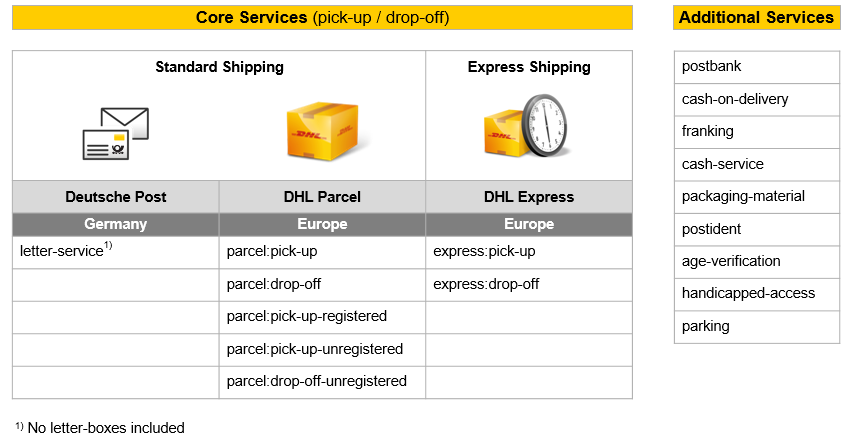
Get Access
You must request credentials for any applications you develop
To register your app and get your API subscription keys:
- Click My Apps on the portal website.
- Click Add Developer App.
The "Add App" form appears.
- Complete the Add App form.
You can select the APIs you want to access.
- When you have completed the form, click the Add App button.
The "Approved" label will appear next to the app name when the app has been approved.
Note: Additional verification steps may be required for some applications.
Authentication
Every call to the API requires a subscription key. This key needs to be specified in the request header (DHL-API-Key).
To view your API subscription keys:
- From the My Apps screen, click on the name of your app.
The Details screen appears.
- If you have access to more than one API, click the name of the relevant API.
Note: The APIs are listed under the "Credentials" section.
- Click the Show link below the asterisks that is hiding the Consumer Key.
The Consumer Key appears.
Environments
The addressable API base URL/URI environment is:
| Environment | Description |
| https://api.dhl.com/location-finder/v1 | Production environment |
Rate limits
Rate limits protect the DHL infrastructure from suspicious requests that exceed defined thresholds.
When you first request access to the Location Finder - Unified API, you will get the initial service level which allows 500 calls per day.
Additional rate limits are available and they are granted according to your specific use case. If you would like to request for additional limits, please proceed with the following steps:
- Create an app as described under Get Access section.
- Click My Apps on the portal website.
- Click on the App you created
- Scroll down to the APIs list and click on the "Request Upgrade" button.
- Please refer to the example below:
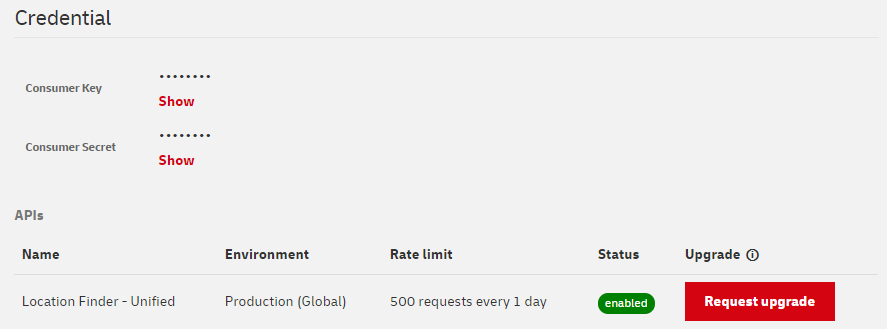
When the limit is reached, you will receive an HTTP Status code:
429: Too many requests.
How to address Shipments
It is possible to send shipments directly to DHL Service Point locations. In order to do so, the addressing schemes described below should be applied.
Important notes:
- The addressing schemes do not apply for DHL Express.
- Additional information on how to use DHL Packstation can be found here
- Shipments can only be sent directly to a DHL Service Point that have a designated Postfiliale number (provided as keywordID in the API response)
- Please provide the recipient e-mail address. This is needed in order to inform you by e-mail as soon as the recipient can pick up the shipment
Addressing to a locker in Germany
If you wish to address your shipment to a locker ("DHL Packstation") in Germany, please follow the steps below:
- Provide your name
- Use "Packstation" as street name
- Use the DHL Packstation number (here "145") as house number
- Provide your PostNumber (here "987654321") in the second name or additional address field.
If you don't have a PostNumber yet, sign up for one here
- Enter the country (here "DE"), postal code (here "53113") and city (here "Bonn")
| First name | Max |
| Last name | Sample |
| Additional address information | 987654321 |
| Street | Packstation |
| House number | 145 |
| Country | DE |
| Postal code | 53113 |
| City | Bonn |
The API sample response below provides all necessary location data:
"url": "/locations/8007-453113145",
"location": {
  "ids": [
    {
      "locationId": "8003-453113145",
      "provider": "parcel"
    }
  ],
  "keyword": "**DHL Packstation**",
  "keywordId": "**145**",
  "type": "locker"
},
"name": "DHL Packstation 145",
"distance": 52,
"place": {
"address": {
    "countryCode": "**DE**",
    "postalCode": "**53113**",
    "addressLocality": "**Bonn**",
    "streetAddress": "Charles-de-Gaulle-Str. 20"
  },
}
...
Addressing to a DHL Service Point in Germany
If you wish to address your shipment to a DHL Service Point ("Postoffice" or "Parcelshop") in Germany, please follow the steps below:
- Provide your name
- Use "Postfiliale" as street name
- Use the Postfiliale number (here "502") as house number
- Optional: Provide your PostNumber (here "987654321") in the second name or additional address field.
If you don't have a PostNumber yet, sign up for one here
- Enter the country (here "DE"), postal code (here "53113") and city (here "Bonn")
| First name | Max |
| Last name | Sample |
| Additional address information (optional) | 987654321 |
| Street | Postfiliale |
| House number | 502 |
| Country | DE |
| Postal code | 53113 |
| City | Bonn |
The API sample response below provides all necessary location data:
"url": "/locations/8003-4008202",
  "location": {
    "ids": [
      {
        "locationId": "8003-4008202",
        "provider": "parcel"
      }
    ],
    "keyword": "**Postfiliale**",
    "keywordId": "**502**",
    "type": "postoffice"
  },
  "name": "Postfiliale 502",
  "distance": 26,
  "place": {
    "address": {
      "countryCode": "**DE**",
      "postalCode": "**53113**",
      "addressLocality": "**Bonn**",
      "streetAddress": "Charles-de-Gaulle-Str. 20"
    },
}
...
Addressing to a locker in Europe
If you wish to address your shipment to a locker in Europe, please follow the steps below:
- Provide your name
- Use the country specific keyword (here "DHL Packstation") as street name
- Use the keywordID (here "NL-110151") as house number
- Enter the country (here "NL"), postal code (here "1101DZ") and city (here "Amsterdam")
| First name | Max |
| Last name | Sample |
| Street | DHL Packstation |
| House number | NL-110151 |
| Country | NL |
| Postal code | 1101DZ |
| City | Amsterdam |
The API sample response below provides all necessary location data:
"url": "/locations/8004-NL-110151",
  "location": {
    "ids": [
      {
        "locationId": "8004-NL-110151",
        "provider": "parcel"
      }
    ],
    "keyword": "**DHL Packstation**",
    "keywordId": "**NL-110151**",
    "type": "locker"
  },
  "name": "DHL Pakketautomaat Shell Lhweg",
  "distance": 472,
  "place": {
    "address": {
      "countryCode": "**NL**",
      "postalCode": "**1101DZ**",
      "addressLocality": "**Amsterdam**",
      "streetAddress": "Laarderhoogtweg 5-PS"
    },
}
...
Addressing to a DHL Service Point in Europe
If you wish to address your shipment to a DHL Service Point in Europe, please follow the steps below:
- Provide your name
- Use the country specific keyword (here "DHL Parcelshop") and keywordID (here "NL-110603") as additional address information
- Enter the country (here "NL"), postal code (here "1106LN"), city (here "Amsterdam"), street (here "Holendrechtplein") and house number (here "14")
| First name | Max |
| Last name | Sample |
| Additional address information | DHL Parcelshop NL-110603 |
| Street | Holendrechtplein |
| House number | 14 |
| Country | NL |
| Postal code | 1106LN |
| City | Amsterdam |
The API sample response below provides all necessary location data:
"url": "/locations/8004-NL-110603",
  "location": {
    "ids": [
      {
        "locationId": "8004-NL-110603",
        "provider": "parcel"
      }
    ],
    "keyword": "**DHL Parcelshop**",
    "keywordId": "**NL-110603**",
    "type": "servicepoint"
  },
  "name": "Akash Multi Plaza 14B",
  "distance": 984,
  "place": {
    "address": {
      "countryCode": "**NL**",
      "postalCode": "**1106LN**",
      "addressLocality": "**Amsterdam**",
      "streetAddress": "Holendrechtplein 14"
    },
}
...
Additional Information
Permitted HTTP methods
- GET for retrieving data
Example requests to the API
Simple HTTP request example:
curl -X GET 'https://api.dhl.com/location-finder/v1/find-by-address?countryCode=GB&addressLocality=London' -H 'DHL-API-Key:ApiKeyPasteHere'
Find DHL locations for delivery in Germany?
Use Case
I am a retailer based in Germany. My customers can order my products via my online store. I want to use the Location Finder - Unified API to display DPDHL locations at the check-out of my online store as delivery option. Only those locations should be returned by the API, which can be used for direct addressing. I offer standard delivery (no Express delivery) and both DPDHL stores (servicepoint, post offices and Postbank) and lockers (called DHL Packstation in Germany) are interesting for me.
Solution
In Germany, the business unit within DPDHL to handle this use case is P&P (Post & Parcel), available with this API through the parameter providerType as parcel. The services that offer direct addressing are parcel:pick-up (offered by service points, post offices and postbank) and parcel:pick-up-registered (only offered by lockers). For more information about this business unit and these services, please visit our overviewpage.
The parameter serviceType allows me to filter locations by services such as parcel:pick-up and parcel:pick-up-registered. Given this parameter will make the result include only locations with at least all of the serviceTypes requested, and in Germany, locations that offer parcel:pick-up do not offer parcel:pick-up-registered, I need to make two calls to the Location Finder - Unified API.
Retrieving locations that offer the service parcel:pick-up
curl -X GET "https://api.dhl.com/location-finder/v1/find-by-geo?latitude=50.7169763&longitude=7.1329916&providerType=parcel&serviceType=parcel%3Apick-up&radius=2500&limit=20" -H "accept: application/json" -H "DHL-API-Key: ****"
- latitude and longitude: This is the reference point used to find locations around it. In this case, /find-by-address could have been use as well, although /find-by-geo is more straight forward as /find-by-address simply converts an address to a geo point as a first step.
- providerType: This parameter with value 'parcel' ensures that only results from P&P (Post & Parcel) will be returned, excluding locations which are not relevant for this case (e.g. DHL Express).
- serviceType: This parameter with value 'parcel:pick-up' ensures that any location which does not offer this service is excluded.
- radius: 2500 meters around the reference point (latitude, longitude) will be considered for the search.
- limit: If available, up to 20 locations will be returned in the response.
Retrieving locations that offer the service parcel:pick-up-registered
curl -X GET "https://api.dhl.com/location-finder/v1/find-by-geo?latitude=50.7169763&longitude=7.1329916&providerType=parcel&serviceType=parcel%3Apick-up-registered&radius=2500&limit=20" -H "accept: application/json" -H "DHL-API-Key: ****"
- serviceType: This parameter with value 'parcel:pick-up-registered' ensures that any location which does not offer this service is excluded. In this case, all other parameters are the same.
Considerations
- If I would make only one call to the API including the parameter serviceType twice (one per service type), I would have no results as the API would look for locations which offer parcel:pick-up and parcel:pick-up-registered. In Germany there are no locations with that characteristic.
- I will have to concatenate the results of both calls in order to display the complete list of locations for delivery to my customer.
This guide is for users of the Location Search Europe API, who want to migrate to the Location Finder - Unified API.
DPDHL places great emphasis on constantly improving its digital touchpoints from a customer perspective to make them more convenient and easier to use. This includes the decision to consolidate our APIs in a way that allows our customers to get the most value with the least effort.
We have therefore decided to transfer the functionalities of the Location Search Europe API, currently published on https://entwickler.dhl.de/, to the Location Finder - Unified API. This API can be found here https://developer.dhl.com/api-reference/location-finder. The Location Search Europe API will be shut down on October 31, 2021.
You can find a mapping of the different data fields belonging to the 2 APIs here:
| Location Search Europe API | Location Search Europe API Response | Location Finder - Unified API (v1) | Location Finder - Unified API (v1) Response |
| distance | n/a | distance | "distance": 662 |
| routingCode | n/a | n/a | n/a |
| countryCode | de | countryCode | "countryCode": "DE" |
| zipCode | 53113 | postalCode | "postalCode": "53113" |
| city | Bonn | addressLocality | "addressLocality": "Bonn" |
| district | n/a | n/a | |
| area | n/a | n/a | |
| additionalInfo | n/a | n/a | |
| street | Charles-de-Gaulle-Str. | streetAddress | "streetAddress": "Charles-de-Gaulle-Str. 20" |
| additionalStreet | n/a | n/a | |
| houseNo | 20 | streetAddress | "streetAddress": "Charles-de-Gaulle-Str. 20" |
| format1 | n/a | n/a | |
| format2 | n/a | n/a | |
| keyWord | Postfiliale | keyword | "keyword": "Postfiliale" |
| partnerType | n/a | n/a | |
| shopType | postOffice | type | "type": "postoffice" |
| shopName | name | "name": "Postfiliale 502" | |
| latitude | 50.7160101 | latitude | "latitude": 50.7160101 |
| longitude | 7.1298043 | longitude | "longitude": 7.1298043 |
| primaryKeyDeliverySystem | 4008202 | n/a | n/a |
| primaryKeyZipRegion | 502 | keywordId | "keywordId": "502" |
| systemID | 8003 | n/a | n/a |
| id | 8003-4008202 | locationId | "locationId": "8003-4008202" |
| psfWelcometexts | n/a | n/a | |
| psfServicetypes | serviceTypes | "serviceTypes" | |
| psfTimeinfos | openingHours | "openingHours" | |
| psfClosureperiods | closurePeriods | "closurePeriods" | |
| primaryLanguage | n/a | n/a | |
| secondaryLanguage | n/a | n/a | |
| tertiaryLanguage | n/a | n/a | |
| psfOtherinfos | n/a | n/a | |
| psfForeignKeys | n/a | n/a | |
| psfFiles | n/a | n/a |
For more details, please check this guide (English version) or guide (German version).
specifics for the use of Location DATA
Data requested and received via the DHL LOCATION FINDER API, such as addresses of DHL Service Point locations, location types, services at location, is hereinafter referred to as "Location Data".
Such Location Data is provided to You and/or the entity you are authorized to represent (hereinafter "You"/"Your") via the DHL LOCATION FINDER API under the following prerequisites and/or restrictions: - You shall only publish, display and/or otherwise use the Location Data in connection with location data of other logistics/transportation services providers (e.g. show DPDHL´s locations together with locations of other transportation and/or logistics services providers on a website - a comparison portal for example - or any other (electronic) channel and/or medium), provided that You - always show and/or display all DPDHL locations, that are available at the according address and that have been provided to You via the DHL LOCATION FINDER API (i.e. without dismissing single locations), and
- do not specifically select and/or recommend single locations thus contradicting DPDHL´s business interests.
- You shall not store and/or modify Location Data in any form; it is especially prohibited to analyze and/or derive data/information for competitive purposes from the Location Data without our prior written consent.