
Best for:
- Business customers of Post & Parcel Germany
- Create and manage shipment labes for domestic and international Parcels
You are on the documentation page of the Parcel DE Shipping API of Post & Parcel Germany. In the following chapters we offer you:

Business overview of the product
Detailed business description of the offered service, which is accessible via the API

Technical documentation of the API
OpenAPI specification:
Postman collection with typical use cases when using the API
JSON Schema
Overview of the latest changes to the API in the release notes



Help and support in case of problems


Scope
The DHL business customer shipping API (Parcel DE Shipping) permits the management of shipments and the online purchase of postage and is typically aimed at senders with a volume of more than 200 shipments per year. For DHL business customers who do not have a DHL business customer account (EKP) and who have a shipping volume of less than 200 shipments per year, shipping documents are created via the private customer shipping API.
Using the API
The business customer shipping API takes care of:
- The preparation of shipping documents for national and international shipping
- Creation of export documents
- Retrieval of labels
General basics
To connect the Business Customer Shipping API (Parcel DE Shipping) to your systems, we would like to give you an overview on shipping of goods with Deutsche Post DHL for business customers.
To create business customer shipments, you (or your customer) need(s) a business customer contract and access to the Post & DHL Business Customer Portal (GKP). The Parcel DE Shipping API must be set up precisely for these contractually agreed products and services. In addition, the user access data to the GKP, all used billing numbers, sender and return addresses and bank account data must be created as configurable.
There are two types of users: system users and personal users. System users can be used for system connections or webservices only. Logging in to the GKP interface is not possible with them. Personal users, on the other hand, are created for the useage in the GKP GUI.
The access data to the GKP consists of a username and a password. The username can, for example, consist of first and last names and may only contain lowercase letters.
The password must comply with the Post & DHL Business Customer Portal guidelines in order to meet certain security criteria: It must be at least 8 characters and no more than 20 characters long, contain at least one special character (!,$,/,(,),=,#,*,+), at least one letter and at least one number. Be sure to use the correct upper and lower case spelling when entering the password.
Password validity is 365 days for system users and 90 days for personal users. Users will be informed by e-mail before a password expires and will also receive a link to assign a new password in this e-mail. If the link in the e-mail has expired or if a user has not received an e-mail, they can use the "Forgot Password?" function on the GKP login page (https://geschaeftskunden.dhl.de/) to assign a new password.
EKP: The EKP is a "uniform customer and product number" and thus the key to using Deutsche Post DHL products. It consists of ten digits and is created and assigned by our sales team. Each customer can be uniquely identified via this EKP. It is required for all system connections and must always be transferred.
Contract Procedure: The products used for shipping are referred to as contract procedure.
Contract Participation: The so-called contract participation is a two-digit numeric (00 to 99) or alphanumeric (AA to ZZ) character string. It is assigned by the sales team. For each product (so-called contract procedure) a customer can use one or more contract participations. It is therefore recommended to keep the number of contract participations variable when configuring the interface. The participations enable a subdivision, for example, according to locations, seasonal business or different conditions. In addition, certain services, such as environmentally friendly shipping with GoGreen, are also stored as separate contract participations.
Bank account data: Bank data is only required if the cash on delivery service is linked. Details of IBAN, BIC, payee, bank name and reason for payment must be entered here.
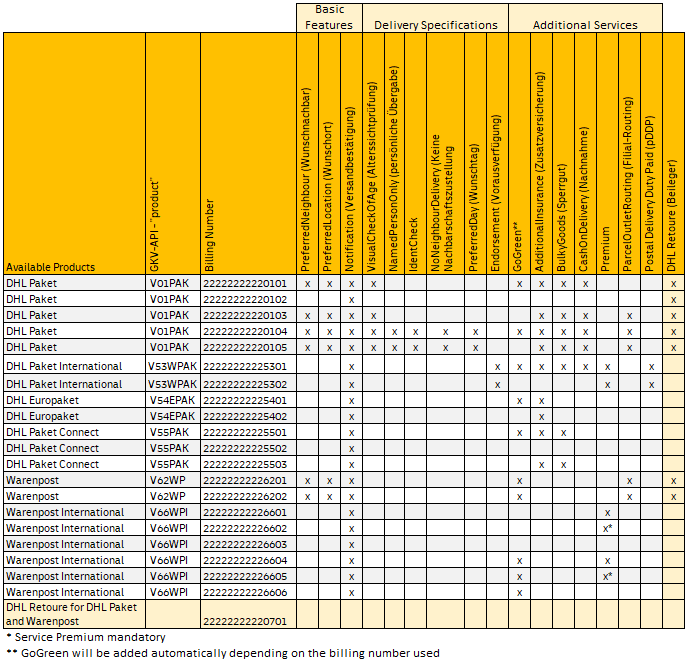
Contract Billingnumber: The billingnumber is a 14-character string. It consists of the EKP, the contract procedure (=product) and the contract participation. The correct spelling is without spaces or special characters (all 14 characters directly one after the other).
Example:
| 1234567890 | 53 | 01 |
| EKP | Contract Procedure | Contract Participation |
Label format and printing
The Parcel DE Shipping API offers all label formats, which are also available in the Post & DHL Business Customer Portal. We would like to point out that scaling of the label is not permitted, as this no longer guarantees the legibility of the label. Shipments for which machine readability is not possible will be invoiced to the sender with an additional charge for the required manual post-processing.
The following label formats are currently available:
{"printFormat":?}
- "A4" Common Label laser printing A4 plain paper
- "910-300-700" Common Label laser printing (sheet A5) 105x208mm (910-300-700)
- "910-300-700-oz" Common Label laser printing (sheet A5) 105x208mm, without additional labels (910-300-700)
- "910-300-710" Common Label laser printing105x209mm (910-300-710)
- "910-300-600" Common Label thermal print (folding tape labels) 103x199mm (910-300-600)
- "910-300-610" Common Label thermal print (roll) 103x199mm (910-300-610)
- "910-300-400" Common Label thermal print (folding tape labels) 103x150mm (910-300-400)
- "910-300-410" Common Label thermal print (roll) 103x150mm (910-300-410)
- "910-300-300" Common Label laser printing (sheet A5) 105x148mm (910-300-300)
- "910-300-300-oz" Common Label laser printing (sheet A5) 105x148mm, without additional labels (910-300-300)
Additionally, the label format 100 x 70 mm can be used, but exclusively for the products Warenpost and Warenpost International. Please note that some information cannot be printed on this label due to its smaller size. The following rules therefore apply to address data on this label format:
- Sender: Name 2 and Name 3 are not printed
- For German recipient addresses, name 3 is not printed
- For international addresses, 6 lines are printed, with the last line always being the recipient country.
Label printing with a thermal printer corresponds to a resolution of 203dpi. We ask you to take this into account accordingly so that a smooth production run is possible.
Products and services via the web service interface
Products
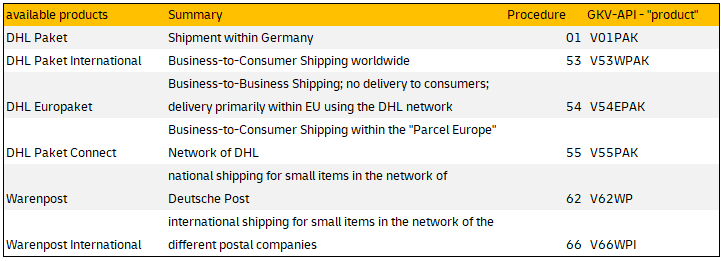
Shipments can be created using the Parcel DE Shipping API function POST "/orders". All products are handed over in the web service attribute "product" and validated by the "contract procedure" in the contract billingnumber. The contract procedures and product codes to be used can be found in the following overview:
Details and combinatoric
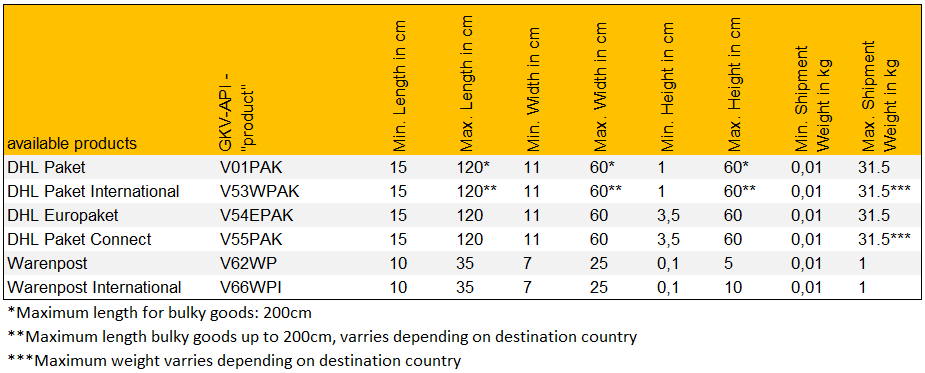
The following table contains an overview of the minimum and maximum dimensions and weights per product. The parameters for creating shipments must be within these limits. The parameters listed are standard values.
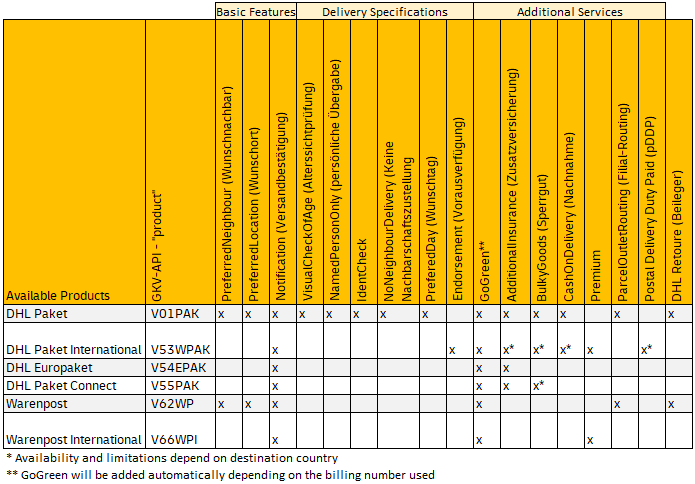
Available services per product
In the following table you will find all available services per product. They are divided into three service groups for the sake of clarity only. These groups are not part of the webservice requests.
The following provides an overview on how to get access to the API.
- Technical Details on the API calls can be found here: "API Specification".
- Further hints on API usage are given in the sections "Support" and "FAQ".
Get Access
How to register your Parcel DE Shipping API and get your API subscription keys:
- Click Get Access Button on top of this page and the create App form will open with the sandbox environment of the API being pre-selected.
-
- When you have completed the form, click the Create App button.
- You will now find your App under My Apps.
- From the My Apps screen, click on the name of your app.
The Details screen appears. - If you have access to more than one API, click the name of the relevant API.
Note: The APIs are listed under the "Credentials" section. - Click the Show link below the asterisks that are hiding the Consumer Key.
The Consumer Key appears.
Every call to the API requires a consumer key. This key needs to be specified in the request header (DHL-API-Key).
Please note that different keys are required for sandbox respectively production environment. Both can be requested via above procedure and copied from API credentials section.
Alternatively to "get access" you can go to My Apps on the portal website and click the + Create App button:
- The "Create App" form appears.
- Complete the Create App form and select the "Parcel DE Returns API".
- You will find two entries of the API in the list: one for Sandbox, one for Production use.
Authentication
Sandbox
To create return labels in the sandbox, you have the option of using our testsuite with the following user data:
- Username: "3333333333_01"
- Username (thermal printer): "3333333333_03"
- Password: "pass"
- EKP: "3333333333"
- from the above-mentioned access data (base64-coded), the following token results:
DPDHL-User-Authentication-Token: MzMzMzMzMzMzM18wMTpwYXNz
A detailed description of the Shipping API can be found in the "Open API Specification".
You can download the "Open API Specification" here.
Production
To use the "Parcel DE Shipping API", you will first need an application created including the API in production mode.
In addition, the following access data for the webservice (API) must be specified:
- User: "User from Post & DHL Business Customer Portal".
(User must be authorized for returns!) - Password: "Password of above user".
- from above-mentioned access data (base64-coded), the result is the
DPDHL User Authentication Token
When selecting the respective user, please also consider the duration of the validity of passwords:
- the password validity of a "user" is" 90 days
- the password validity of a "system user" is" 365 days
It is not possible to log on to the Post & DHL Business Customer Portal with a "system user".
Important: DHL contract customers receive the access data for access to production from the Post & DHL Business Customer Portal via DHL Paket sales.
Environments
The addressable API base URL/URI environments are:
Authentication Details
This section summarizes preconditions for access and provides background.
| Technical Artefact | Sandbox | Production | Comment |
|
API KEY |
Obtained via Get Access! (app creation) and manually approved by DHL. | Obtained via Get Access! (app creation) and manually approved by DHL. |
Key is a hexadecimal string like below. Provide a HTTP Header parameter like in sample curl call which can be used for validation:
-H "dhl-api-key: ${KEY}" https://api-sandbox.dhl.com/parcel/de/shipping/v1/
Sample key: 7eelE1paJtbWvAKw0ROgVNLZak6rvEoD |
|
GKP Credentials (username + password for https://www.dhl-geschaeftskundenportal.de/ ) |
gkpuser=2222222222_01 For the sandbox, please use the above credentials. |
gkpuser=YOUR_USERNAME For production, you must be an active business customer. You need to contact DHL. |
GKP username and password must be provided via basic authentication. Curl example below.
curl
|
Next Steps
Once you have obtained API key for at least the sandbox:
-
Try out basic access by querying the API version:
curl --H "accept: application/json" -H "dhl-api-key: ${KEY}" https://api-sandbox.dhl.com/parcel/de/shipping/v1/ -
Try out to validate a shipment against the sandbox (which you have stored in my_request.json)
curl -X POST -H "dhl-api-key: ${KEY}" --H "accept: application/json" -H "Content-Type: application/json" -u 2222222222_01:pass -d @my_request.json https://api-sandbox.dhl.com/parcel/de/shipping/v1/orders/?validate=True
Note that you can use your credentials to try out several calls directly in the API description under "Reference Information". You will also see more complete curl examples and request documents there. Next, you can actually create a shipping label, retrieve it, and more.
Use Case Overview
In order to further test our API you can download our test suite here
The test suite can be used as a collection on the software postman: Postman API Platform | Sign Up for Free
Following steps have to be taken in order to use it:
- request access to Sandbox environment and receive an API-key (see Get Access for further details)
- import collection into postman (see official documentation from postman learning platform)
- replace value of the variable "dhl-api-key" by your personal API-key
Example Requests
Examples to come
Access, Authentication, and Autorisation
Where can I find samples for authentication?
Please refer to the section on authentication at the [user guide] (https://developer.dhl.com/api-reference/parcel-de-shipping-post-parcel-germany#get-started-section/user-guide). This also has a curl example.
What authentication is needed for the "Try now!" function?
Two factors are needed. You need a valid api key (it looks like 7eelE1paJtbWvAKw0ROgVNLZak6rvEoD). For the basic auth part, you need GKP user and password. For try-out, use the known sandbox credentials (2222222222_01/pass).
My setup works for getVersion() but I get HTTP 401 for all other calls.
Please check the GKP credentials (they are provided via basic auth header). getVersion does not require those, but all other calls do.
I requested access and did not hear back for 48 hours or more.
Please reach out via contact form. Approval is not automatic as long as we are in beta.
Label Formatting and Printing
Can I modify the side margin when printing ZPL label?
A client reported successfully using the following: Before sending the received ZPL file to the printer, I add on the fly a ZPL command (^LS-30) just after the beginning of ZPL Data (^XA command).
Request Document
Do you support multi-piece shipments?
Not fully. There is limited support for that via the "costCenter" attribute if you need to group shipments.
ShipperRef attribute -- how to use
You need to set the reference to a shipper (address details) in the business customer portal and may then refer to this shipper via the shipperRef attribute. In that case, no shipper details are needed. If both are provided, the explicit information will be applied. Error message "CIG:Exception in extension function java.lang.IllegalArgumentException: is not known" is related to ShipperRef setting.
Weight
Shipment weight is important for billing. This is a mandatory attribute. You can provide shipment weight in either kg or g unit. If shipping internationally and needing customs data: Similar rules apply for individual item weights.
Dimensions
Providing dimensions (length, width, height) are optional. Adherance to product limitations will be checked by DHL. If you choose to provide that data, all attributs (unit of measure, length, height, width) are required.
Packstation Addresses
Please refer to sample included in the spec. A packstation destination is identified by providing the lockerID attribute.
address2 and address3 elements of the recipient address
Please check the API spec. Those elements are not printed for most labels. Exceptions include Parcel International labels for selected countries.
Label Download
How long are the labels available for download via /labels URL?
The labels are available for download until they have been manifested. After an initial download (and only then), the labels are being cached for currently 48 h. This means that labels can be downloaded for up to 48 h after manifesting. Note that after this time expired you receive HTTP 500.
Services
I set premium=false but PREMIUM is still printed on the label?
This is country-specific. Most EU countries do not offer economy products, so premium=true is applied. Other countries (CH) offer both.
COD (cash on delivery) - cannot provide the full bank account data
Depending on the GKP account privileges you may be required to create the account in the business customer portal and refer to it via accountRef attribute in the API.
Retoure international
This is NOT supported on this API. Please check the "online retoure API". You can create return labels for standard domestic parcels.
Retoure Services
This is a popular service, please refer to the samples included in the technical API spec and/or postman collection.
Notification
You can provide an email address and an optional (existing) email template reference here to notify about delivery progress. This functionality has been enhanced (template functionality) in June 2021 but the "old style" will work (but will fail JSON validation). Use validation if in doubt.
Customs Information
When providing customs information, do I need to provide it for each item I plan to ship?
Yes.
Will I need to provide customs information?
Depends on origin and destination address. Whenever shipping internationally and not covered differently. (E.g., You don't need it when shipping within the european customs union). Incomplete information may result in a backend errors 1101.
Manifest
GetManifest appears slow on the sandbox
The sandbox accounts are heavily shared. Therefore, the manifests can be extensive and slow to download. The production behavior is different since your manifests are exclusive.
Can I get a manifest for each billing number?
GET /manifests/{account}/ currently only supports one big combined manifest per EKP (customer number). The only parameter available is the manifesting date (if not provided, today's date is used). The manifest contains multiple sections and is sorted by billing number. For example, today's manifest (March 1 2021) currently has: Total of 73 pages. All relate to 2222222222 EKP. There are 8 sections, e.g. for 22222222220101, 22222222220104 billing numbers.
It is planned to enhance the functionality of manifesting to allow more flexible retrieval.
When is Manifest done? Do I have to do it?
It is done automatically at a preagreed time, usually the end of your work day. Afterwards shipments cannot be changed and labels (unless cached) cannot be downloaded. You can trigger manifesting explicitly via API as well.
Version
Do I need to call this?
This helps you as a quick connectivity check and also tells you the current version number. Part of the response is like "version": "v1.1.13" - the version of the API. Updates in the last component -- patch level -- will not be announced, they are guaranteed to be compatible.
Errors
General Hints
PLEASE use the validation switch available for POST /orders. It will tell you if you are missing an required elements, mistyped an attribute name and more. Please also use the postman collection (it does have samples for common requests). Please also note that the Swagger (OAS) descriptions contains working samples for most products (available via choice box when trying out a post).
I get an error message complaining "detail": "1101(Die Angabe der Zeile ist nicht möglich.)"
Likely you are getting the german error message when sending an Europaket V54EPAK with more than one goods categories per packet. This product allows only a single goods category.
I get an error message complaining "detail": "1101(Bitte geben Sie die Art der Sendung an)"
Likely you are getting the german error message when sending a Parcel International and you are missing required customs data. Please use validation, it will provide information on where the data is missing.
I get an error message complaining "detail": "1101(Der angegebene Service ist nicht bekannt)"
Likely you are getting the german error message when requesting a service which is either not known (check with validate=true please) or your account number + billing number information is not enabled for the service (e.g., Retoure). In that case please reach out to your DHL contact to check that.
I got an HTTP 500 error downloading a label from the URL returned by the POST call
Likely you are attempting to download a label after it has expiration. Please check the API spec on it. Before manifesting has been done there is also an alternative obtaining a label through the authenticated GET /orders call. This will also allow to obtain the label directly in the reponse plus many other options.
Warnings
I get an warning message complaining "detail": "0(Die angegebene Strasse kann nicht gefunden werden.)" or "detail": "0(Die angegebene Hausnummer kann nicht gefunden werden.)"
The address data could not be validated. You can use that label but DHL may incur extra charges (please check with your sales representative) to correct the address during processing. This also is indicated by a routing code on the label ending with 6 or more zeroes. To avoid this, please the query parameter mustEncode=true.
Other
I see there is also a dedicated Retoure API. What's the difference?
The Parcel Shipping API allows you as business customer to already provide a return label as part of the original outbound shipment. The Retoure API scope is different.
I see German error messages, is English also available?
Part of underlying systems in DHL may currently provide error details only in German. At the API layer this is mitigated where possible.
Currencies can be specified in the request, what can I use?
Please use EUR as currency, this is supported in all currency attributes.
For create, I am using the validate=true switch as recommended but I like the error messages better if I don't use it.
It is highly recommended to use validation initially. Validation will do two things:
- check the message syntax against JSON schema. This will tell you if the structure (and more) of your message looks good. Note that you can do this also offline by downloading the JSON schema [here] (https://developer.dhl.com/api-reference/parcel-de-shipping-post-parcel-germany#get-started-section/user-guide%other-information)
- do a dry-run against the backend. This will never create a shipment. However, you will get the same errors or success codes you would get with an actual shipment creation. As of v1.2.1, validate provides potentially additional error detail compared to create.
User-agent header
Please ensure that you are setting the user agent header to something unique. E.g., mydhlinterface/1.0.
Go-Live
I am an Easylog customer and want to migrate to REST. What do I need to know?
You should speak with your DHL sales representative. Likely you will need new billing numbers to avoid clashing number ranges between your Easylog shipments and shipments generated via API.
How long does it take to get certified to use the production environment? Is there a special procedure to follow?
This depends on the specifics. In general, you should plan for anything between 3 days and 1 month. There is no formal certification (we're in pilot mode) but suggest to cover:
- know how to retrieve the current version information
- be comfortable with the type of requests you will be creating in production, ensure that the products and services are covered
- use
validation=truedry-run during testing prior to sending the actual request - test other endpoints like
delete /orders/${EKP}and the manifesting calls if you plan to use those - ask DHL if things are unclear, we're happy to help and enhance
- set user-agent header
This can be all covered at your pace or you can ask DHL to observe a test scheduled at a convenient time for you. In both cases, please contact us, we'll double-check that your testing looks fine; your PROD credentials (EKP and billing numbers, other operational setup) appear correctly set up and will enable/approve your API key generally within 24 hours.
Will I use the same key for PROD and SANDBOX?
If you have requested access to both sandbox and production products in the same app, the same key will be typically be enabled for both PROD and SANDBOX. We can set you up based on your preferences. We can also add PROD access if you had originally only requested sandbox access.
You can request support in our Help Center. You can raise a ticket that allows you to request direct support from DHL Support. Please describe your enquiry in as much detail as possible and also send us reproducible extracts from the web service communication. We will try to help you with your problem as soon as possible during following times:
IT Customer Support & Integration Parcel
Business hours: Mo-Fr 8 a.m. to 16 p.m.
Specific Terms for the use of and/or access to the "Parcel DE Shipping API"
To register for the use of DHL Parcel DE Shipping API You and/or the legal entity you are authorized to represent (hereinafter "You"/"Your") need to have an active customer account with DHL Paket GmbH (hereinafter referred to as "DHL"). An API Productive Key and access details will be provided to You subject to a successful validation of Your credentials by DHL. If You engage an external developer, or other IT services provider to develop Your Application or any other third party to access and/or use the DHL Parcel DE Shipping API on Your behalf, You remain fully liable for any acts or omissions of such Third Parties in connection with the access to and/or usage of the DHL Parcel DE Shipping API.
These Legal Terms do not replace and/or modify the applicable "General Terms and Conditions of DHL Parcel for business customers", available at https://www.dhl.de/en/geschaeftskunden/paket/rund-um-den-versand/agb.html or any other shipment services agreement, which govern Your parcel shipments.
In case You act as a third party software, vendor, marketplace or otherwise as commercial agent on DHL's and/or its affiliates' behalf, i.e. with DHL's and/or its affiliates' consent, You are obliged to refer the customer (i.e. the sender of the shipments) to the applicable terms and conditions for shipment.
You shall use the services and/or data that You receive via the DHL Parcel DE Shipping API only for the legitimate contractual purposes and only in connection with Your DHL shipments.
The following prerequisites and/or restrictions apply for the usage of and/or access to the DHL Parcel DE Shipping API:
- The DHL Parcel DE Shipping API provides the possibility to create and print shipping labels and to book shipments. Please be aware that the booking of the shipment within DHL Parcel DE Shipping API does not constitute the contract of carriage. The contract of carriage will only be concluded when the shipment is handed over or picked up and accepted by DHL.
- Please note that the DHL Parcel DE Shipping API only facilitates shipments from Germany to Germany and from Germany to other countries as well as from Austria to Austria or from Austria to other countries. Creating shipping documents from abroad to Germany or Austria and from abroad to abroad is not possible via the DHL Parcel DE Shipping API .
- Please note, that the standard implementation of the functionality "Print Label and Export Documents" (createShipmentOrder) is as PDF label; an implementation according to the" Common Label specification" requires a separate approval by DHL.
- You need to configure your DHL business customer portal (account number or "EKP", procedures, products, services etc.) according to the necessities of the DHL Parcel DE Shipping API. If you act as a third party vendor or marketplace, these configurations need to be implemented for each shipping customer (merchant) individually.
- Credentials (user / password) for the DHL business customer portal need to be delivered/shared within the XML Request.
- When using the service "cash-on-delivery" ("Nachnahme") bank details (incl. BIC and IBAN data for national and international transfers) need to be delivered/shared within the XML Request.
- You shall implement the functionality "Cancel Shipment" (deleteShipmentOrder) within your Application.
- For all products value for the weight must necessarily be delivered. This value may have a predefined default value (only for contractually agreed fixed prices in procedure 01 ("Verfahren 01")) or consist of the specific weight of the shipment. Accordingly, the detection / default must be displayed in the e-shop or marketplace.
- You need to implement the functionality to cancel incorrect labels and have them generated correctly again.
- Non-codable shipments will result in extra charges of €0.30 per shipment (according to procedure 01 ("Verfahren 01")). Accordingly, the procedure must be clarified internally (Accept label without encodable address or cancellation and reprint after correction) and , if applicable, your customer/merchant needs to be informed.
- The delivery of shipments to a "Packstation", "Postfiliale Direkt"" and or a "Parcelshop" needs to be be implemented. For these services a 6-10 digit postal number ("PostNummer") is provided. Specific types of addresses have been defined for the recipient: "Packstation", "Postfiliale" and "ParcelShop".
- If you act as a third party vendor or marketplace a documentation of the interface is mandatory.
Please note the following additional guidance and recommendations:
- For one DHL product multiple billing numbers or participations ("Teilnahmen") can exist e.g. to distinguish locations, clients or promotions or to use on "GoGreen". If you act as a third party vendor or marketplace we recommend to provide multiple fields for the entry of billing numbers or participations ("Teilnahmen").
- If you act as a third party vendor or marketplace and do not wish to integrate all DHL products and services via the DHL Parcel DE Shipping API, we recommend that you additionally integrate a shortcut link to DHL's business customer portal. Your customers / merchants can then create shipping documents for non-integrated products directly or edit shipping documents created in your Application.
- Each package is exactly one (1) shipment. Please consider this shipping multiple items in multiple packages to one (1) recipient.
1.0.0
- tbd
Notifications
Parcel DE Shipping (Post & Parcel Germany)
There have been content updates on the API Page Parcel DE Shipping (Post & Parcel Germany).
You can have a detailed look at the changes by clicking the following link: Click here
Sincerely,
Your DHL API Developer Portal Team
You are receiving this message because you have subscribed to notifications on the DHL API Developer Portal. If you want to unsubscribe from notifications click here: Cancel Subscription
Sehr geehrte Nutzer der Geschäftskundenversand SOAP API,
wie bereits angekündigt wird die veraltete Geschäftskundenversand SOAP API v2 zum 31. Mai 2025 deaktiviert.
Die Beauftragung von Sendungen über diese Schnittstelle ist somit in wenigen Wochen nicht mehr möglich! Dies ist die letzte Erinnerung an den dringend notwendigen Wechsel!
- Sollten Sie eine Softwarelösung zur Beauftragung von Sendungen wie z.B. JTL oder Xentral nutzen, setzen Sie sich bitte unverzüglich mit dem Hersteller in Verbindung, um noch rechtzeitig vor dem Abschalttermin Ende Mai 2025 auf eine neue Version zu wechseln.
- Sollten Sie die API direkt an Ihr System angebunden haben, ist es nun unbedingt erforderlich, dass Sie die veraltete Version Geschäftskundenversand SOAP API v2 auf die neue DHL Paket DE Versenden REST API umstellen. Diese ist unter DHL Paket DE Versenden REST API im Group API Developer Portal von DHL verfügbar. Hier finden Sie auch weitere hilfreiche Informationen für Ihren Umstieg.
Hinweis: Außerdem werden wir die Weiterentwicklung der Version v3 der Geschäftskundenversand SOAP API einstellen. Diese Version wird ein Jahr später, zum 31. Mai 2026, abgeschaltet.
Sie können uns jederzeit bei Fragen zur Migration auf die DHL Paket DE Versenden API über das DHL API Developer Portal Help Center kontaktieren.
Mit freundlichen Grüßen
Ihr DHL-Team
Dear user of DHL Parcel Shipping SOAP API,
As previously announced, the deprecated Geschäftskundenversand (GKV) [Business Customer Shipping] SOAP API v2 will be deactivated on May 31, 2025.
Therefore, shipment orders via this interface will no longer be possible in a few weeks! This is the final reminder for the urgently needed transition!
- If you use a software solution to order shipments – such as JTL or Xentral – please contact the manufacturer to switch to a new version in time before the shutdown date at the end of May 2025.
- If your systems are directly connected to the API and not via a third-party software, it is necessary for you to switch from the outdated version 2 of the Geschäftskundenversand (GKV) SOAP API to the new DHL Parcel DE Shipping RESTful API. Our REST API is available at DHL Parcel DE Shipping REST API in the DHL Group API Developer Portal. Here you will also find other helpful information for your transition.
Please note: We will also discontinue the development of version v3 of the Geschäftskundenversand (GKV) SOAP API. This API is scheduled to be decommissioned on May 31, 2026.
You can always contact us with questions about migration to the DHL Paket DE Shipping API via the DHL API Developer Portal Help Center.
Sincerely,
Your DHL team
Sehr geehrte Nutzer der Geschäftskundenversand SOAP API,
wie bereits angekündigt wird die veraltete Geschäftskundenversand SOAP API v2 zum 31. Mai 2025 deaktiviert.
Die Beauftragung von Sendungen über diese Schnittstelle ist somit in wenigen Wochen nicht mehr möglich! Dies ist die letzte Erinnerung an den dringend notwendigen Wechsel!
• Sollten Sie eine Softwarelösung zur Beauftragung von Sendungen wie z.B. JTL oder Xentral nutzen, setzen Sie sich bitte unverzüglich mit dem Hersteller in Verbindung, um noch rechtzeitig vor dem Abschalttermin Ende Mai 2025 auf eine neue Version zu wechseln.
• Sollten Sie die API direkt an Ihr System angebunden haben, ist es nun unbedingt erforderlich, dass Sie die veraltete Version Geschäftskundenversand SOAP API v2 auf die neue DHL Paket DE Versenden REST API umstellen. Diese ist unter DHL Paket DE Versenden REST API im Group API Developer Portal von DHL verfügbar. Hier finden Sie auch weitere hilfreiche Informationen für Ihren Umstieg.
Hinweis: Außerdem werden wir die Weiterentwicklung der Version v3 der Geschäftskundenversand SOAP API einstellen. Diese Version wird ein Jahr später, zum 31. Mai 2026, abgeschaltet.
Sie können uns jederzeit bei Fragen zur Migration auf die DHL Paket DE Versenden API über das DHL API Developer Portal Help Center kontaktieren.
Mit freundlichen Grüßen
Ihr DHL-Team
Final reminder on the deactivation of Geschäftskundenversand (GKV) SOAP API v2
Dear user of DHL Parcel Shipping SOAP API,
As previously announced, the deprecated Geschäftskundenversand (GKV) [Business Customer Shipping] SOAP API v2 will be deactivated on May 31, 2025.
Therefore, shipment orders via this interface will no longer be possible in a few weeks! This is the final reminder for the urgently needed transition!
• If you use a software solution to order shipments – such as JTL or Xentral – please contact the manufacturer to switch to a new version in time before the shutdown date at the end of May 2025.
• If your systems are directly connected to the API and not via a third-party software, it is necessary for you to switch from the outdated version 2 of the Geschäftskundenversand (GKV) SOAP API to the new DHL Parcel DE Shipping RESTful API. Our REST API is available at DHL Parcel DE Shipping REST API in the DHL Group API Developer Portal. Here you will also find other helpful information for your transition.
Please note: We will also discontinue the development of version v3 of the Geschäftskundenversand (GKV) SOAP API. This API is scheduled to be decommissioned on May 31, 2026.
You can always contact us with questions about migration to the DHL Paket DE Shipping API via the DHL API Developer Portal Help Center.
Sincerely,
Your DHL team
Parcel DE Shipping (Post & Parcel Germany)
There have been content updates on the API Page Parcel DE Shipping (Post & Parcel Germany).
You can have a detailed look at the changes by clicking the following link: Click here
Letzte Erinnerung an die Abschaltung der Geschäftskundenversand SOAP API v2 Sehr geehrte Nutzer der Geschäftskundenversand SOAP API, wie bereits angekündigt wird die veraltete Geschäftskundenversand SOAP API v2 zum 31. Mai 2025 deaktiviert. Die Beauftragung von Sendungen über diese Schnittstelle ist somit in wenigen Wochen nicht mehr möglich! Dies ist die letzte Erinnerung an den dringend notwendigen Wechsel!
Hinweis: Außerdem werden wir die Weiterentwicklung der Version v3 der Geschäftskundenversand SOAP API einstellen. Diese Version wird ein Jahr später, zum 31. Mai 2026, abgeschaltet. Sie können uns jederzeit bei Fragen zur Migration auf die DHL Paket DE Versenden API über das DHL API Developer Portal Help Center kontaktieren. Mit freundlichen Grüßen Dear user of DHL Parcel Shipping SOAP API, As previously announced, the deprecated Geschäftskundenversand (GKV) [Business Customer Shipping] SOAP API v2 will be deactivated on May 31, 2025. Therefore, shipment orders via this interface will no longer be possible in a few weeks! This is the final reminder for the urgently needed transition!
Please note: We will also discontinue the development of version v3 of the Geschäftskundenversand (GKV) SOAP API. This API is scheduled to be decommissioned on May 31, 2026. You can always contact us with questions about migration to the DHL Paket DE Shipping API via the DHL API Developer Portal Help Center. Sincerely, |
Sehr geehrte Nutzer der Geschäftskundenversand SOAP API, wie bereits angekündigt wird die veraltete Geschäftskundenversand SOAP API v2 zum 31. Mai 2025 deaktiviert. Die Beauftragung von Sendungen über diese Schnittstelle ist somit in wenigen Wochen nicht mehr möglich! Dies ist die letzte Erinnerung an den dringend notwendigen Wechsel!
Hinweis: Außerdem werden wir die Weiterentwicklung der Version v3 der Geschäftskundenversand SOAP API einstellen. Diese Version wird ein Jahr später, zum 31. Mai 2026, abgeschaltet. Sie können uns jederzeit bei Fragen zur Migration auf die DHL Paket DE Versenden API über das DHL API Developer Portal Help Center kontaktieren. Mit freundlichen Grüßen Dear user of DHL Parcel Shipping SOAP API, As previously announced, the deprecated Geschäftskundenversand (GKV) [Business Customer Shipping] SOAP API v2 will be deactivated on May 31, 2025. Therefore, shipment orders via this interface will no longer be possible in a few weeks! This is the final reminder for the urgently needed transition!
Please note: We will also discontinue the development of version v3 of the Geschäftskundenversand (GKV) SOAP API. This API is scheduled to be decommissioned on May 31, 2026. You can always contact us with questions about migration to the DHL Paket DE Shipping API via the DHL API Developer Portal Help Center. Sincerely, |