
Best for:
- Providing access to the shipment status at any time
- Integrating all types of Deutsche Post DHL shipments
- Multipleshipments (e.g. eCommerce, Express, Freight, Letter, Parcel, etc.)
The Shipment Tracking API provides up-to-the-minute shipment status reports. Users of this API can:
- Retrieve tracking information for shipments.
- Identify the Deutsche Post DHL (DPDHL) service provider involved with the shipment.
- Verify DPDHL is using the correct delivery address. This can reduce the number of misdelivered shipments.
Initial changes using the CLI
Scope
This API covers services provided by DPDHL under these brand names:
- Post & Parcel Germany (incl. mail / letter tracking)
- DHL Global Forwarding (incl. DHL Same Day)
- DHL Freight
- DHL Express
- DHL Supply Chain
- DHL eCommerce Solutions
- Asia-Pacific
- US, Canada
- EU (Belgium, Luxemburg, Netherlands, Poland, Portugal, Spain, UK)
It does not cover:
- Services that require a login (eg. B2B systems). These are excluded as a backend.
The API provides users with tracking information on:
- Shipment location
- Shipment delivery time
- Shipment travel history
- The Proof of Delivery*
- Shipment timestamp
- Shipment address
- Shipment number of pieces*
- Shipment piece level events*
- Shipment dimensions*
- Shipment weight*
* Not available for all DPDHL services.
Using the API
You must have an eligible tracking code for the shipment and an API subscription key (this key needs to be either passed through a query string parameter or specified in the request header).
Example Use Cases
Find the location of a shipment
You can use the API to help you build a website or application that enables DPDHL customers to see the location of their shipment.
The API will also identify the DPDHL service provider involved.
Discover when a shipment will arrive
You can use the API to help you build a website or application that enables DPDHL customers to see when they can expect a delivery.
The system will also identify the DPDHL service provider involved.
Discover where a shipment has been (location history)
Some customers want to know their shipments' travel history.
You can use the API to help you build a website or application that enables DPDHL customers to see location history information such as:
- The timestamps
- The locations traveled
The API will also identify the DPDHL service provider involved.
Check if DPDHL will ship to the correct address
You can help DPDHL customers verify the DPDHL service provider is using the correct delivery address.
You can use the API to build query forms where users needs to enter the Tracking ID for a shipment.
Discover which DPDHL service I used
You can help DPDHL customers find out which DPDHL service provider is delivering their shipment.
You can use the API to build query forms where users needs to enter the Tracking ID for a shipment.
Get the Proof of Delivery
DHL's Electronic Proof of Delivery lets you get delivery details and an image of the receiver's signature, if it is captured digitally. When a shipment is delivered by DHL, the recipient signs and writes their name on the driver's hand-held device. The digital signature is available the next day after delivery.
Some ordering clients want Proof of Delivery, because they want to charge their customers.
The API can provide users with a Proof of Delivery.
The API will also identify the DPDHL service provider involved.
Get information on shipment delays
Some customers want to be informed of any potential delays to a delivery.
The API can provide them with the information regarding potential shipment delays.
The API will also identify the DPDHL service provider involved.
Customize my web application
You can use optional parameters and customize your web application based on your users' needs.
You can use the API to create language-specific web applications, so that customers can track their shipment in their native language.
Get Access
You must request credentials for any applications you develop
To register your app and get your API subscription keys:
- Click My Apps on the portal website.
- Click the + Add App button.
The "Add App" form appears. - Complete the Add App form.
You can select the APIs you want to access. - When you have completed the form, click the Add App button.
Authentication
Every call to the API requires a subscription key. This key needs to be either passed through a query string parameter or specified in the request header (DHL-API-Key).
To view your API subscription keys:
- From the My Apps screen, click on the name of your app.
The Details screen appears. - If you have access to more than one API, click the name of the relevant API.
Note: The APIs are listed under the "Credentials" section. - Click the Show link below the asterisks that is hiding the Consumer Key.
The Consumer Key appears.
Environments
The addressable API base URL/URI environments are:
| Environment | Description |
| https://api-eu.dhl.com/track/shipments | Sandbox and production environment |
Rate limits
Rate limits protect the DHL infrastructure from suspicious requests that exceed defined thresholds.
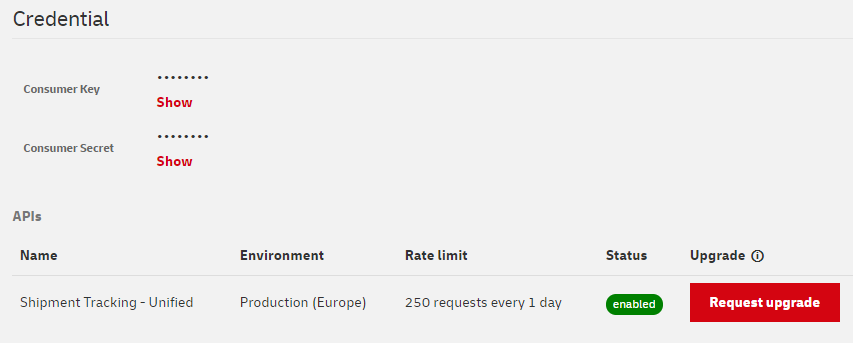
When you first request access to the Shipment Tracking - Unified API, you will get the initial service level which allows 250 calls per day with a maximum of 1 call per second.
Additional rate limits are available and they are granted according to your specific use case. If you would like to request for additional limits, please proceed with the following steps:
- Create an app as described under Get Access section.
- Click My Apps on the portal website.
- Click on the App you created
- Scroll down to the APIs list and click on the "Request Upgrade" button.
- Please refer to the example below:
If the limit is reached, you will receive an HTTP Status code:
429: Too many requests.
Additional Information
Message Format
This API uses RESTful JSON format to represent any resource affordances and link relations between resources. Any non-error response of application/json media type shall be interpreted as defined in RESTful JSON specification.
JSON-LD
Furthermore, the RESTful JSON responses are in JSON-LD-compatible format.
General conventions
Enums defined in the API response entities might hold just a subset of possible values (e.g. new values can be added to enum in future non-breaking versions). In the case, when the value doesn't meet clients expectation, client should process it as undefined.
Error Message Format
In the case of error, the application/problem+json (Problem Detail) is used to communicate details about an error.
Date & Time format
Date and Time always conform to the ISO 8601 format e.g.: 2017-06-21T14:07:17+2:00 (date time) or 2017-06-21T14:07:17Z (date time) or 2017-06-21 (date). If no time zone information is provided the time zone should be interpreted as in the place of the respective shipment event.
Error Responses
This API might use the full range of common HTTP response statuses as defined in RFC7231.
This API documentation shows only the 404 for illustration purposes on how an error response might look like.
Language
The API request might return localized messages (e.g. human readable description of a shipment status code). It is possible to indicate the language preferred by the calling user agent using the language query parameter. If the requested language is not available but the shipment is still found the API returns a successful response and indicates the actual langaguage of the response in the Content-Language header.
API Client Recommendation
Clients of the API should expect, that enums defined in the API response entities might hold just subset of possible values (e.g. new values can be added to enum in future non-breaking versions). In the case, when the value doesn't meet clients expectation, client should process it as undefined.
Clients are advised, that optional fields may not be included in response when their value is not defined.
Selecting the preferred language
The API request can return localized messages (e.g. a human readable description of a shipment status code).
To select your preferred language:
- Use the language query parameter when calling the user agent.
If the requested language is not available but the shipment is still found, the API returns a successful response and indicates the actual language of the response in the Content-Language header.
Permitted HTTP methods
| HTTP method | Use this to: |
|---|---|
| GET | Retrieve data |
DHL Parcel queries and responses
DHL Parcel Germany
For our parcel services in Germany, you can add recipientPostalCode to your query. This will provide you with more detailed information about the shipment.
DHL Parcel Netherlands
For our parcel services in the Netherlands, you can add recipientPostalCode to your query. This will provide you with more detailed information, such as status information.
Example requests to the API
Simple HTTP request example
curl -X GET 'https://api-eu.dhl.com/track/shipments?trackingNumber=7777777770' -H 'DHL-API-Key:PasteHere_ConsumerKey'
An explanation of the simple HTTP request example
| Command | Description |
|---|---|
| curl | curl is the command for running the cURL tool from the command line interface. cURL is a tool for transferring data to or from a server that is on the internet. |
| -X | -X is the command that allows you to send the “HTTP method” that you want to use. HTTP methods are used by web browsers and web servers to request information from each other. The most common HTTP methods are GET, POST, PUT, and DELETE. |
| GET | GET is the command (“HTTP method”) for requesting information from an API. |
| https://api-eu.dhl.com/track/shipments | https://api-eu.dhl.com/track/shipments is the endpoint location (URI) of the “resource” you are requesting. Resources are the information objects that the API can exchange. Resources have data associated with them. |
| ? | ? tells the API the request contains query string parameters. The ? followed by the parameters, and their values are called the “query string.” Parameters are options you can send with your requests. Parameters are used to tailor and filter the response you receive from the API. In the query string, each parameter is listed one after the other, with an & separating them (not shown in this example). |
| trackingNumber=7777777770 | This query string requests information on a shipment whose tracking number is 7777777770. |
| -H | -H is the command that allows you to pass “http request headers” to the API resource. Headers contain information about the request. It often contains security information, such as user authentication keys. You must replace PasteHere_ConsumerKey with the Consumer Key provided to you by DHL in the MyApps screen. |
Detailed HTTP request example
curl -X GET 'https://api-eu.dhl.com/track/shipments?trackingNumber=7777777770&service=express&originCountryCode=NZ&requesterCountryCode=GB' -H 'DHL-API-Key:PasteHere_ConsumerKey'
The cURL example contains these parameters:
| Parameter | Description | Example |
| trackingNumber |
The tracking number of the shipment for which you want tracking information. | 7777777770 |
| service |
Advice on which service (provider) should be used to resolve the tracking number. | express |
| originCountryCode |
The country code of the shipment origin. This can be used to further qualify the shipment tracking number (`trackingNumber`) parameter in the request. |
NZ |
| requesterCountryCode |
The requester country code. This can be used to adjust the display options. | GB |
Note: See the DHL Shipment Tracking API Reference Guide for more information on the available parameters.
Simple Python code sample
import http.client
import urllib.parse
import json

params = urllib.parse.urlencode({
    'trackingNumber': '7777777770',
    'service': 'express'
})

headers = {
    'Accept': 'application/json',
    'DHL-API-Key': 'ApiKeyHere'
}

connection = http.client.HTTPSConnection("api-eu.dhl.com")

connection.request("GET", "/track/shipments?" + params, "", headers)
response = connection.getresponse()

status = response.status
reason = response.reason
data = json.loads(response.read())

print("Status: {} and reason: {}".format(status, reason))
print(data)

connection.close()
specifics for the use of Tracking Data
- Tracking data is provided to You and/or the entity you are authorized to represent (hereinafter "You"/"Your") via this SHIPMENT TRACKING API under the prerequisite, that You retrieved the according tracking number in compliance with the applicable law, especially in the field of data protection and competition law and that You use the tracking number and/or tracking data solely for Your own legitimate tracking purposes.
- You may only submit tracking data to the recipient of DP DHL Group shipment and no other person; such submission shall always been in compliance with applicable laws in the field of data protection and competition law, which includes that the data shall not be combined with advertisement or presented in a way that it could be regarded as advertisement.
- If You are neither the sender nor the recipient of DP DHL Group-shipment/s, the tracking data refers to,
- You shall ensure, that you are authorized to act on behalf of the sender
- You shall make the sender aware of the restrictions set out in this User Guide just as the General Developer Portal Terms of Use
- You shall make the sender aware of the necessity to inform the recipient transparently about the processing of his/her personal data according to applicable data protection laws.
- In no case shall you reveal and/or provide third parties with the tracking number and/or tracking data and/or analyze, modify such data in any form and/or derive data/information especially for competitive reasons from it without our prior written consent.
- Tracking data shall be used in accordance with the following specification:
- Display "Delivered by Deutsche Post DHL Group" in text (minimum font size) as soon as it is presented/submitted to recipient
- You shall delete the tracking number and tracking data which You received via the SHIPMENT TRACKING API 30 days after the delivery (of the shipment) to the recipient is completed.
Test
1.3.2
-
Added `provider` to shipment model, including the field `destinationProvider`.
Disclaimer
This changelog section is an abstract and optional representation of the actual changes to the OpenAPI specification. For full details of the changes to a previous version please refer to the OpenAPI specification.
1.3.1
- Updates...
1.3.0
- Added `parcel-uk` to enum list `service`.
- Added `pieceIds` to shipment event model.
- Updated Date & Time format comment section.
1.2.0
- Added `sameday` to enum list `service`.
1.1.0
- Added `post-de` to enum list `service`.
1.0.13
- Updated to OpenAPI specification version 3.
- Added `serviceUrl` and `rerouteUrl` to shipment model.
- Added `reference` as new reference type in shipment details model.
- Updated Description for statusCode
1.0.12
- Fixed typos, maintenance release.
1.0.11
- Added `shipment-id` to list of possible responses.
1.0.10
- Added pagination.
1.0.9
- Maintenance release.
1.0.8
- Updated vocabulary location.
- Added general conventions notice in comment section.
- Added `housebill` to list of possible responses.
1.0.7
- Removed example for
trackingNumberandrecipientPostalCode. - Modified format of the API description comment section.
Content review
- Added `Legal specifics for the use of tracking data`
- Adjusted the Standard `Rate Limits`
1.0.6
- Minor typo fixes in comment section.
- Edited description of requesterCountryCode.
1.0.5
- Fixed the host name introduced as part of the 1.0.4 version.
1.0.4
- Introduced new host name and API key header name. The old names are deprecated but still functional until further notice. Please migrate to the new host and API key header and refrain from using the deprecated ones.
- Added a disclaimer in the changelog section.
- Improved timestamps descriptions to convey the value might be either ISO 8601 date OR ISO 8601 date time.
- Shipments:
- Added description to the additional matching shipments link relation (`possibleAdditionalShipmentsUrl`) at the shipments level.
1.0.3
- Added `documentURL` and marked `signatureURL` as deprecated to the response "ProofOfDelivery" model.
- Added `possibleAdditionalShipmentsUrl` to reflect matches in other backends / services to the response "Shipment" model.
- Fixed some warnings related to JSON syntax.
1.0.1
- Initial launch
Notifications
Shipment Tracking - Unified
There have been content updates on the API Page Shipment Tracking - Unified.
You can have a detailed look at the changes by clicking the following link: Click here
Sincerely,
Your DHL API Developer Portal Team
You are receiving this message because you have subscribed to notifications on the DHL API Developer Portal. If you want to unsubscribe from notifications click here: Cancel Subscription
Shipment Tracking - Unified
There have been content updates on the API Page Shipment Tracking - Unified.
You can have a detailed look at the changes by clicking the following link: Click here
Sincerely,
Your DHL API Developer Portal Team
You are receiving this message because you have subscribed to notifications on the DHL API Developer Portal. If you want to unsubscribe from notifications click here: Cancel Subscription
Shipment Tracking - Unified
There have been content updates on the API Page Shipment Tracking - Unified.
You can have a detailed look at the changes by clicking the following link: Click here
Sincerely,
Your DHL API Developer Portal Team
You are receiving this message because you have subscribed to notifications on the DHL API Developer Portal. If you want to unsubscribe from notifications click here: Cancel Subscription
Shipment Tracking - Unified
There have been content updates on the API Page Shipment Tracking - Unified.
You can have a detailed look at the changes by clicking the following link: Click here
Sincerely,
Your DHL API Developer Portal Team
You are receiving this message because you have subscribed to notifications on the DHL API Developer Portal. If you want to unsubscribe from notifications click here: Cancel Subscription
Shipment Tracking - Unified
There have been content updates on the API Page Shipment Tracking - Unified.
You can have a detailed look at the changes by clicking the following link: Click here
Sincerely,
Your DHL API Developer Portal Team
You are receiving this message because you have subscribed to notifications on the DHL API Developer Portal. If you want to unsubscribe from notifications click here: Cancel Subscription