
Best for:
- Providing access to the shipment status at any time
- Integrating all types of Deutsche Post DHL shipments
- Multiple shipments (e.g. eCommerce, Express, Freight, Letter, Parcel, etc.)
MyDHL API combines the benefits of DHL Express with your in-house shipping processes. Integrating into your website, it connects with your existing order entry, warehouse management and other business software systems to help you run a more streamlined and efficient operation. Simply integrate!
MyDHL API is your one stop solution for all DHL EXPRESS service operations. It consists of:
 |
 |
 |
 |
 |
 |
 |
 |
| Rating | Product | Landed Cost | Shipment | Pickup | Tracking | Address | Identifier |
Optimize and grow your business
- Integrate DHL Express functions – such as fulfilment processes – into your existing system seamlessly
- Access shipping options and rates for DHL Express without the need to switch programs or re-enter information
- Retain the user interface your teams are familiar with – no need for timely and costly employee training
- Sell more at your e-commerce checkout by offering DHL Express shipping products, Landed costs and On Demand Delivery
Created for developers
- A single API based on industry standards that developers know and understand
- Built with the fast-paced warehouse and time-sensitive e-commerce checkout in mind
- Dedicated API environment to test your solution
- Developer support from local DHL Express API experts
Scope
NOTE: Give the user information about the Scope (please delete this message).
Do more with MyDHL API
| MyDHL API Services | Description |
|---|---|
|
RATING
|
The Rating service Operation will return DHL EXPRESS product capabilities (products, value added services and estimated delivery time) and your DHL EXPRESS Account rates. |
|
PRODUCT
|
A light-weight version of the Rating service to retrieve available DHL Express products for a one-piece shipment. |
|
LANDED COST
|
Retrieve the estimated Landed Cost which includes Duties & Taxes. Please note for this service a catalogue of your items together with the customs data (i.e. HS Codes) needs to be provided upfront. |
|
SHIPMENT
|
The Shipment service Operation allows you to create complete DHL EXPRESS shipments which includes the shipping labels, optional customs documentation and pickups together with value added services such as Insurance. DHL EXPRESS recommends to use the Rating service first to see all the available products and value added services first to then pass the desired DHL EXPRESS product and value added service into the Shipment service Operation. In addition to creating DHL Express shipments the SHIPMENT service can also provide electronic proof of delivery for certain delivered shipments and upload updated customs invoice images for your shipments. |
|
PICKUP
|
The Pickup service can create, update or cancel DHL Express pickup requests |
|
TRACKING
|
The Tracking service retrieves tracking statuses for DHL Express Shipments |
|
ADDRESS
|
Validates if DHL Express has got pickup/delivery capabilities at origin/destination |
|
IDENTIFIER
|
Service to allocate identifiers upfront for DHL Express Breakbulk or Loose Break Bulk shipments |
Using the API
The API has been designed for use by developers. You will need basic knowledge of REST APIs, JSON, and HTTPS. Also, your organization must to have an active customer account with DHL Express. If you need to learn more on how to get an account, go to the DHL Express customer account request page.
Example Use Cases
NOTE: Describe the use cases which people can relate to their use of the API (please delete this message).
Calculate The Duty and Tax Costs of a Shipment
The API will return calculated duties and taxes, taking into account the price of the goods contained in the shipment, freight and insurance costs, and currency conversion.
Calculate the Duty and Tax Costs of a Shipment utilizing Pricing Strategy
Users of the API can define a pricing strategy that will be utilized when calculating duties and taxes. The following strategies are supported:
- MINIMUM -- The system will return the minimum duty rate found in the tariffs based on the number of HS digits the caller provides in the request.
- MAXIMUM - The system will return the maximum duty rate found in the tariffs based on the number of HS digits the callers provides in the request.
- AVERAGE - The system will return the average duty rate found in the tariffs based on the number of HS digits the caller provides in the request.
- EXACT - The system will return the exact rate found in the tariffs based on the full HS Code. This is the default strategy that will be applied if no pricing strategy is defined by the caller.
For Minimum, Maximum, and Average strategies, the input HS digit length can be 2, 4, 6 or full length.
Get Access
NOTE: Describe the process how the user gets access to this API (please delete this message).
- To request access for our Production and Sandbox environments you have to sign up. To sign up, please get in touch with your local sales representative. You can contact them via the contact form.
- You will receive your credentials.
- Check this User Guide documentation to understand how to get a valid Access Token and submit shipments or get tracking information.
Note: The Sandbox environment is accessible directly from this documentation page, where you can leverage the predefined test requests in Reference section.
Authentication
Access Token
NOTE: Describe the access token(Please delete this message).
The API provides an OAuth 2.0 access token with various authorization scopes.
The access token can be used to authorize access for the Deutsche Post Shipping API.
Get Access Token
NOTE: Describe how to get access to the token (Please delete this message).
The Get Access Token API call provides OAuth 2.0 Bearer token with authorization scope, assigned to your client id, which will grants you an access to the Deutsche Post International Shipping APIs.
The API operation is secured by HTTP Basic authentication, therefore you have to provide client_id and client_secret as an username and password, when calling the API.
Example:
NOTE: Give the user an example (Please delete this message).
You will receive client_id and client_secret from Deutsche Post International representative in following format.
Credentials bellow could be used in this Sandbox environment to get the Access Token.
Client_id: c96b49bb-c378-4a15-b2e3-842a9850b23d
Client_secret: be44af0a-74f9-438e-a3ac-e3e21d84259f
When passing the client_id and client_secret via HTTPS request, using HTTP Basic authentication, you have to populate HTTP Header Authorization in following format.
Note: Client_id and client_secret has to be encoded in base64-encoding. There is a space characeter between Basic and the base64-encoded string. There is a : character between the client_id and client_secret, when encoded in base64-encoding.
Authorization: Basic base64-encoded(client_id:client_secret)
Authorization: Basic Yzk2YjQ5YmItYzM3OC00YTE1LWIyZTMtODQyYTk4NTBiMjNkOmJlNDRhZjBhLTc0ZjktNDM4ZS1hM2FjLWUzZTIxZDg0MjU5Zg==
Note: You can test the Get Access Token API directly from the documentation page. The Authorization HTTP Header was populated for you in the Console View on the right side of the screen.
You will receive following response in the JSON format.
{
"access_token": "vzoJsASlFm0rfz3HsZEWC69lgQcytQQqWJvk9eBL3cMF8j7W4ny4Dh",
"token_type": "Bearer",
"expires_in": 18000,
"scope": "dpilabel dpitracking"
}
Understanding of the response fields: access_token: Contains Access Token string for the Shipping / Tracking API authentication and authorization.
- token_type: Type of the OAuth 2.0 access token. Default value is "Bearer".
- expires_in: Time to live of the access token. Default value is 18000 seconds / 5 hours. After this time the token expires.
- scope: Authorization scope of access token. Default value for Shipping API is "dpilabel". It could contain multiple scope values, which will be separated by space character.
Access Token Info
NOTE: Give Information about the Access Token (Please delete this message).
The Get Access Token Info API call provides an information about the issued token.
Revoke Access Token
NOTE: Give Information about how to revoke the Access Token (Please delete this message).
The Revoke Access Token API call provides you an option to revoke your Access Token, which not yet expired.
Environments
NOTE: Give the user a feeling about the available environments (Please delete this message).
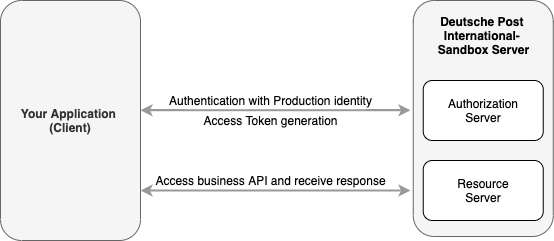
Deutsche Post International provides Production environment as well as Sandbox for development and testing.
Access to both environments is managed and you have to use OAuth 2.0 Access Token, when accessing the API resources.
Access Token could be requested via Get Access Token API, where you have to provide your API credentials: Client_ID and Client_Secret.
Note: You will have different identities for Production and Sandbox environment.
Sandbox:
NOTE: Give the user information about the Sandbox environment if available (Please delete this message).
You can use the Sandbox environment for development and testing purpose.
Sandbox Base URL: https://api-qa.deutschepost.com
Sandbox provides the same APIs as Production environment. >Note: The APIs exposed on Sandbox could be called directly from this documentation.
Production
NOTE: Give the user information about the Production environment if available (Please delete this message).
For production purposes please use the production environment. The production environment hosts the same APIs as the sandbox, but with different base URL.
Production base URL: https://api.deutschepost.com
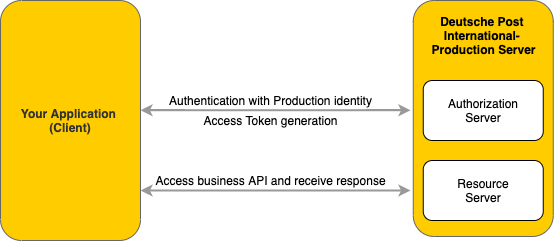
Note: Please keep in mind that sandbox credentials are not valid for the production environment. To access the latter, please use the production set of credentials provided to you during on boarding.
Rate limits
NOTE: Describe the API's rate limits and options if available (Please delete this message).
Rate limits protect the DHL infrastructure from suspicious requests that exceed defined thresholds.
The table below details the main request limits:
| Service Level | Maximum calls per second | Maximum calls per day |
|---|---|---|
| Starter | 1 | 250 |
| Standard | 2 | 1000 |
When the limit is reached, you will receive an HTTP Status code:
429: Too many requests.
If you need higher throughput, go to your APP and click on "Upgrade Rate Limit" or please contact support@dpdhl.freshdesk.com.
Legal Terms Content. This section is required for customer facing APIs.
Here, you need to specify the legal terms under which your API can be used by the Developer Portal users.
Please contact Simon Wirges (simon.wirges@dhl.com) for further information.
Please delete this message afterwards.
1.0.1
NOTE: Make sure to add a changelog with every API release.
- Added feature: Request package location
- fixed bug: UTF-8 encoded address data is displayed correctly
1.0.0
- Initial launch